

📊 What are Positions?
Positions are the stocks and options you currently own. A position includes:- Ticker symbol
- Number of shares/contracts
- Cost basis (what you paid)
- Current value
- Profit/Loss
- Today’s change
- AI Snapshot Grade
📱 Viewing Your Positions
iOS
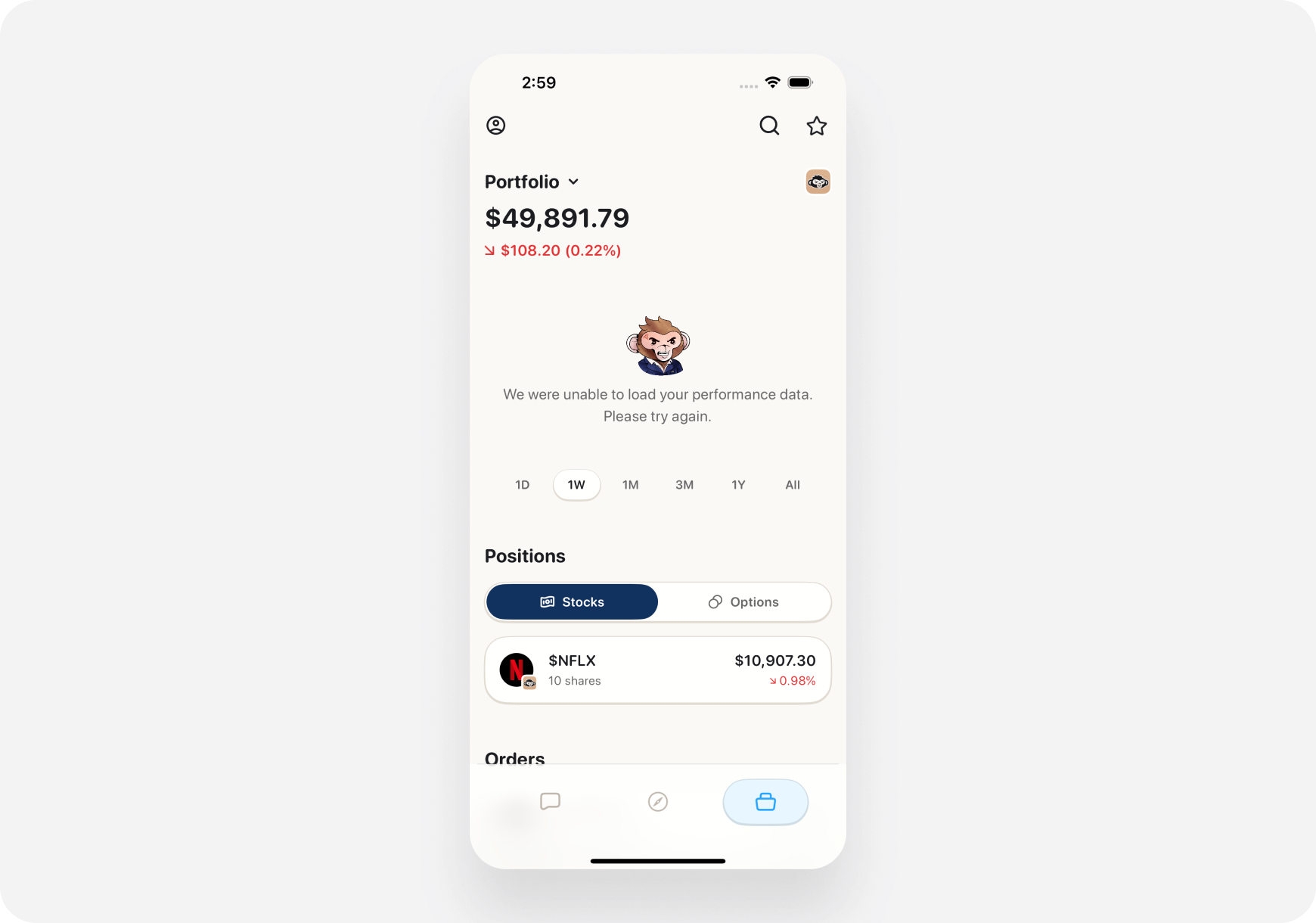
1. Go to Portfolio Tab- Bottom navigation → Portfolio
- Scroll down past summary cards
- See “Your Positions” section
- Ticker & company name
- Shares owned
- Current price & today’s change
- Your profit/loss ($ and %)
- AI grade badge
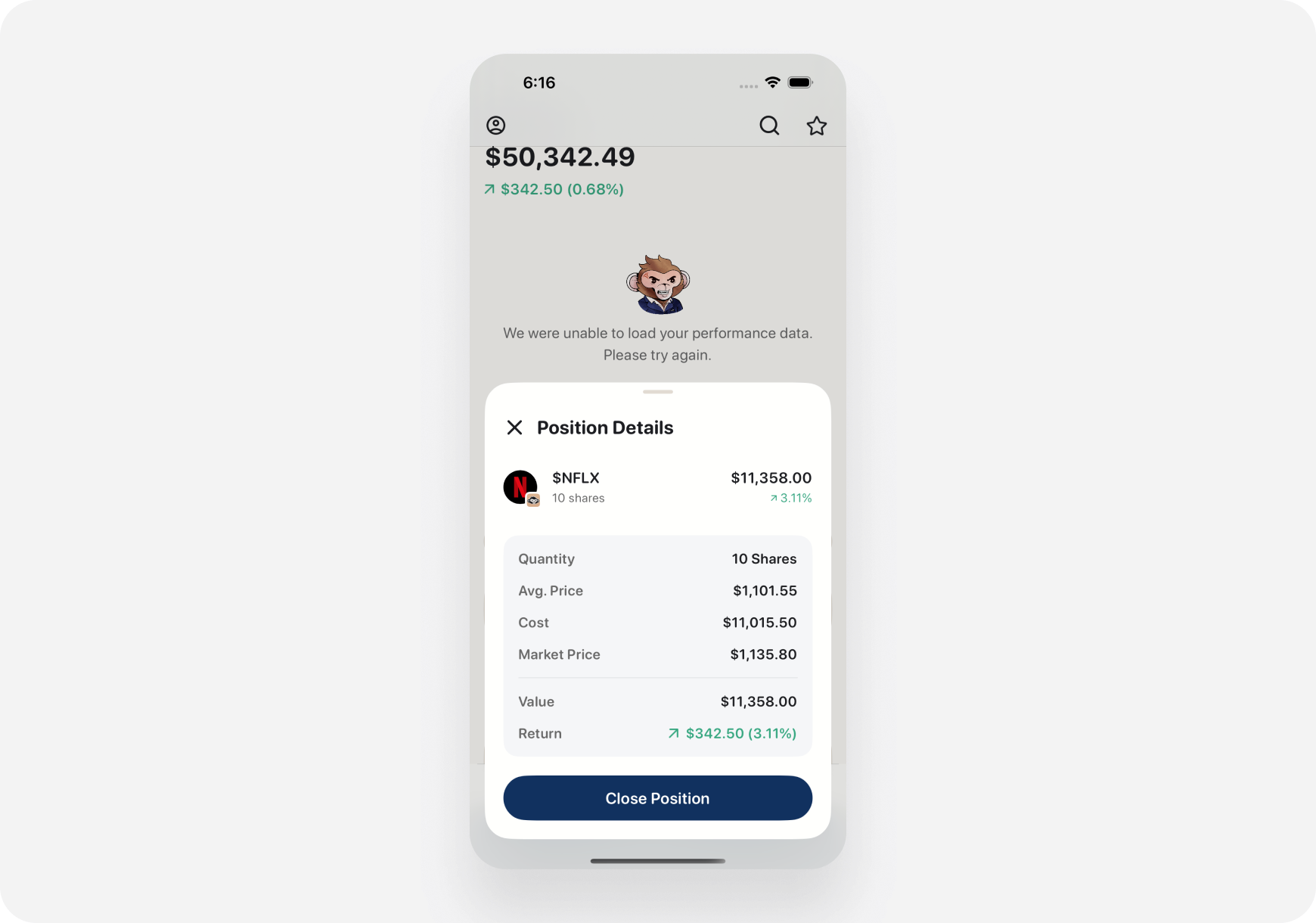
3. Tap a Position for Details:
- Full ticker page opens
- See complete analysis
- Company info
- AI insights
- Bulls vs Bears
- Performance charts
Web
1. Portfolio Page- Left sidebar → Portfolio
- Positions listed below summary
- Wider screen = more info visible
- Multiple columns:
- Symbol
- Shares
- Avg Cost
- Current Price
- Day Change
- Total P&L
- AI Grade
3. Click Position:
- Ticker page opens in main area
- Keep portfolio visible in sidebar
- Easy to compare multiple positions
📈 Position Details
What Each Field Means
Ticker Symbol- Stock abbreviation (TSLA, AAPL, NVDA)
- Tap/click to view full company page
- How many you own
- For options: Number of contracts
- What you paid per share (average if multiple buys)
- Cost Basis = Avg Cost × Shares
- Real-time market price
- Updates every few seconds
- Current Price × Shares
- What you could sell for right now
- How much stock moved today
- $ change and % change
- Profit or loss on this position
- (Current Value - Cost Basis)
- Shown in $ and %
- AI’s A-F rating
- Quick health check
- A = Strong, F = Weak
🎯 Position Status Indicators
Color Coding
🟢 Green- Position is profitable
- Current price > Your cost
- Unrealized gain
- Position is losing
- Current price < Your cost
- Unrealized loss
- Break-even
- Current price ≈ Your cost
Icons & Badges
📈 Up Arrow- Stock up today
- Momentum positive
- Stock down today
- Momentum negative
- Risk alert
- Earnings soon
- News event
- High volatility
- High-conviction pick
- AI rates highly
- Strong fundamentals
- Options expiring soon
- Time-sensitive position
📊 Sorting & Filtering Positions
Sort Options
📱 iOS: Tap sort icon (top right) 🌐 Web: Click column headers Sort by:- % Gain - Biggest winners first
- % Loss - Biggest losers first
- Value - Largest positions first
- Day Change - Today’s movers
- AI Grade - Best grades first
- Alphabetical - A to Z
- Sort by % Gain → See your wins, consider profit-taking
- Sort by % Loss → See your losers, consider cutting
- Sort by AI Grade → See which holdings are strongest
Filter Options
Show/Hide:- All Positions - Everything
- Stocks Only - No options
- Options Only - No stocks
- Profitable - Green positions only
- Losing - Red positions only
- Today’s Movers - Stocks with >2% change today
- All accounts
- Specific brokerage (Robinhood, Webull, etc.)
- Paper trading only
💡 Managing Positions
1. Setting Exit Targets
For each position, track: Profit Target 🎯- Where you’ll sell for gains
- Example: Bought TSLA at $450, target $500 (+11%)
- Where you’ll bail if wrong
- Example: Bought at $450, stop at $430 (-4.4%)
- Tap/click position
- Go to ticker page
- Set price alerts at your targets
- Get notified when hit
2. Risk Management
Position Size Check- Don’t let any single stock be >20% of portfolio
- Ape AI shows % of portfolio for each holding
- AI alerts if you’re too concentrated
⚠️ Warning: TSLA is now 35% of your portfolio. Consider trimming to reduce risk.
3. Reviewing Underperformers
Weekly task:- Sort by % Loss
- Review bottom 3 positions
- Ask yourself:
- Is my thesis still valid?
- Has anything changed?
- Should I cut losses?
4. Profit Taking
When a position is up big:- Sort by % Gain
- See top performers
- Consider taking partial profits
- “Nobody went broke taking profits”
- NVDA up 50% since purchase
- Sell half, lock in gains
- Let the rest ride
🤖 AI-Powered Position Insights
Automatic Position Analysis
AI watches your positions and alerts: 🚨 Risk Alerts“AMD has earnings tomorrow. High volatility expected. Consider closing or hedging.”💰 Profit Opportunities
“AAPL up 20% since your purchase. This is a good exit point based on historical patterns.”⚠️ Deteriorating Fundamentals
“TSLA’s Snapshot Grade dropped from A to C. Negative news and sentiment decline. Review position.”📊 Rebalancing Suggestions
“Tech is 55% of your portfolio. Consider trimming to reduce concentration risk.”
Ask Portfolio AI About Positions
Portfolio AI can answer:- “What’s my best performing position?”
- “Which stock should I sell first?”
- “Is my TSLA position too large?”
- “Show me all losing positions”
- “Which holdings have earnings soon?”
📉 Options Positions
Options Show Additional Info
Beyond stock position data:- Strike Price - The contract strike
- Expiration Date - When it expires
- Type - Call or Put
- Contracts - How many
- Premium Paid - What you paid
- Current Value - What it’s worth now
- IV (Implied Volatility) - Current IV
- Greeks - Delta, Theta, Gamma, Vega
Options Expiration Tracking
Time-sensitive alerts: 30 Days Out:“Your AMD $180 calls expire in 30 days. Monitor closely.”7 Days Out:
“⚠️ TSLA $470 calls expire in 7 days. Decision time: Hold, sell, or roll?”1 Day Out:
”🚨 AMD calls expire tomorrow! Current value $350. Close today or let expire.”Options require active management. Don’t forget!
📊 Position Performance Tracking
Individual Position Charts
Tap/click any position to see: 1. Your Entry vs Current- Line showing your cost basis
- Current price line
- Profit zone (green) or loss zone (red)
- How your unrealized P&L changed
- Day by day since purchase
- Full technical chart
- Your entry point marked
- Resistance/support levels
Trade Journal (Coming Soon)
Track why you made trades:- Entry reason (thesis)
- Target price
- Stop loss
- Actual results
- Lessons learned
💡 Pro Tips
1. Review Positions Sunday Evening
Weekly routine:- Sort by % Gain → Celebrate wins
- Sort by % Loss → Review losers
- Check AI grades → See health
- Plan next week’s moves
2. Use the 20% Rule
Position sizing:- No single stock >20% of portfolio
- Reduces risk
- Forces diversification
- Sleep better at night
- Trim it back to 15-20%
- Take profits
- Rebalance
3. Set Alerts for Every Position
When you buy:- Set price alert at profit target
- Set price alert at stop loss
- Get notified when time to act
4. Track Cost Basis for Taxes
Important for tax time:- Cost basis = what you paid
- Determines capital gains
- Short-term vs long-term
5. Trim Winners, Cut Losers
Winning position up 50%?- Take partial profits
- Lock in gains
- Reduce risk
- Re-evaluate thesis
- If broken, cut loss
- Don’t hope it comes back
🎭 Position Management by Companion
Blitz (Day Trader) 🚀
Focus:- Intraday P&L per position
- Close all positions by EOD
- Quick profit/loss recognition
- Move fast
- Real-time updates critical
- Watch minute-by-minute
- Set tight stops
- Take quick profits
Maverick (Momentum Trader) 📈
Focus:- Multi-day position management
- Entry, target, stop clearly defined
- Hold 3-10 days average
- Momentum-based exits
- Check 2-3 times daily
- Monitor swing targets
- Patient profit-taking
- Give trades room to breathe
Sage (Long-Term) 🏦
Focus:- Buy and hold quality
- Positions held months/years
- Dividend reinvestment
- Fundamental strength
- Weekly check-ins sufficient
- Focus on business fundamentals
- Ignore day-to-day noise
- Long-term compound growth
❓ FAQ
Q: How often do positions update? A: Real-time during market hours (every few seconds). Q: Can I manually add a position? A: No. Positions sync from connected brokerages. Use Ape Paper Trading for paper positions. Q: What if I buy more shares of a stock I own? A: Position updates automatically. Average cost recalculates. Q: Do closed positions show up? A: No. Once sold, they move to order history. Portfolio shows only open positions. Q: Can I see my position history? A: Yes! Go to Settings → Order History to see all past trades. Q: Why is my profit/loss different from my broker? A: Possible reasons:- Broker includes fees, Ape AI may not
- Dividend reinvestment timing
- Cost basis calculation method (FIFO vs LIFO)
- Usually close, minor differences normal
What’s Next?
Improve Position Management:- Portfolio AI→ - Get AI advice on positions
- AI Analysis Tools → - Advanced portfolio analysis
- Portfolio Health Check → - Review your positions
- Ticker Page Overview → - Deep dive on holdings
- AI Snapshot Grades → - How AI grades stocks
Track Your Positions. Manage Your Risk. Grow Your Wealth! 📈🚀