

The Situation
You’re scrolling through Twitter and see $TSLA trending. Everyone’s talking about it. You’re curious but don’t know where to start. Let’s use Ape AI to research it properly.Step-by-Step Guide
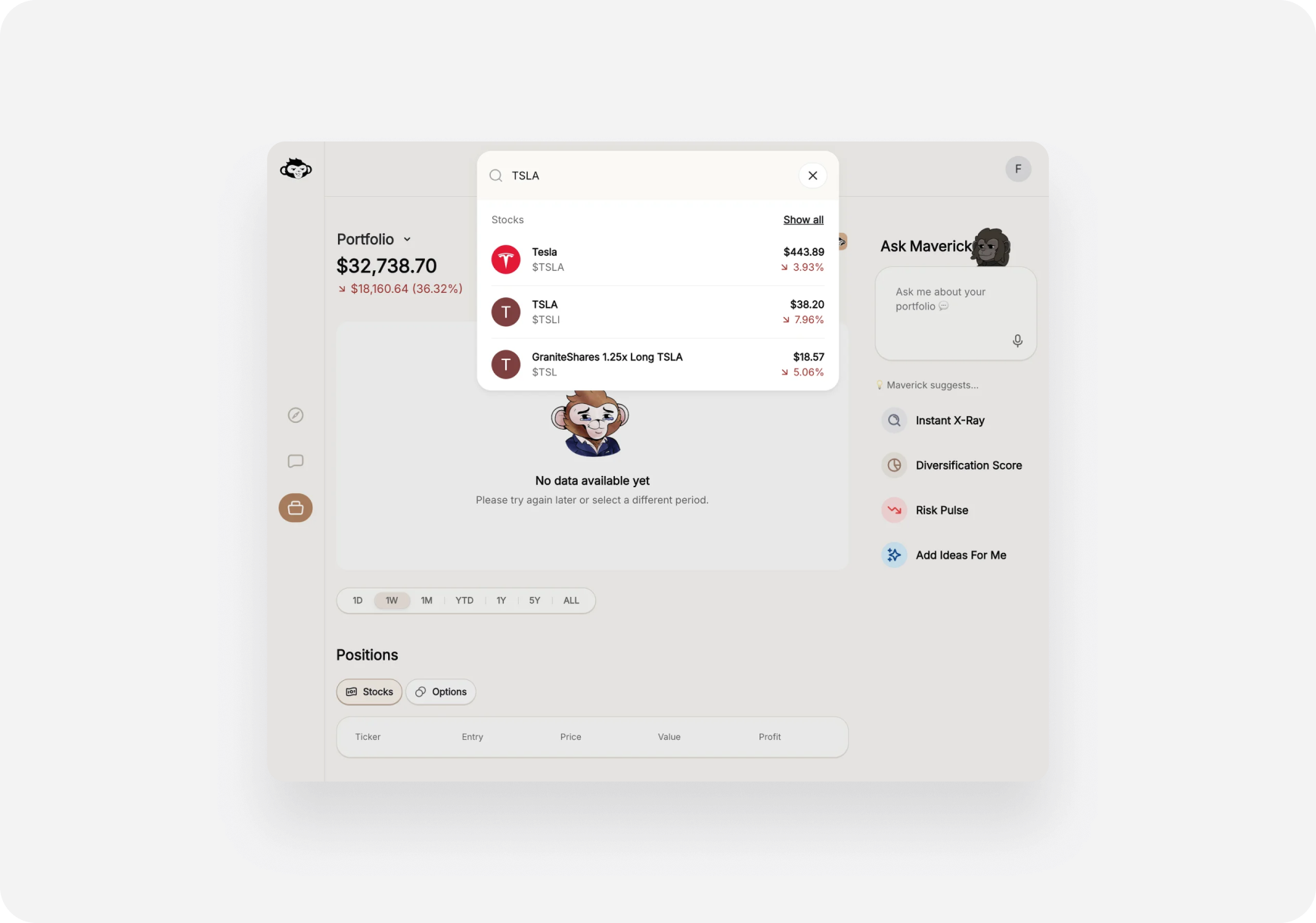
Step 1: Search for the Stock
📱 iOS:- Open Ape AI
- Tap the Search icon (top right)
- Type “TSLA”
- Tap the result
- Go to app.askape.com
- Click the Search bar (top) or press
/ - Type “TSLA”
- Click the result or press Enter
Step 2: Check the AI Snapshot Grades
You’ll land on the ticker page. First thing: check the 4 grades. The 4 Grades:- Fundamental (A-F) - Company health, earnings, growth
- Technical (A-F) - Chart patterns, momentum
- Sentiment (A-F) - What analysts and social media say
- Risk (A-F) - Downside risks, volatility
- A’s and B’s ✅ - Generally positive
- C’s ⚠️ - Neutral, be careful
- D’s and F’s ❌ - Warning signs
- Fundamental: B- (good growth but pricey)
- Technical: A+ (strong momentum)
- Sentiment: A- (bullish overall)
- Risk: C- (high volatility)
Step 3: Read “How It Makes Money”
Scroll down to the Company Story section. Tap/click the first card: “How It Makes Money” This explains:- Tesla’s business model (EVs, energy, AI)
- Main revenue streams
- What products they sell
Step 4: Check “Pricey or Cheap”
This is the key valuation question! Scroll to the “Pricey or Cheap” card and tap/click to expand. What you’ll learn:- Is the stock overvalued or undervalued?
- How does it compare to competitors?
- What’s a fair value estimate?
Step 5: Ask the AI “Is It Overvalued?”
Let’s get AI analysis on the valuation. 📱 iOS:- Scroll down on the ticker page
- Tap “Pricey or Cheap” quick prompt (if available) OR
- Go to Chat tab (bottom)
- Use Quick Action: “Pricey or Cheap”
- Select TSLA when prompted
- Click Chat in sidebar
- Click Prompts icon (or press
Ctrl+P) - Select “Pricey or Cheap”
- Type “TSLA” when asked
- Current valuation metrics
- Compared to historical average
- Compared to peers (other EV companies)
- Whether it’s expensive or cheap right now
- Key risks to the valuation
Step 6: Read Bulls vs Bears
Go back to the ticker page (if you’re in Chat) and scroll to Bulls vs Bears section. You’ll see:- Analyst breakdown: % Buy, Hold, Sell
- Visual bar: Green (bullish) vs Red (bearish)
- Bulls Say: Why people are optimistic
- Bears Say: Why people are cautious
Step 7: Check the Risks (“Bagholder Risks”)
Scroll to Company Story and tap “Bagholder Risks” This tells you:- What could go wrong long-term
- Risks for holding the stock
- Warning signs to watch
- Competition from legacy automakers
- Dependence on Elon Musk
- Regulatory changes
- Valuation risk (if earnings disappoint)
Step 8: Compare Performance vs S&P 500
Scroll down to Performance Comparison You’ll see:- TSLA’s return vs S&P 500 over time
- Outperformance or underperformance %
- Chart showing both performances
- If it’s underperforming the market, why buy it?
- If it’s outperforming, is it sustainable?
Decision Framework
After your research, you should know: ✅ What the company does (How It Makes Money) ✅ If it’s overvalued or not (Pricey or Cheap + AI analysis) ✅ What bulls and bears think (Sentiment) ✅ What could go wrong (Bagholder Risks) ✅ How it’s performed (vs S&P 500) Now ask yourself:- Do I understand the business?
- Do I believe in the long-term story?
- Am I comfortable with the valuation?
- Can I handle the risks?
- Is this better than just buying SPY (S&P 500)?
💡 Pro Tips
- Don’t buy immediately - Add to watchlist first, watch for a few days
- Check multiple sources - Ape AI is one tool, not the only tool
- Read the risks - Don’t just focus on the upside
- Compare to alternatives - Check Related Companies on the ticker page
- Start small - First investment? Use [Paper Trading](<../Pre-Investor/Getting Started/paper-trading-practice.md>) first!
What You Learned
🎓 You now know how to:- Search for any stock on Ape AI
- Read AI Snapshot Grades
- Understand company business model
- Assess valuation (pricey or cheap)
- Use AI for deeper analysis
- Read Bulls vs Bears sentiment
- Identify key risks
- Compare performance to market
What’s Next?
Add the stock to your watchlist:- 📱 iOS: Tap the star icon (top right on ticker page)
- 🌐 Web: Click the star icon
- [Get Ape Paper Trading Account](<../Pre-Investor/Getting Started/paper-trading-practice.md>)
- Place a practice trade
- Watch how it performs
- Try the same process with other tickers
- Use Themes to find similar stocks
- Ask AI: “What are stocks similar to TSLA?”
Common Mistakes to Avoid
❌ Buying based on hype alone - Twitter trends aren’t research ❌ Ignoring the valuation - Overpriced stocks can fall even if the company is good ❌ Only reading Bulls Say - Always check Bears Say too ❌ Skipping risk analysis - Every stock has risks ❌ Investing money you can’t afford to lose - Only invest what you can loseQuestions?
Still not sure about something?- Contact Support
- Ask in Discord
- Finding My First Investment - Build a long-term portfolio
- [Learning with Paper Trading](<../Pre-Investor/Getting Started/paper-trading-practice.md>) - Practice risk-free
Congrats! 🎉 You just did your first proper stock research. Keep learning, start small, and never invest what you can’t afford to lose. 🦍🚀 Let’s find that alpha!