

📧 Email Support
Support Email
[email protected] Use this email for:- Technical issues
- Questions about features
- Trading problems
- Account help
- Bug reports
- General inquiries
General Contact
[email protected] Use this email for:- Account deletion requests
- Partnership inquiries
- Business matters
- General feedback
💬 Live Support via Help Center
The fastest way to get help is through our Help Center, which opens a direct support conversation.📱 Accessing Help Center on iOS
Step 1: Open Profile- Open the Ape AI app
- Tap your Profile icon (top left of chat screen)
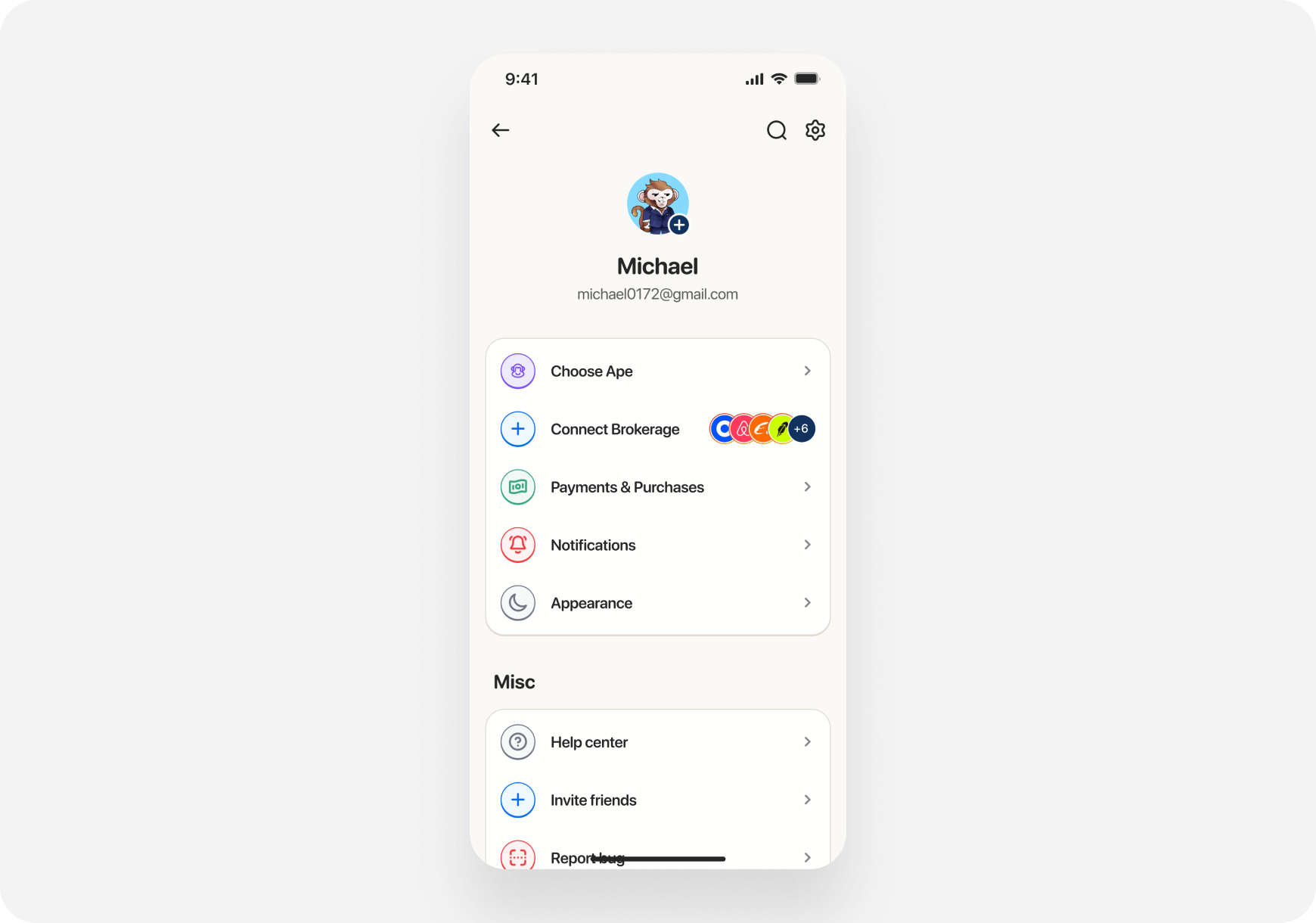
- Scroll down to the “Misc” section
- Tap “Help Center”
- Your email app will open with a pre-filled message to [email protected]
- Email opens automatically
- “To” field: [email protected]
- Subject line: Pre-filled with “Question for Ape AI”
- Body: Empty - describe your issue here
🌐 Accessing Help Center on Web
Step 1: Open Profile- Go to app.askape.com
- Click your profile icon (top right, shows your initial)
- Select “Profile” from the dropdown
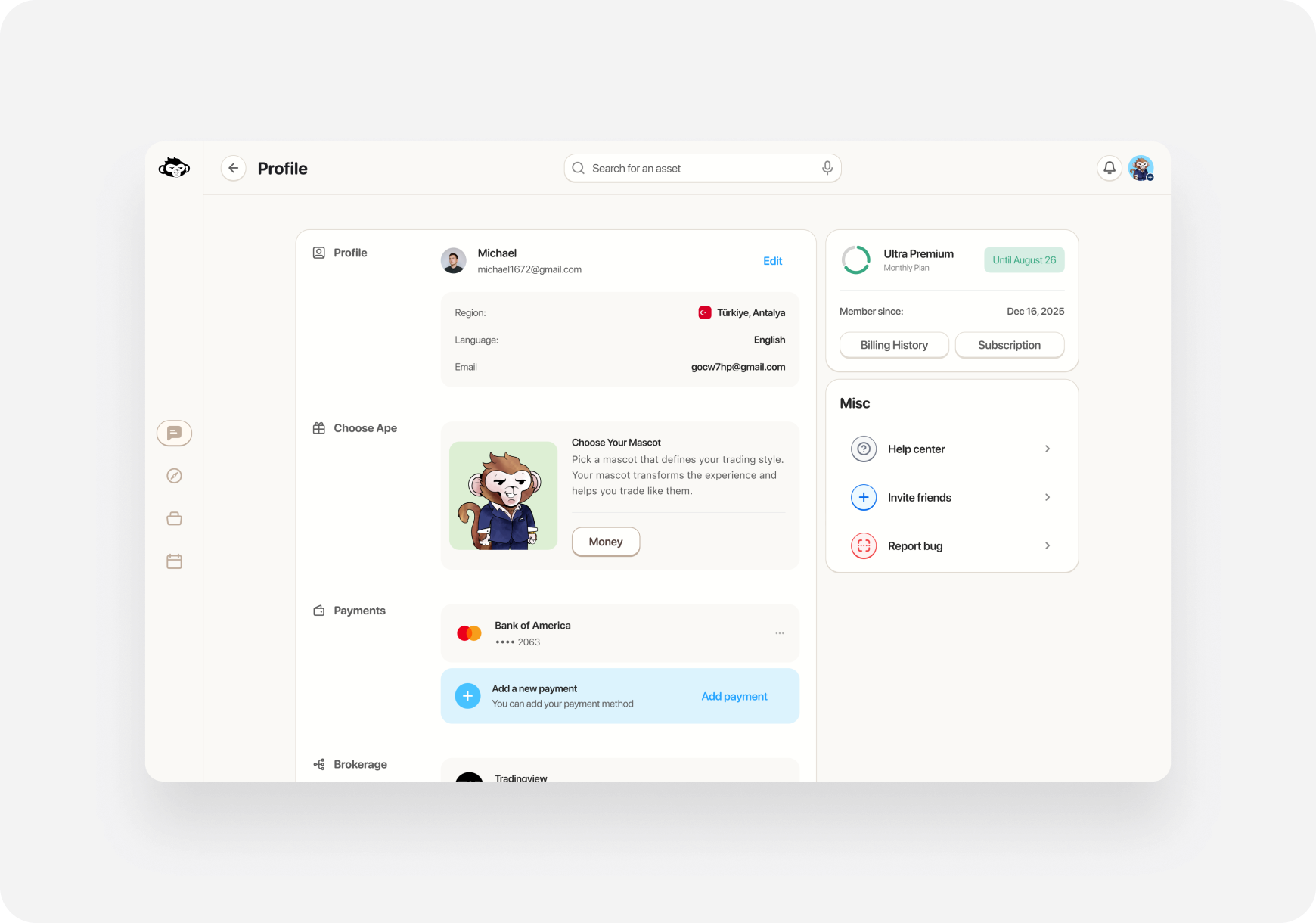
- On the profile page, look for “Misc” section on the right
- Click “Help Center”
- Your email client will open with a pre-filled message to [email protected]
- Default email app opens
- Pre-addressed to [email protected]
- Subject: “Question for Ape AI”
- Compose your message and send
🐛 Reporting Bugs
Option 1: Report Bug Button (Recommended)
📱 iOS:- Profile → “Report Bug”
- Email opens to [email protected]
- Describe the bug in detail
- Include steps to reproduce
- Profile → “Report a Bug”
- Email opens to [email protected]
- Describe what happened
- Include browser info if relevant
Option 2: Direct Email
Send detailed bug reports to: [email protected] Include in your bug report:- What you were trying to do
- What happened instead
- Steps to reproduce the issue
- Screenshots or screen recordings (very helpful!)
- Device: iPhone/Android/Web browser
- Account email (so we can investigate)
💡 What to Include When Contacting Support
To help us resolve your issue quickly, include: For Technical Issues:- 📱 Device: iOS/Android/Web + version
- 🔍 What you were doing when the issue occurred
- 📸 Screenshots showing the problem
- 📧 Your account email
- 📊 Ticker symbol involved
- 🕐 Time the issue occurred
- 💼 Brokerage connected (if relevant)
- 📸 Screenshot of error message
- 📧 Email address associated with your account
- 🆔 Description of the issue
- 🔐 Do NOT include passwords or sensitive info
⏰ Response Times
Email Support:- Business days: 24-48 hours
- Weekends/holidays: Up to 72 hours
- Urgent issues: Mark “URGENT” in subject line
- Monday-Friday: 9 AM - 5 PM ET (fastest response)
- Evenings and weekends: Slower response
🚨 Urgent Issues
For critical issues like:- ⚠️ Can’t access your account
- 💰 Money missing from portfolio
- 🔐 Security concerns
- 🚫 Unable to execute trades
URGENT: [Brief description]
Example: URGENT: Cannot access account after login
🙋 Frequently Contacted For
Common reasons users contact support:Account Issues
- Password reset
- Email change
- Account deletion
- Subscription management
Trading Problems
- Brokerage connection failed
- Order not executing
- Portfolio sync issues
- Missing positions
Technical Bugs
- App crashes
- Features not working
- Data not loading
- Login problems
🤝 Community Support
Discord Community
Join our Discord for:- Community discussions
- Trading tips from other users
- Feature suggestions
- Quick questions
📱 Social Media
Follow us for updates and announcements: Note: DMs on social media are NOT monitored for support. Please use email.✉️ Email Template
Not sure how to word your support request? Use this template:🔒 Privacy & Security
What we’ll never ask for:- ❌ Your password
- ❌ Credit card details via email
- ❌ Social Security Number
- ❌ Brokerage login credentials
❓ FAQ
Q: How long does support take to respond? A: Usually 24-48 hours on business days. Urgent issues are prioritized. Q: Can I call support? A: Currently, we only offer email support. This allows us to better track and resolve issues. Q: I didn’t get a response to my email. What should I do? A: Check your spam folder. If still nothing after 48 hours, send a follow-up email. Q: Can I get help on Discord instead? A: Discord is great for general questions, but for account-specific issues, always email [email protected]. Q: Do you have live chat? A: Not at this time. Help Center opens your email client for fastest response. Q: How do I escalate an urgent issue? A: Put “URGENT” in your email subject line and clearly explain why it’s urgent.What’s Next?
Need immediate answers?- FAQ → - Common questions answered
- Getting Started - Setup guides
- Feature Guides → - How to use features
We’re here to help! Don’t hesitate to reach out at [email protected] 📧🦍