

📊 What is the Portfolio?
The Portfolio is your command center for tracking investments. Think of it as:- Your trading dashboard
- Net worth tracker
- Performance monitor
- Position manager
- All your holdings (stocks, options, cash)
- Current values
- Profit/Loss
- Today’s performance
- Historical returns
📱 Where to Find Portfolio
iOS
- Open Ape AI
- Tap Portfolio tab (bottom right, wallet icon)
- See your full portfolio view
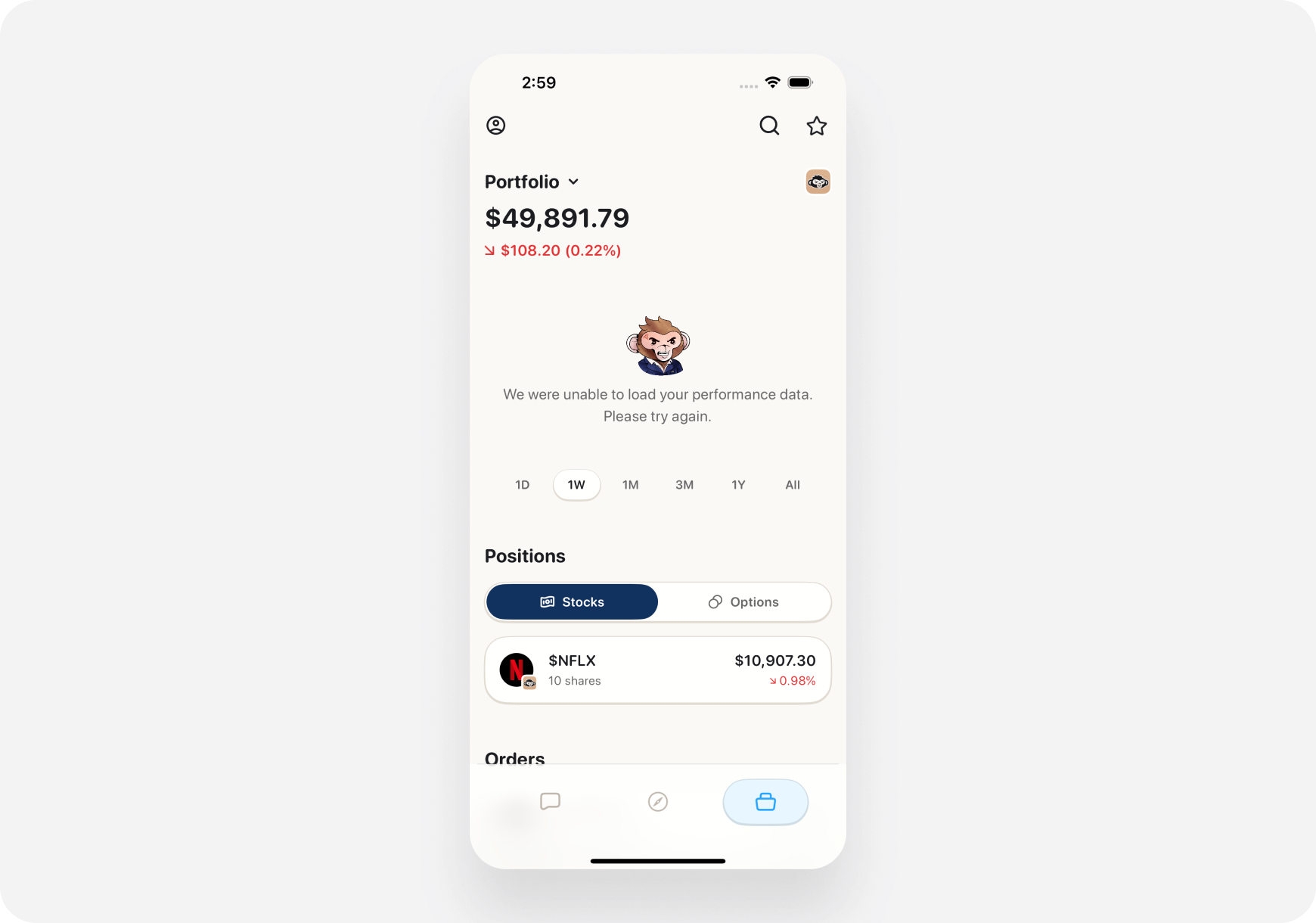
- 💬 Chat
- 🧭 Discover
- 📊 Portfolio ← You are here
Web
- Go to app.Ape AI.com
- Click Portfolio (left sidebar)
- Full portfolio page opens
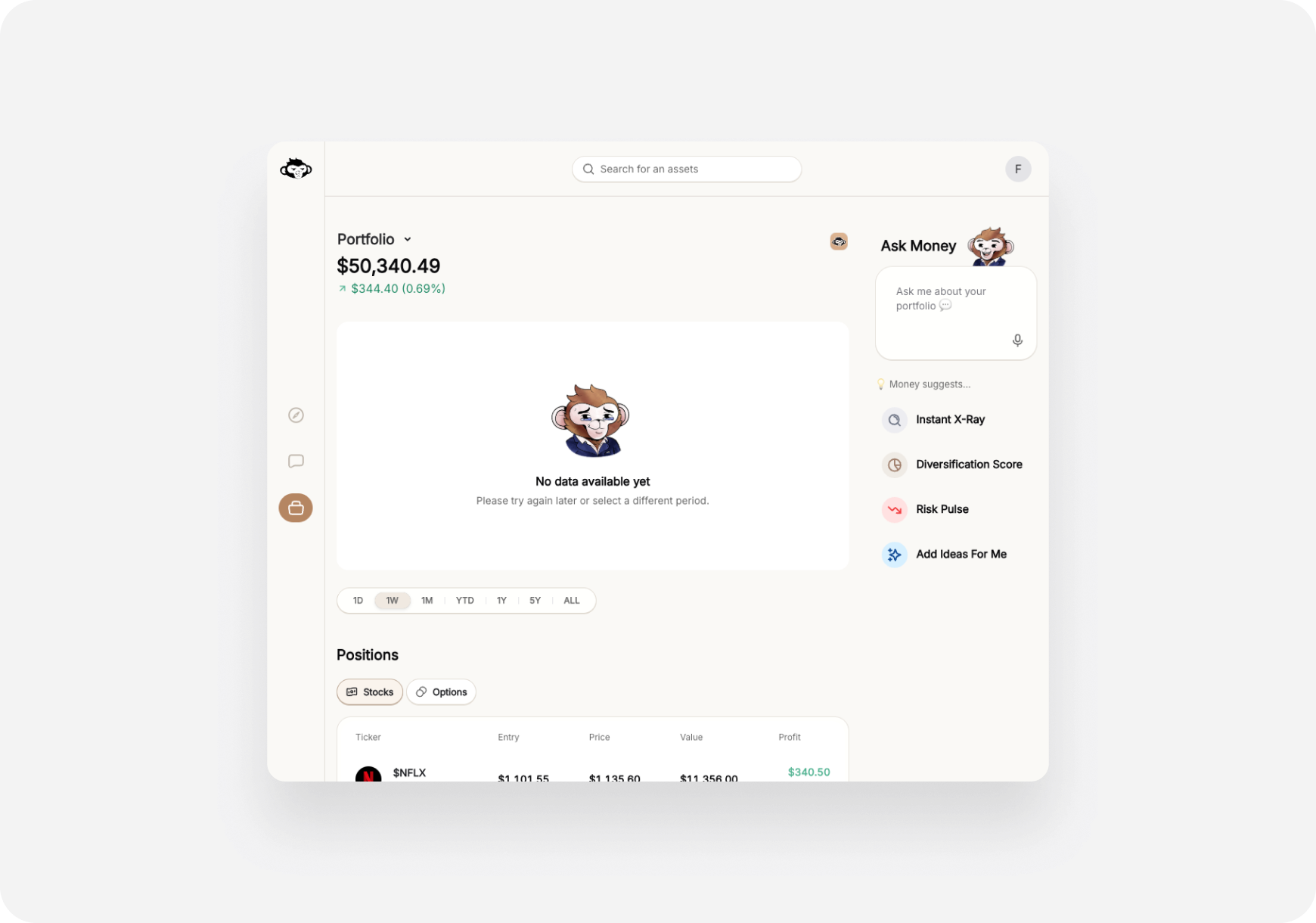
- 🏠 Home
- 💬 Chat
- 🎯 Themes
- 📊 Portfolio ← You are here
- ⚙️ Settings
🎨 Portfolio Layout
Top Section: Summary Cards
Total Portfolio Value 💰**$45,250.00** +$2,105 (+4.88%) Today +$8,250 (+22.3%) All TimeShows:
- Current total value
- Today’s change ($ and %)
- All-time P&L ($ and %)
Cash Available 💵
$5,000.00 Available to tradeShows:
- Buying power
- Settled cash
- Unsettled funds (if any)
Day’s Performance 📈
+$2,105 (+4.88%) 8 positions up 🟢 | 2 down 🔴Shows:
- Intraday profit/loss
- Number of winners vs losers
- Visual breakdown
Middle Section: Your Positions
List of all holdings: Example Position Card:TSLA - Tesla Inc. 10 shares Current: $465.20 (+$15.20, +3.38% today) Avg Cost: $450.00 **Total Value:** $4,652.00 Profit: +$152.00 (+3.38%) Snapshot Grade: A- 🟢Tap/click to view full ticker page
Color Coding:
- 🟢 Green = Profitable position
- 🔴 Red = Losing position
- ⚪ White/Gray = Break-even
Sort Options:
- By % Gain (biggest winners first)
- By % Loss (biggest losers first)
- By Value (largest positions first)
- By Today’s Change
- Alphabetical
Bottom Section: Performance Charts
1. Portfolio Value Over Time- Line chart showing growth
- Toggle timeframes: 1D | 1W | 1M | 3M | 1Y | ALL
- Pie chart of your holdings
- By stock (what % is TSLA, AAPL, etc.)
- By sector (Tech 40%, Healthcare 20%, etc.)
- Bar chart
- Green bars = Profitable positions
- Red bars = Losing positions
🎯 Key Metrics Explained
Total Portfolio Value
What it is: Current market value of all your holdings + cash Formula:- 10 TSLA @ $465 = $4,650
- 50 AAPL @ $180 = $9,000
- Cash = $5,000
- Total = $18,650
Cost Basis
What it is: How much you paid for each stock (avg if multiple buys) Why it matters: Determines your profit/loss and tax liability Example:- Bought 5 TSLA @ $440 = $2,200
- Bought 5 more @ $460 = $2,300
- Cost Basis = $4,500 / 10 shares = **$450/share**
Unrealized P&L
What it is: Paper gains/losses on open positions Formula:- 10 TSLA @ $465 current
- Cost basis $450
- Unrealized P&L = ($465 - $450) × 10 = +$150
Realized P&L
What it is: Actual profits/losses from closed trades Shows in: Order history, tax reports Example:- Bought 10 AAPL @ $170 = $1,700
- Sold 10 AAPL @ $180 = $1,800
- Realized P&L = +$100
Day Change
What it is: How much your portfolio moved today Resets daily at 4:00 PM ET close Example:- Yesterday close: $45,000
- Today now: $47,105
- Day Change: +$2,105 (+4.68%)
Return %
What it is: Total return since you started Formula:- Invested $37,000 total
- Current value $45,250
- Return = ($45,250 - $37,000) / $37,000 = +22.3%
💼 Multiple Accounts View
Connected multiple brokerages? Portfolio shows:- Combined total at top
- Breakdown by account
- Switch between accounts with dropdown
All Accounts: $65,250 Robinhood: $35,000 (12 positions)Filter:Webull: $25,000 (8 positions)
- TSLA, AAPL, NVDA, AMD, etc.
Ape Paper: $5,250 (3 positions)
- Day trading positions
- Testing strategies
- View all accounts together
- Or select one account to view
🎭 Portfolio by Companion
Blitz (Day Trader) View 🚀
Focus:- Intraday P&L (today’s $ change)
- Open positions (what’s active NOW)
- Realized P&L today (closed trades)
- Quick access to close positions
Maverick (Momentum Trader) View 📈
Focus:- Weekly/monthly performance
- Swing positions (multi-day holds)
- Upcoming exit targets
- Risk/reward per position
Sage (Long-Term) View 🏦
Focus:- Total return (all-time)
- Dividend income
- Asset allocation
- Quality scores for holdings
- Long-term growth chart
🤖 AI-Powered Features
Portfolio AI
Your personal portfolio AI assistant. Tap “Portfolio AI” button to:- Get portfolio analysis
- Ask questions about holdings
- Rebalancing suggestions
- Risk assessment
- “How’s my portfolio doing?”
- “What should I sell?”
- “Am I too concentrated?”
- “Which holding is riskiest?”
Snapshot Grades for Each Holding
Every stock in your portfolio gets graded A-F:- Fundamental Grade
- Technical Grade
- Sentiment Grade
- Risk Grade
Smart Alerts
AI watches your portfolio and alerts you:- 🚨 “TSLA dropped 5% today. Time to review?”
- 💰 “AAPL up 15% since purchase. Consider taking profits?”
- ⚠️ “AMD earnings tomorrow. High risk event.”
- 📊 “Your tech exposure is now 60%. Consider rebalancing.”
⚙️ Portfolio Settings
Customize Your View
📱 iOS: Portfolio → ⚙️ (top right) 🌐 Web: Portfolio → Settings icon Options:- Display: Show/hide certain metrics
- Sorting: Default sort order
- Notifications: Portfolio alerts
- Privacy: Hide $ amounts (show % only)
- Tax Lots: FIFO vs LIFO for cost basis
Privacy Mode
Don’t want people seeing your screen? Enable Privacy Mode:- Hides dollar amounts
- Shows only percentages
- Masks position sizes
📊 Performance Tracking
Time Period Views
Toggle between:- 1D: Today’s performance
- 1W: This week
- 1M: This month
- 3M: Quarter performance
- YTD: Year to date
- 1Y: Past year
- ALL: Since inception
Benchmark Comparison
Compare your performance to:- S&P 500 (SPY)
- Nasdaq (QQQ)
- Dow Jones (DIA)
- Custom benchmark
Your Portfolio: +22.3% S&P 500: +15.8% You’re beating the market by +6.5%! 🎉Or:
Your Portfolio: +8.2% S&P 500: +15.8% You’re underperforming by -7.6% 😔Humbling but important to know!
💡 Pro Tips
1. Check Portfolio Daily (But Don’t Obsess)
Morning routine:- Check overall P&L
- See biggest movers
- Read AI alerts
- Plan day’s trades
2. Use Snapshot Grades
Quick portfolio health check:- Sort by grade (worst first)
- See which holdings are struggling
- Consider trimming positions with D or F grades
- Double down on A grades
3. Monitor Allocation
Don’t be too concentrated:- Keep any single stock under 20% of portfolio
- Diversify across sectors
- AI will alert if you’re too concentrated
4. Set Target Exits
For each position, know:- Profit target (where to sell for gains)
- Stop loss (where to bail if wrong)
- Time frame (how long to hold)
5. Review Weekly, Not Daily
Weekly review (Sunday evening):- What worked this week?
- What didn’t?
- Any positions to trim?
- What to add next week?
❓ FAQ
Q: Why doesn’t my portfolio match my broker exactly? A: Small delays (1-2 seconds) during fast markets. Refresh if needed. Q: Can I manually add positions? A: No, positions sync from connected brokerages. Use Ape Paper Trading to track paper positions. Q: Does Portfolio include options? A: Yes! Options positions shown with expiration and strike. Q: What about crypto? A: Crypto stocks (COIN, MARA) yes. Actual crypto (BTC, ETH) not yet. Q: Can I see historical portfolio value? A: Yes! Use the time period charts (1M, 3M, 1Y, ALL). Q: Does Portfolio include dividends? A: Yes! Dividend income shown in realized P&L.What’s Next?
Explore Portfolio Features:- Tracking Positions → - Manage your holdings
- Portfolio AI → - Portfolio AI assistant
- AI Analysis Tools → - Advanced portfolio analysis
- Portfolio Health Check → - Review your holdings
Your Portfolio = Your Trading Command Center. Check it daily! 📊🚀