

📰 What is Personalized News?
Personalized News shows you real-time financial news about stocks and topics you care about. Not just any news. YOUR news. What makes it personalized:- Stocks in your portfolio
- Stocks you search/view
- Themes you create
- Your trading style (companion)
- Market sectors you follow
- Random stocks you don’t care about
- Irrelevant market noise
- Clickbait headlines
- Off-topic content
📱 Where to Find News
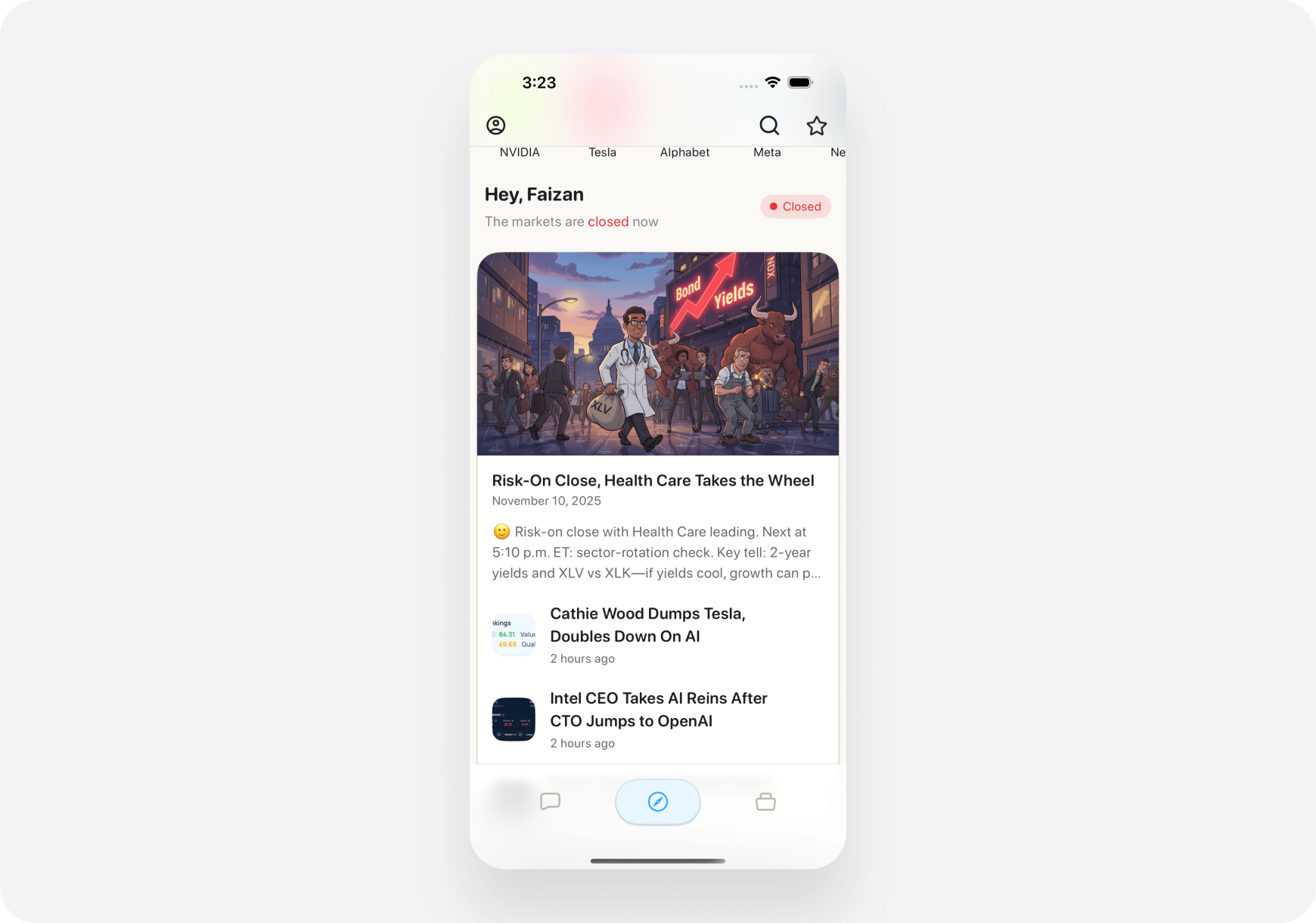
iOS
- Open Discover tab (bottom middle)
- Scroll past the carousel
- See News Feed section
- Scroll to read more
Web
- Go to Home page (dashboard)
- Main feed shows news mixed with other content
- Or click News filter at top to see only news

🎯 Types of News You’ll See
1. Earnings Announcements 📊
When a company reports quarterly earnings What you’ll see:- Company ticker
- Beat or miss (vs expectations)
- Revenue & EPS numbers
- Stock reaction (pre/post market)
- Key highlights
NVDA Earnings Beat 🚀 Revenue: $18.1B (expected $16.2B) - BEAT EPS: $4.02 vs $3.37 expected - BEAT Stock: +8% pre-market Key: Data center revenue up 112% YoY
2. Analyst Ratings 📈📉
When analysts upgrade/downgrade stocks What you’ll see:- Analyst firm name
- Action (upgrade, downgrade, initiate)
- New rating & price target
- Previous rating
- Reasoning
Goldman Sachs Upgrades TSLA Rating: Neutral → Buy Price Target: $500 (from $450) Reason: Strong delivery numbers, China growth Stock: +2.3%
3. Breaking Market News 🔥
Major market-moving events Types:- Fed announcements
- Economic data (jobs, inflation, GDP)
- Geopolitical events
- Sector-wide news
- Regulatory changes
Fed Holds Rates Steady 🏦 Decision: 5.25%-5.50% unchanged Powell: “Inflation still elevated”
- Market reaction: SPY -0.8%
Impact: Growth stocks down, bonds up
4. Company-Specific News 🏢
News about individual companies Types:- Product launches
- FDA approvals
- Mergers & acquisitions
- Partnerships
- Management changes
- Legal/regulatory issues
Apple Announces Vision Pro Launch Date 🥽 Release: February 2, 2024 Price: $3,499 Pre-orders start January 19 Analyst take: “Game changer for spatial computing” AAPL: +1.2%
5. Unusual Activity Alerts 🚨
When something weird is happening Types:- Unusual volume spikes
- Large options trades
- Insider buying/selling
- Short interest changes
- Halts/circuit breakers
GME Unusual Options Activity 🎯 Alert: 10x normal call volume Strikes: $30-$35 exp Friday Premium flow: $15M+ into calls Possible catalyst: Earnings next week GME: +12% on the day
6. Sector News 🏭
Industry-wide developments Types:- Sector rotation
- Commodity price changes (oil, gold)
- Industry regulations
- Technology trends
- Economic sector shifts
Tech Sector Rally Continues 💻 QQQ: +2.1% this week Leaders: NVDA (+8%), AMD (+6%), MSFT (+4%) Driver: AI optimism, strong earnings Outlook: Momentum likely to continue
🎭 How News Changes by Companion
Blitz (Day Trader) 🚀
You see more:- Pre-market/after-hours movers
- Intraday catalysts
- Options flow alerts
- Technical breakout news
- High-volume spikes
“TSLA breaking out: +5% on volume spike. Key level $470 breached.”
Maverick (Momentum Trader) 📈
You see more:- Earnings calendars
- Multi-day catalysts
- Analyst rating changes
- Trend-change news
- Momentum shifts
“AMD upgraded by 3 analysts this week. Avg target: $200. 10% upside.”
Sage (Long-Term) 🏦
You see more:- Fundamental company news
- Long-term growth stories
- Dividend announcements
- Competitive moat news
- Management changes
“MSFT raises dividend 10%. 21st consecutive year of increases. Dividend aristocrat status.”
🔔 News Notifications
Get Alerted to Important News
📱 iOS: Push Notifications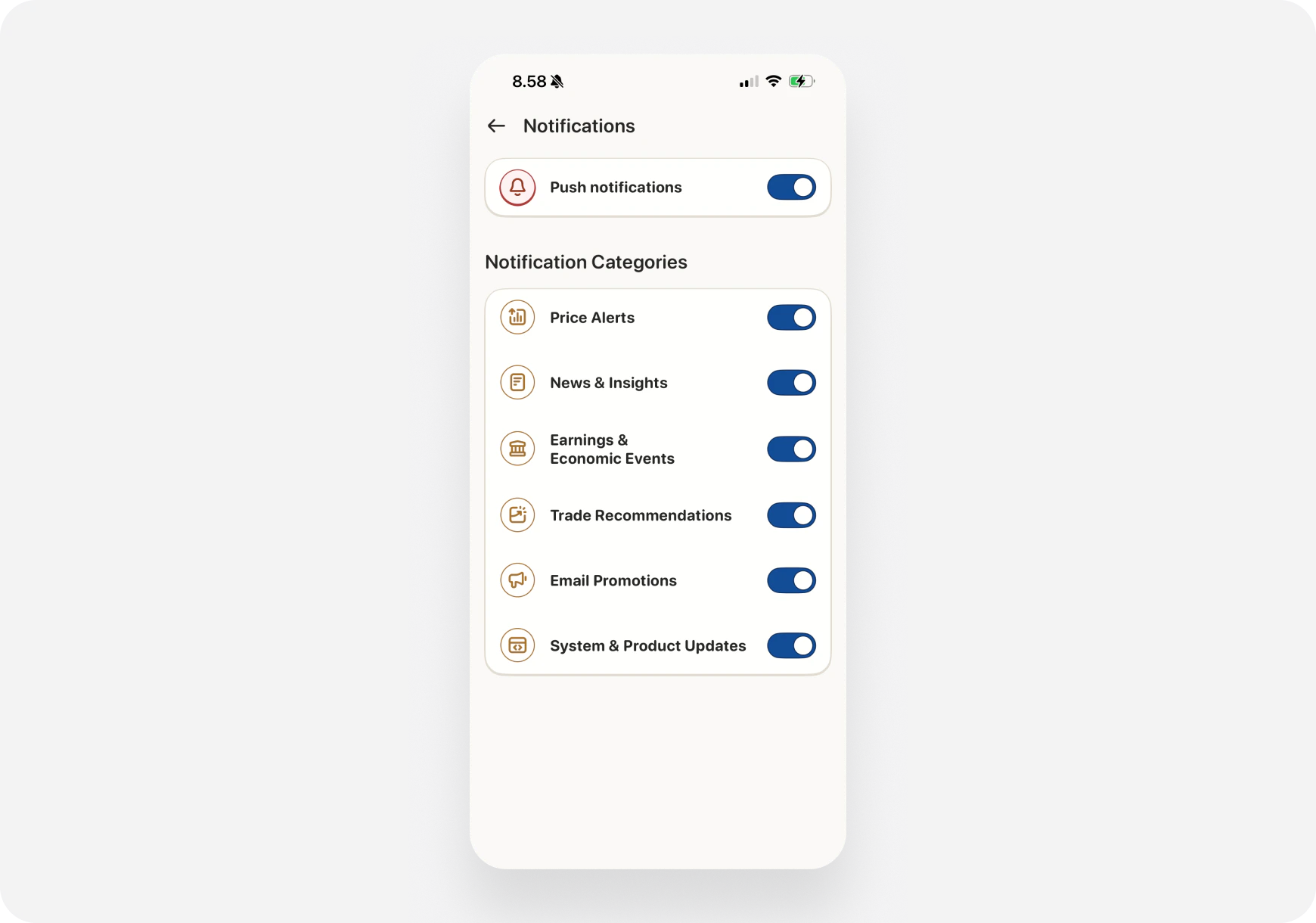
- Profile → Settings
- Notifications
- Toggle “Push Notifications” ON
- Choose:
- Price Alerts
- News & Insights
- Earnings & Economic Events
- Earnings announcements (your stocks)
- Major price moves (+/- 5%+)
- Analyst upgrades/downgrades
- Breaking market news
🌐 Web: Browser Notifications Set up:
- Profile → Settings
- Notifications
- Enable “Browser Notifications”
- Allow in browser popup
- Tab is closed
- You’re on another site
- Important news breaks
💡 How to Use News Effectively
1. Morning News Scan (3 minutes)
Routine:- Open Feed/Discover
- Check Breaking News section
- Scan headlines
- Tap any relevant ones
- Read full articles if interesting
- Overnight news affecting your portfolio
- Pre-market movers with catalysts
- Sector trends
- Economic data releases
- Read every single article
- Spend hours scrolling
- React to every headline
2. News → AI → Decision
When you see interesting news: Step 1: Read the headline“TSLA Announces Cybertruck Delivery Event”Step 2: Ask AI about it Go to Chat tab, ask:
- “What does the Cybertruck news mean for TSLA stock?”
- “Should I buy TSLA before the delivery event?”
- “What’s the risk if Cybertruck disappoints?”
AI: “TSLA Cybertruck event is priced in. Stock up 15% this month on hype. Risk/reward not great here. Wait for post-event dip if you want entry.”Step 4: Make informed decision News → Context → Smart decision
3. Filter Noise from Signal
Not every headline matters. Ask yourself:- Does this affect my portfolio? If no, skip.
- Is this actionable? If no, skip.
- Is this time-sensitive? If no, save for later.
- Does this change my thesis? If no, skip.
🔍 Deep Dive on Any News
Tap a News Card to:
1. Read Full Article- Complete story
- Source link
- Publication date
- Related tickers
- Tickers mentioned in article
- Tap to go to ticker page
- See how they’re reacting
- “Explain this news” button
- Get AI’s take
- Understand implications
- Trading ideas based on news
- Copy link
- Share to Twitter
- Send to Discord/Telegram
- Text to friends
⚙️ Customize Your News Feed
What You Can Control:
📱 iOS: Discover → ⚙️ Settings 🌐 Web: Home → Customize Feed Options:- News Sources
- Bloomberg
- CNBC
- Financial Times
- MarketWatch
- Benzinga
- All sources
- Stock Focus
- Portfolio holdings only
- Watchlist stocks
- Trending stocks
- Custom themes
- All personalized
- News Frequency
- High: Every article
- Medium: Important news
- Low: Major events only
- Content Types
- Earnings ✅
- Analyst ratings ✅
- Market news ✅
- Company news ✅
- Unusual activity ✅
📊 News Sources
Where Ape AI Gets News:
Premium Sources:- Bloomberg
- Financial Times
- Reuters
- Dow Jones
- CNBC
- MarketWatch
- Yahoo Finance
- Barron’s
- Benzinga
- PR Newswire
- SEC Filings (8-K, 10-Q)
- Reddit r/WallStreetBets
- Twitter trending
- StockTwits sentiment
💡 Pro Tips
1. Create a News Routine
Morning (5 min):- Check overnight news
- Read earnings announcements
- Scan for catalysts
- Quick scroll during lunch
- Check for breaking news
- Any portfolio alerts?
- After-hours earnings
- Tomorrow’s catalysts
- Prep for next day
2. Set Price Alerts + News Together
Powerful combo:- Set price alert for $100
- Get news notification when stock hits $100
- See if news caused the move
- Make informed decision
3. Use News to Generate Trade Ideas
Weekly routine:- Review all news from past week
- Identify trends (AI sector hot? Energy weak?)
- Ask AI: “Based on this week’s news, what are good swing trades?”
- AI uses recent news context to suggest setups
4. Follow Earnings Season Closely
Earnings weeks are gold mines:- 4-6 weeks per year (quarterly)
- Huge moves after announcements
- Easy trading opportunities
- News feed lights up
❓ FAQ
Q: Is news real-time? A: Yes! Updates within seconds of being published. Q: Can I see news for stocks not in my portfolio? A: Yes! Search any ticker → View ticker page → News tab shows all news for that stock. Q: Why don’t I see all financial news? A: Personalized = filtered for relevance. You only see news about stocks you care about. Q: Can I change news sources? A: Yes! Settings → News Sources → Select which sources you want. Q: Do I get news on weekends? A: Yes, if there’s significant news. But most news happens Mon-Fri market hours. Q: Can I save news articles? A: Coming soon! Bookmark feature in development.What’s Next?
Explore More Feed Features:- Feed Overview → - What’s in the Feed
- Daily Summary → - AI market recap
- Banana Bites → - Educational content
- Trending Stocks → - What’s hot
Personalized News = Your Competitive Edge. Stay informed, trade smarter! 📰🚀