> ## Documentation Index
> Fetch the complete documentation index at: https://guide.askape.com/llms.txt
> Use this file to discover all available pages before exploring further.
# Support
Need help? We're here for you! Reach out to the Ape AI support team.
**⏱️ Time to read:** 2 minutes **📱🌐 Platform:** Both iOS & Web **👤 Best for:** Everyone
***
## 📧 Email Support
### Support Email
**[support@askape.com](mailto:support@askape.com)**
Use this email for:
* Technical issues
* Questions about features
* Trading problems
* Account help
* Bug reports
* General inquiries
**Response time:** Usually within 24-48 hours during business days
***
### General Contact
**[contact@askape.com](mailto:contact@askape.com)**
Use this email for:
* Account deletion requests
* Partnership inquiries
* Business matters
* General feedback
***
## 💬 Live Support via Help Center
The fastest way to get help is through our Help Center, which opens a direct support conversation.
### 📱 Accessing Help Center on iOS
**Step 1: Open Profile**
1. Open the Ape AI app
2. Tap your **Profile icon** (top left of chat screen)
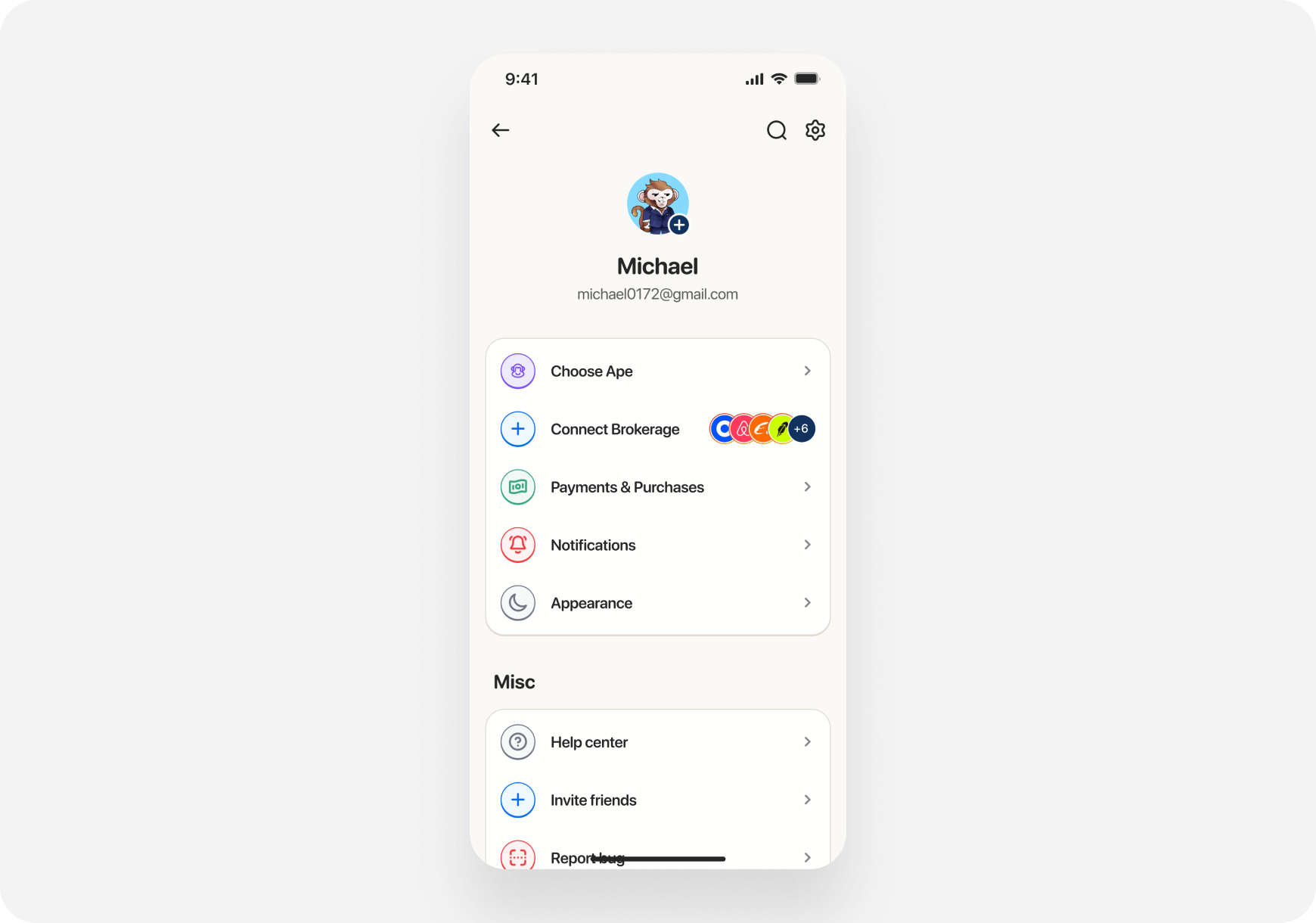 **Step 2: Tap Help Center**
1. Scroll down to the **"Misc"** section
2. Tap **"Help Center"**
3. Your email app will open with a pre-filled message to [support@askape.com](mailto:support@askape.com)
**What happens:**
* Email opens automatically
* "To" field: [support@askape.com](mailto:support@askape.com)
* Subject line: Pre-filled with "Question for Ape AI"
* Body: Empty - describe your issue here
**Pro tip:** Include screenshots of your issue in the email for faster resolution!
***
### 🌐 Accessing Help Center on Web
**Step 1: Open Profile**
1. Go to app.askape.com
2. Click your **profile icon** (top right, shows your initial)
3. Select **"Profile"** from the dropdown
**Step 2: Tap Help Center**
1. Scroll down to the **"Misc"** section
2. Tap **"Help Center"**
3. Your email app will open with a pre-filled message to [support@askape.com](mailto:support@askape.com)
**What happens:**
* Email opens automatically
* "To" field: [support@askape.com](mailto:support@askape.com)
* Subject line: Pre-filled with "Question for Ape AI"
* Body: Empty - describe your issue here
**Pro tip:** Include screenshots of your issue in the email for faster resolution!
***
### 🌐 Accessing Help Center on Web
**Step 1: Open Profile**
1. Go to app.askape.com
2. Click your **profile icon** (top right, shows your initial)
3. Select **"Profile"** from the dropdown
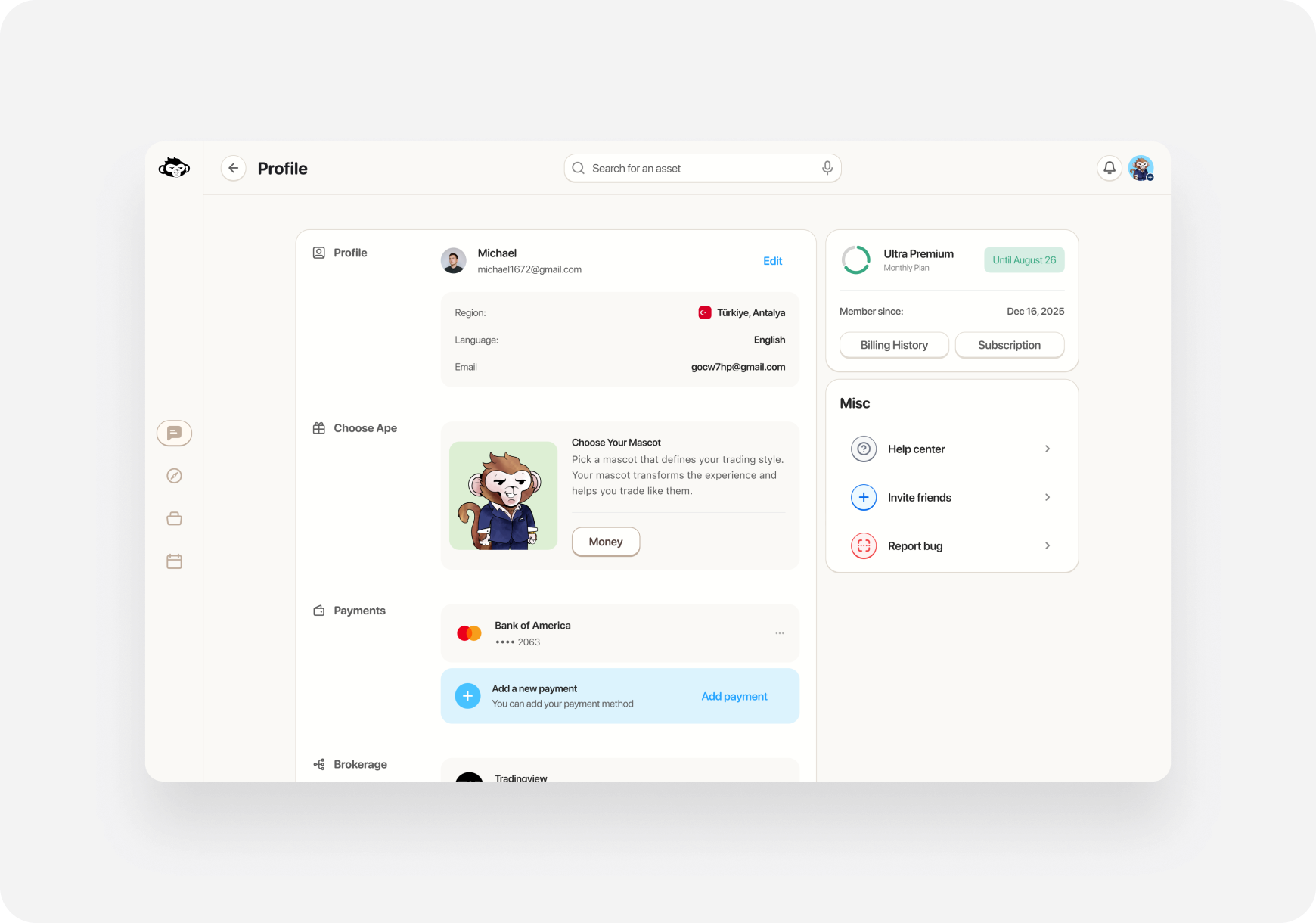 **Step 2: Click Help Center**
1. On the profile page, look for **"Misc"** section on the right
2. Click **"Help Center"**
3. Your email client will open with a pre-filled message to [support@askape.com](mailto:support@askape.com)
**What happens:**
* Default email app opens
* Pre-addressed to [support@askape.com](mailto:support@askape.com)
* Subject: "Question for Ape AI"
* Compose your message and send
***
## 🐛 Reporting Bugs
### Option 1: Report Bug Button (Recommended)
**📱 iOS:**
1. Profile → **"Report Bug"**
2. Email opens to [support@askape.com](mailto:support@askape.com)
3. Describe the bug in detail
4. Include steps to reproduce
**🌐 Web:**
1. Profile → **"Report a Bug"**
2. Email opens to [support@askape.com](mailto:support@askape.com)
3. Describe what happened
4. Include browser info if relevant
### Option 2: Direct Email
Send detailed bug reports to: **[support@askape.com](mailto:support@askape.com)**
**Include in your bug report:**
* What you were trying to do
* What happened instead
* Steps to reproduce the issue
* Screenshots or screen recordings (very helpful!)
* Device: iPhone/Android/Web browser
* Account email (so we can investigate)
***
## 💡 What to Include When Contacting Support
To help us resolve your issue quickly, include:
**For Technical Issues:**
* 📱 Device: iOS/Android/Web + version
* 🔍 What you were doing when the issue occurred
* 📸 Screenshots showing the problem
* 📧 Your account email
**For Trading Issues:**
* 📊 Ticker symbol involved
* 🕐 Time the issue occurred
* 💼 Brokerage connected (if relevant)
* 📸 Screenshot of error message
**For Account Issues:**
* 📧 Email address associated with your account
* 🆔 Description of the issue
* 🔐 Do NOT include passwords or sensitive info
***
## ⏰ Response Times
**Email Support:**
* Business days: 24-48 hours
* Weekends/holidays: Up to 72 hours
* Urgent issues: Mark "URGENT" in subject line
**Best times to reach out:**
* Monday-Friday: 9 AM - 5 PM ET (fastest response)
* Evenings and weekends: Slower response
***
## 🚨 Urgent Issues
For critical issues like:
* ⚠️ Can't access your account
* 💰 Money missing from portfolio
* 🔐 Security concerns
* 🚫 Unable to execute trades
**Subject line:** `URGENT: [Brief description]`
**Example:** `URGENT: Cannot access account after login`
***
## 🙋 Frequently Contacted For
Common reasons users contact support:
### Account Issues
* Password reset
* Email change
* Account deletion
* Subscription management
### Trading Problems
* Brokerage connection failed
* Order not executing
* Portfolio sync issues
* Missing positions
### Technical Bugs
* App crashes
* Features not working
* Data not loading
* Login problems
***
## 🤝 Community Support
### Discord Community
Join our Discord for:
* Community discussions
* Trading tips from other users
* Feature suggestions
* Quick questions
**Note:** For account-specific issues, always use email support ([support@askape.com](mailto:support@askape.com)) instead of public Discord.
***
## 📱 Social Media
Follow us for updates and announcements:
* **Twitter/X:** [@askapeAI](https://x.com/askApeAI)
* **LinkedIn:** [Ape AI](https://www.linkedin.com/company/apeai)
* **Instagram:** [@askape](https://www.instagram.com/askapeai?igsh=eW1zeXA3aXNkcjEx\&utm_source=qr)
**Note:** DMs on social media are NOT monitored for support. Please use email.
***
## ✉️ Email Template
Not sure how to word your support request? Use this template:
```
Subject: [Brief description of issue]
Hi Ape AI Support,
Account Email: your.email@example.com
Device: [iOS/Android/Web]
Issue: [Describe what's wrong]
What I was doing:
1. [Step 1]
2. [Step 2]
3. [Error occurred]
What I expected: [What should have happened]
What happened instead: [What actually happened]
[Attach screenshots if applicable]
Thank you!
[Your Name]
```
***
## 🔒 Privacy & Security
**What we'll never ask for:**
* ❌ Your password
* ❌ Credit card details via email
* ❌ Social Security Number
* ❌ Brokerage login credentials
**If someone asks for these, it's not us!** Forward suspicious emails to [support@askape.com](mailto:support@askape.com).
***
## ❓ FAQ
**Q: How long does support take to respond?** A: Usually 24-48 hours on business days. Urgent issues are prioritized.
**Q: Can I call support?** A: Currently, we only offer email support. This allows us to better track and resolve issues.
**Q: I didn't get a response to my email. What should I do?** A: Check your spam folder. If still nothing after 48 hours, send a follow-up email.
**Q: Can I get help on Discord instead?** A: Discord is great for general questions, but for account-specific issues, always email [support@askape.com](mailto:support@askape.com).
**Q: Do you have live chat?** A: Not at this time. Help Center opens your email client for fastest response.
**Q: How do I escalate an urgent issue?** A: Put "URGENT" in your email subject line and clearly explain why it's urgent.
***
## What's Next?
**Need immediate answers?**
* [FAQ →](https://askape.com/) - Common questions answered
**Learn more:**
* [Getting Started](use-cases/pre-investor/getting-started/) - Setup guides
* [Feature Guides →](features/) - How to use features
***
**We're here to help! Don't hesitate to reach out at [support@askape.com](mailto:support@askape.com) 📧🦍**
**Step 2: Click Help Center**
1. On the profile page, look for **"Misc"** section on the right
2. Click **"Help Center"**
3. Your email client will open with a pre-filled message to [support@askape.com](mailto:support@askape.com)
**What happens:**
* Default email app opens
* Pre-addressed to [support@askape.com](mailto:support@askape.com)
* Subject: "Question for Ape AI"
* Compose your message and send
***
## 🐛 Reporting Bugs
### Option 1: Report Bug Button (Recommended)
**📱 iOS:**
1. Profile → **"Report Bug"**
2. Email opens to [support@askape.com](mailto:support@askape.com)
3. Describe the bug in detail
4. Include steps to reproduce
**🌐 Web:**
1. Profile → **"Report a Bug"**
2. Email opens to [support@askape.com](mailto:support@askape.com)
3. Describe what happened
4. Include browser info if relevant
### Option 2: Direct Email
Send detailed bug reports to: **[support@askape.com](mailto:support@askape.com)**
**Include in your bug report:**
* What you were trying to do
* What happened instead
* Steps to reproduce the issue
* Screenshots or screen recordings (very helpful!)
* Device: iPhone/Android/Web browser
* Account email (so we can investigate)
***
## 💡 What to Include When Contacting Support
To help us resolve your issue quickly, include:
**For Technical Issues:**
* 📱 Device: iOS/Android/Web + version
* 🔍 What you were doing when the issue occurred
* 📸 Screenshots showing the problem
* 📧 Your account email
**For Trading Issues:**
* 📊 Ticker symbol involved
* 🕐 Time the issue occurred
* 💼 Brokerage connected (if relevant)
* 📸 Screenshot of error message
**For Account Issues:**
* 📧 Email address associated with your account
* 🆔 Description of the issue
* 🔐 Do NOT include passwords or sensitive info
***
## ⏰ Response Times
**Email Support:**
* Business days: 24-48 hours
* Weekends/holidays: Up to 72 hours
* Urgent issues: Mark "URGENT" in subject line
**Best times to reach out:**
* Monday-Friday: 9 AM - 5 PM ET (fastest response)
* Evenings and weekends: Slower response
***
## 🚨 Urgent Issues
For critical issues like:
* ⚠️ Can't access your account
* 💰 Money missing from portfolio
* 🔐 Security concerns
* 🚫 Unable to execute trades
**Subject line:** `URGENT: [Brief description]`
**Example:** `URGENT: Cannot access account after login`
***
## 🙋 Frequently Contacted For
Common reasons users contact support:
### Account Issues
* Password reset
* Email change
* Account deletion
* Subscription management
### Trading Problems
* Brokerage connection failed
* Order not executing
* Portfolio sync issues
* Missing positions
### Technical Bugs
* App crashes
* Features not working
* Data not loading
* Login problems
***
## 🤝 Community Support
### Discord Community
Join our Discord for:
* Community discussions
* Trading tips from other users
* Feature suggestions
* Quick questions
**Note:** For account-specific issues, always use email support ([support@askape.com](mailto:support@askape.com)) instead of public Discord.
***
## 📱 Social Media
Follow us for updates and announcements:
* **Twitter/X:** [@askapeAI](https://x.com/askApeAI)
* **LinkedIn:** [Ape AI](https://www.linkedin.com/company/apeai)
* **Instagram:** [@askape](https://www.instagram.com/askapeai?igsh=eW1zeXA3aXNkcjEx\&utm_source=qr)
**Note:** DMs on social media are NOT monitored for support. Please use email.
***
## ✉️ Email Template
Not sure how to word your support request? Use this template:
```
Subject: [Brief description of issue]
Hi Ape AI Support,
Account Email: your.email@example.com
Device: [iOS/Android/Web]
Issue: [Describe what's wrong]
What I was doing:
1. [Step 1]
2. [Step 2]
3. [Error occurred]
What I expected: [What should have happened]
What happened instead: [What actually happened]
[Attach screenshots if applicable]
Thank you!
[Your Name]
```
***
## 🔒 Privacy & Security
**What we'll never ask for:**
* ❌ Your password
* ❌ Credit card details via email
* ❌ Social Security Number
* ❌ Brokerage login credentials
**If someone asks for these, it's not us!** Forward suspicious emails to [support@askape.com](mailto:support@askape.com).
***
## ❓ FAQ
**Q: How long does support take to respond?** A: Usually 24-48 hours on business days. Urgent issues are prioritized.
**Q: Can I call support?** A: Currently, we only offer email support. This allows us to better track and resolve issues.
**Q: I didn't get a response to my email. What should I do?** A: Check your spam folder. If still nothing after 48 hours, send a follow-up email.
**Q: Can I get help on Discord instead?** A: Discord is great for general questions, but for account-specific issues, always email [support@askape.com](mailto:support@askape.com).
**Q: Do you have live chat?** A: Not at this time. Help Center opens your email client for fastest response.
**Q: How do I escalate an urgent issue?** A: Put "URGENT" in your email subject line and clearly explain why it's urgent.
***
## What's Next?
**Need immediate answers?**
* [FAQ →](https://askape.com/) - Common questions answered
**Learn more:**
* [Getting Started](use-cases/pre-investor/getting-started/) - Setup guides
* [Feature Guides →](features/) - How to use features
***
**We're here to help! Don't hesitate to reach out at [support@askape.com](mailto:support@askape.com) 📧🦍**