> ## Documentation Index
> Fetch the complete documentation index at: https://guide.askape.com/llms.txt
> Use this file to discover all available pages before exploring further.
# Themes Overview
Natural language stock screener. Find stocks by describing what you want.
**⏱️ Time to read:** 4 minutes **📱🌐 Platform:** Both iOS & Web **👤 Best for:** Everyone
***
## 🎯 What are Themes?
**Themes** are custom stock lists created using natural language. Instead of complex screening criteria, just describe what you want.
**Think of them as:**
* Smart stock lists
* Natural language screener
* Custom watchlists on steroids
* AI-powered stock collections
**Instead of:** "Filter by P/E \< 15 AND Revenue Growth > 20% AND Market Cap > \$10B"
**Just say:** "Find me undervalued tech stocks with strong growth"
**AI understands and creates the list.**
***
## 💡 How Themes Work
### Traditional Stock Screener:
```
1. Choose filters (P/E, Market Cap, Sector...)
2. Set values (P/E < 15, Market Cap > $10B...)
3. Apply filters
4. Get results
5. Save as watchlist
```
**Time:** 10-15 minutes. **Hard to use.**
***
### Ape AI Themes:
```
1. Describe what you want in plain English
2. AI creates the theme
3. Get results instantly
```
**Time:** 30 seconds. **Easy.**
**That's the power of natural language.**
***
## 🎨 Types of Themes
### 1. Quick Themes (Pre-Built) 🚀
**Suggested themes** created by Ape AI:
* **Tech Titans** - Large cap tech leaders (AAPL, MSFT, GOOGL...)
* **Dividend Aristocrats** - 25+ years of dividend growth
* **EV Revolution** - Electric vehicle companies
* **AI & Machine Learning** - AI-focused stocks
* **Clean Energy** - Solar, wind, renewable energy
* **Biotech Movers** - High-growth biotech
* **Value Plays** - Undervalued quality stocks
* **Meme Stocks** - WSB favorites (GME, AMC...)
**One tap to add these to your feed.**
[Learn more about Suggested Themes →](/features/themes/suggested)
***
### 2. Custom Themes (You Create) 🎨
**Your own custom lists:**
**Examples:**
* "Stocks under \$50 that pay dividends"
* "Tech companies growing revenue over 30% YoY"
* "Stocks Warren Buffett owns"
* "Companies with earnings next week"
* "Stocks breaking all-time highs"
* "Reddit r/WallStreetBets trending stocks"
**Literally anything you can describe, AI can find.**
[Learn how to Create Themes →](/features/themes/creating)
***
## 📱 Where to Find Themes
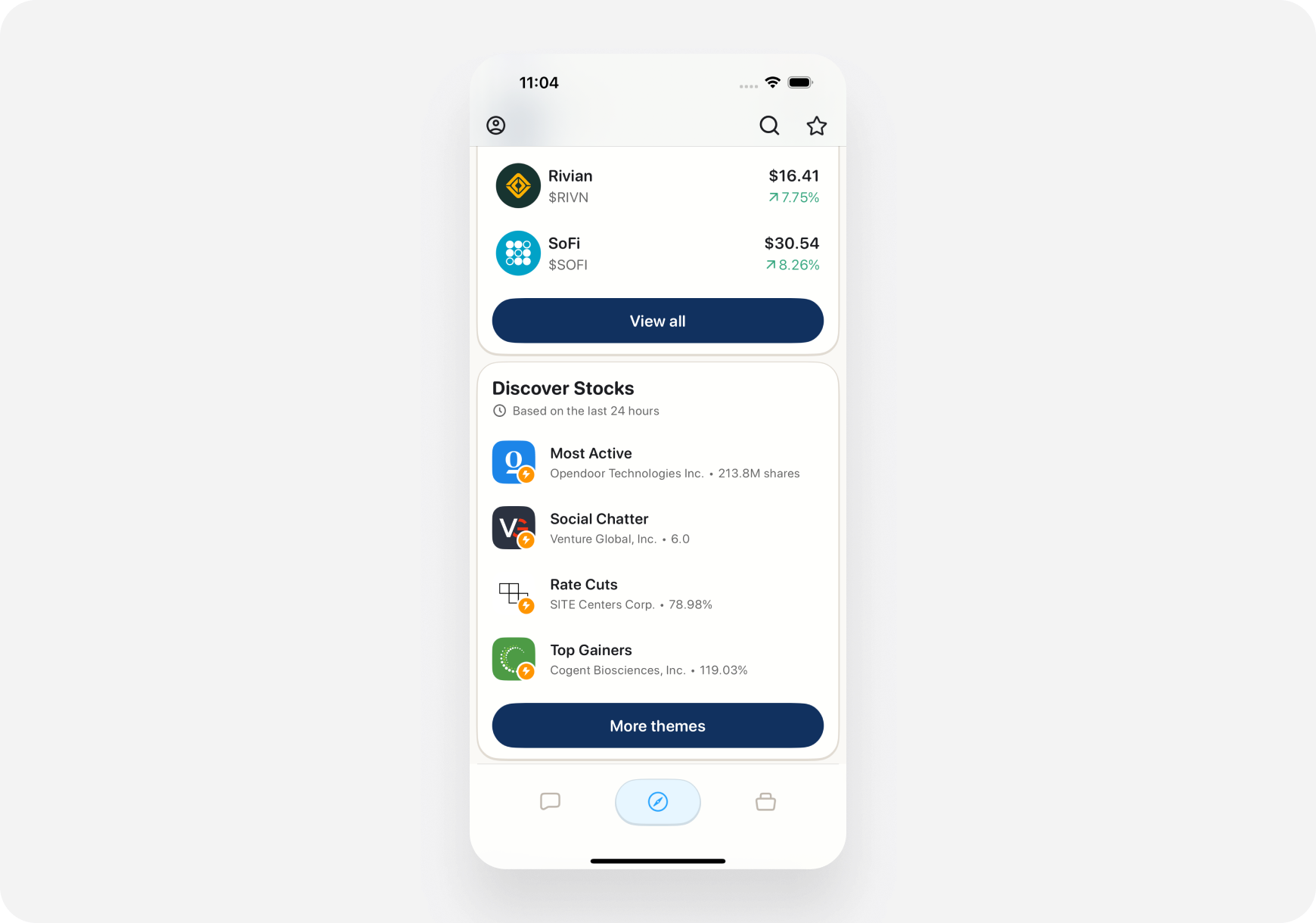
### iOS
1. Open **Discover tab**
2. Swipe right on top carousel until you see **"Themes"**
3. Or scroll to **"Your Themes"** section
4. Tap a theme to view stocks in it
 ***
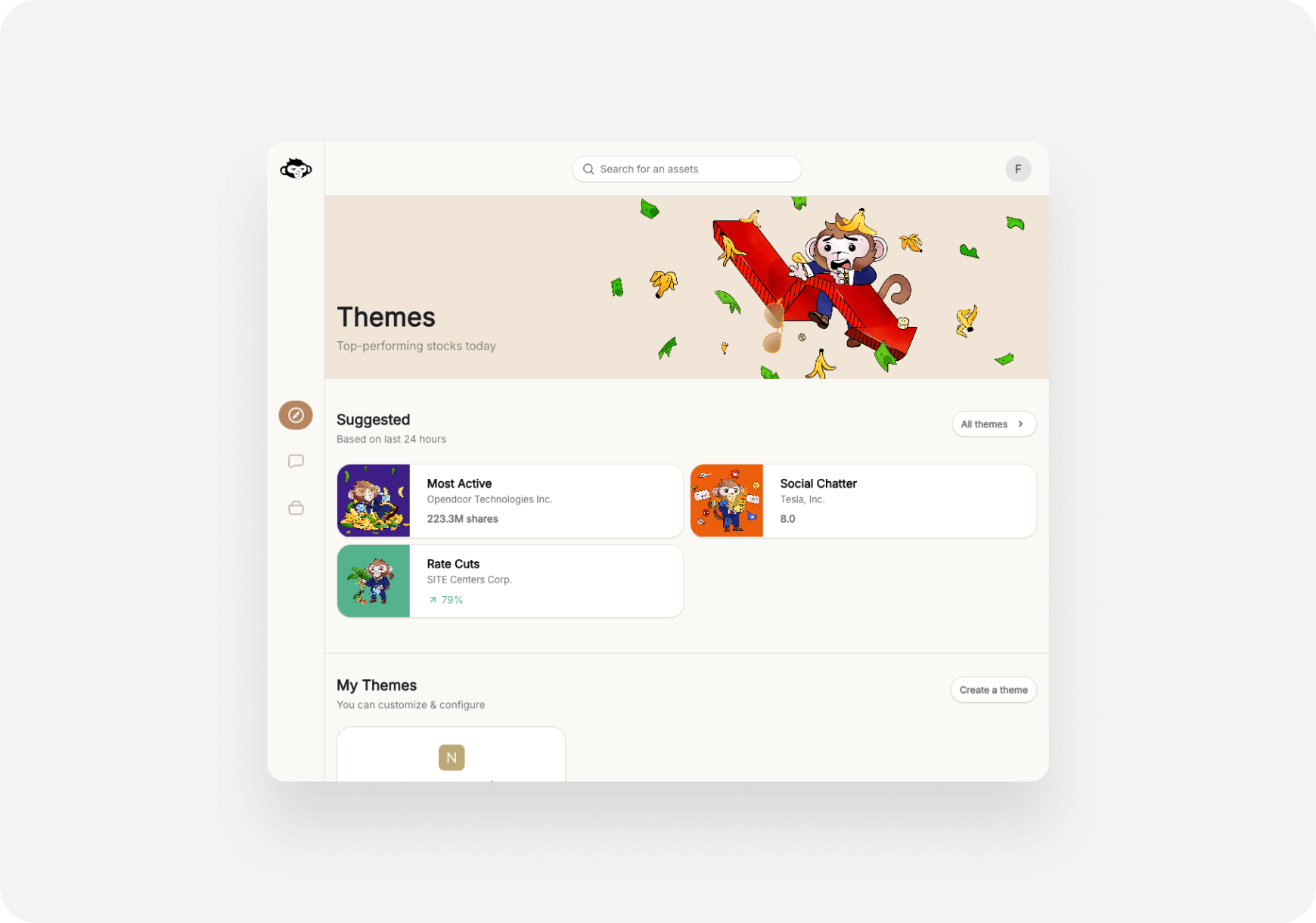
### Web
1. Go to **Themes** page (left sidebar)
2. See all your themes listed
3. Browse suggested themes
4. Click any theme to open
***
### Web
1. Go to **Themes** page (left sidebar)
2. See all your themes listed
3. Browse suggested themes
4. Click any theme to open
 ***
## 🎯 What You Can Do with Themes
### 1. Browse Stocks in Theme
**Tap/click a theme →** See all stocks that match
**For each stock, you see:**
* Ticker & company name
* Current price & % change today
* AI Snapshot Grade (A-F)
* Quick stats (Market Cap, P/E, etc.)
**Tap any stock →** Go to full ticker page
***
### 2. Monitor Theme Performance
**Track how your theme is doing:**
* Average % change today
* How many stocks up vs down
* Top performers in theme
* Worst performers in theme
**Example:**
> **Your Theme: "AI Stocks"**
>
> * 15 stocks in theme
> * Avg performance today: +2.3% 🚀
> * 12 up, 3 down
> * Top: NVDA +5.2%
> * Bottom: AI -1.8%
**See at a glance if your theme is hot or not.**
***
### 3. Get AI Analysis on Theme
**Ask AI about your theme:**
**Examples:**
* "Which stocks in my AI theme are the best buys?"
* "Analyze my Tech Titans theme"
* "Which stock should I buy from my Value Plays theme?"
* "Are my EV stocks overvalued?"
**AI looks at all stocks in your theme and gives recommendations.**
***
### 4. Set Alerts on Theme
**Get notified when:**
* Any stock in theme moves +/- 5%
* New stocks match your theme criteria
* Earnings coming up (for stocks in theme)
* Major news for theme stocks
**Never miss action in your themes.**
***
### 5. Add to Feed
**Show theme updates in your Feed:**
**When enabled:**
* News about theme stocks shows up
* Price alerts for theme stocks
* Trending stocks from your theme highlighted
**Your feed becomes personalized to your themes.**
***
## 🌟 Why Themes are Powerful
### 1. No Complex Filters
**Traditional screeners:**
* Dozens of dropdown menus
* Need to know exact metrics
* Easy to make mistakes
* Hard to save and reuse
**Themes:**
* Just describe what you want
* AI figures out the filters
* One sentence = one theme
* Easy to modify
***
### 2. Dynamic & Live
**Traditional watchlists:**
* Static list you manually update
* Stocks stay even if no longer relevant
**Themes:**
* Automatically update
* Stocks removed if they no longer match
* New stocks added if they match
* Always current
**Example:** "Tech stocks under \$100"
* NVDA at \$95? In the theme. ✅
* NVDA hits \$105? Removed from theme. ❌
**Your theme stays true to your criteria.**
***
### 3. Shareable (Coming Soon)
**Share themes with friends:**
* Export theme criteria
* Send to Discord/Twitter
* Others can clone your theme
* Build community themes
**Feature coming soon!**
***
### 4. Multiple Strategies, One Place
**Have different trading strategies?**
**Create themes for each:**
* "Day Trade Momentum Plays" (Blitz)
* "Swing Trade Setups" (Maverick)
* "Long-Term Value Holds" (Sage)
**Switch between strategies by switching themes.**
***
## 💡 Theme Ideas by Companion
### For Blitz (Day Trader) 🚀
**Momentum Themes:**
* "Stocks up 5%+ today with high volume"
* "Breaking 52-week highs"
* "Gapping up pre-market on earnings"
* "High IV options for day trading"
* "Most volatile stocks today"
**Goal:** Find intraday action
***
### For Maverick (Momentum Trader) 📈
**Swing Setup Themes:**
* "Stocks breaking out of consolidation"
* "Oversold quality stocks (RSI \< 30)"
* "Earnings in 2-4 weeks with positive momentum"
* "Cup and handle patterns forming"
* "Trending stocks with volume confirmation"
**Goal:** Find multi-day opportunities
***
### For Sage (Long-Term) 🏦
**Value & Quality Themes:**
* "Dividend aristocrats yielding over 3%"
* "Undervalued stocks (P/E \< 15) with earnings growth"
* "Wide moat companies trading below fair value"
* "Berkshire Hathaway holdings"
* "Stocks with 10+ years of profit growth"
**Goal:** Find quality long-term holds
***
## 🔄 Theme Workflow Examples
### Example 1: Finding Swing Trades
**1. Create Theme:**
> "Tech stocks breaking out with volume, priced $50-$150"
**2. AI Creates List:** 15 stocks match → AMD, NVDA, CRM, NOW, PANW\...
**3. Review Snapshot Grades:** Filter for A or B grades only
**4. Narrow to Top 3:** AMD (A-), NVDA (A+), CRM (B+)
**5. Deep Dive:** Open ticker pages, read AI analysis
**6. Ask AI:** "Which of these 3 is the best swing trade?"
**7. Execute:** AI recommends AMD → Place trade from chat
**Total time: 5 minutes**
***
### Example 2: Building Long-Term Portfolio
**1. Create Theme:**
> "Dividend stocks with 20+ years of growth, yield over 2.5%"
**2. AI Finds 23 Stocks:** JNJ, PG, KO, PEP, MMM, etc.
**3. Review Fundamentals:** Check each company's Snapshot Grade
**4. Ask AI:** "Rank these by best value for long-term hold"
**5. AI Ranks Top 5:**
1. JNJ
2. PG
3. KO
4. CAT
5. TGT
**6. Diversify:** Buy 1 from each sector
**Portfolio built in 10 minutes.**
***
## ⚙️ Theme Settings
### Customize Your Themes:
**Theme Refresh Frequency:**
* Real-time (updates as market moves)
* Daily (updates once per day)
* Weekly (updates Monday)
**Notification Settings:**
* Alert when stocks added/removed
* Alert on big moves in theme
* Daily theme performance summary
**Display Options:**
* Sort by: % change, market cap, grade
* Show: All stocks, top 10, top 25
* View: List, grid, chart
***
## 📊 Theme Performance Tracking
**See how your themes perform over time:**
**Metrics:**
* Average return (day, week, month)
* Best performing stock in theme
* Worst performing stock
* Win rate (% of stocks up)
* Volatility
**Example:**
> **Theme: "AI Stocks"**
>
> * Created: Oct 1, 2024
> * 1-month return: +12.5%
> * Best stock: NVDA +28%
> * Worst stock: C3.AI -5%
> * Win rate: 80% (12 of 15 stocks up)
**Track which themes work best for you.**
***
## 💡 Pro Tips
### 1. Start with Suggested Themes
**Don't know what to create?**
* Browse suggested themes first
* See what's possible
* Clone and modify
* Build confidence
### 2. Combine Themes for Better Ideas
**Create multiple related themes:**
* "Tech Stocks" (broad)
* "Undervalued Tech" (value)
* "Tech Earnings This Week" (catalyst)
**Compare them to find the sweet spot.**
### 3. Use Themes for Sector Rotation
**Create a theme for each sector:**
* Tech, Healthcare, Energy, Finance, etc.
* Monitor performance daily
* See which sector is hot
* Rotate capital accordingly
### 4. Be Specific
❌ **Vague:** "Good stocks" ✅ **Specific:** "Large-cap tech stocks with earnings growth over 25% and P/E under 30"
**Specific themes = better results**
***
## ❓ FAQ
**Q: How many themes can I create?** A: Unlimited! Create as many as you want.
**Q: Do themes update automatically?** A: Yes! Stocks are added/removed as they match criteria.
**Q: Can I export my theme to my broker?** A: Not yet, but export feature coming soon!
**Q: Can I backtest my theme?** A: Coming soon! Historical performance feature in development.
**Q: Do themes work with paper trading?** A: Yes! Use themes to find ideas for your Ape Paper Trading account.
**Q: Can I share themes with friends?** A: Not yet, but theme sharing coming in future update!
***
## What's Next?
**Explore Themes:**
* [Suggested Themes →](/features/themes/suggested) - Pre-built themes to try
* [Creating Themes →](/features/themes/creating) - Step-by-step creation guide
**Use Themes in Workflows:**
* [Swing Trade Entry Timing →](../../Use-Cases/Trader/swing-trade-from-chat) - Find setups with themes
***
**Themes = Your Custom Stock Universe. Find exactly what you're looking for! 🎨🚀**
***
## 🎯 What You Can Do with Themes
### 1. Browse Stocks in Theme
**Tap/click a theme →** See all stocks that match
**For each stock, you see:**
* Ticker & company name
* Current price & % change today
* AI Snapshot Grade (A-F)
* Quick stats (Market Cap, P/E, etc.)
**Tap any stock →** Go to full ticker page
***
### 2. Monitor Theme Performance
**Track how your theme is doing:**
* Average % change today
* How many stocks up vs down
* Top performers in theme
* Worst performers in theme
**Example:**
> **Your Theme: "AI Stocks"**
>
> * 15 stocks in theme
> * Avg performance today: +2.3% 🚀
> * 12 up, 3 down
> * Top: NVDA +5.2%
> * Bottom: AI -1.8%
**See at a glance if your theme is hot or not.**
***
### 3. Get AI Analysis on Theme
**Ask AI about your theme:**
**Examples:**
* "Which stocks in my AI theme are the best buys?"
* "Analyze my Tech Titans theme"
* "Which stock should I buy from my Value Plays theme?"
* "Are my EV stocks overvalued?"
**AI looks at all stocks in your theme and gives recommendations.**
***
### 4. Set Alerts on Theme
**Get notified when:**
* Any stock in theme moves +/- 5%
* New stocks match your theme criteria
* Earnings coming up (for stocks in theme)
* Major news for theme stocks
**Never miss action in your themes.**
***
### 5. Add to Feed
**Show theme updates in your Feed:**
**When enabled:**
* News about theme stocks shows up
* Price alerts for theme stocks
* Trending stocks from your theme highlighted
**Your feed becomes personalized to your themes.**
***
## 🌟 Why Themes are Powerful
### 1. No Complex Filters
**Traditional screeners:**
* Dozens of dropdown menus
* Need to know exact metrics
* Easy to make mistakes
* Hard to save and reuse
**Themes:**
* Just describe what you want
* AI figures out the filters
* One sentence = one theme
* Easy to modify
***
### 2. Dynamic & Live
**Traditional watchlists:**
* Static list you manually update
* Stocks stay even if no longer relevant
**Themes:**
* Automatically update
* Stocks removed if they no longer match
* New stocks added if they match
* Always current
**Example:** "Tech stocks under \$100"
* NVDA at \$95? In the theme. ✅
* NVDA hits \$105? Removed from theme. ❌
**Your theme stays true to your criteria.**
***
### 3. Shareable (Coming Soon)
**Share themes with friends:**
* Export theme criteria
* Send to Discord/Twitter
* Others can clone your theme
* Build community themes
**Feature coming soon!**
***
### 4. Multiple Strategies, One Place
**Have different trading strategies?**
**Create themes for each:**
* "Day Trade Momentum Plays" (Blitz)
* "Swing Trade Setups" (Maverick)
* "Long-Term Value Holds" (Sage)
**Switch between strategies by switching themes.**
***
## 💡 Theme Ideas by Companion
### For Blitz (Day Trader) 🚀
**Momentum Themes:**
* "Stocks up 5%+ today with high volume"
* "Breaking 52-week highs"
* "Gapping up pre-market on earnings"
* "High IV options for day trading"
* "Most volatile stocks today"
**Goal:** Find intraday action
***
### For Maverick (Momentum Trader) 📈
**Swing Setup Themes:**
* "Stocks breaking out of consolidation"
* "Oversold quality stocks (RSI \< 30)"
* "Earnings in 2-4 weeks with positive momentum"
* "Cup and handle patterns forming"
* "Trending stocks with volume confirmation"
**Goal:** Find multi-day opportunities
***
### For Sage (Long-Term) 🏦
**Value & Quality Themes:**
* "Dividend aristocrats yielding over 3%"
* "Undervalued stocks (P/E \< 15) with earnings growth"
* "Wide moat companies trading below fair value"
* "Berkshire Hathaway holdings"
* "Stocks with 10+ years of profit growth"
**Goal:** Find quality long-term holds
***
## 🔄 Theme Workflow Examples
### Example 1: Finding Swing Trades
**1. Create Theme:**
> "Tech stocks breaking out with volume, priced $50-$150"
**2. AI Creates List:** 15 stocks match → AMD, NVDA, CRM, NOW, PANW\...
**3. Review Snapshot Grades:** Filter for A or B grades only
**4. Narrow to Top 3:** AMD (A-), NVDA (A+), CRM (B+)
**5. Deep Dive:** Open ticker pages, read AI analysis
**6. Ask AI:** "Which of these 3 is the best swing trade?"
**7. Execute:** AI recommends AMD → Place trade from chat
**Total time: 5 minutes**
***
### Example 2: Building Long-Term Portfolio
**1. Create Theme:**
> "Dividend stocks with 20+ years of growth, yield over 2.5%"
**2. AI Finds 23 Stocks:** JNJ, PG, KO, PEP, MMM, etc.
**3. Review Fundamentals:** Check each company's Snapshot Grade
**4. Ask AI:** "Rank these by best value for long-term hold"
**5. AI Ranks Top 5:**
1. JNJ
2. PG
3. KO
4. CAT
5. TGT
**6. Diversify:** Buy 1 from each sector
**Portfolio built in 10 minutes.**
***
## ⚙️ Theme Settings
### Customize Your Themes:
**Theme Refresh Frequency:**
* Real-time (updates as market moves)
* Daily (updates once per day)
* Weekly (updates Monday)
**Notification Settings:**
* Alert when stocks added/removed
* Alert on big moves in theme
* Daily theme performance summary
**Display Options:**
* Sort by: % change, market cap, grade
* Show: All stocks, top 10, top 25
* View: List, grid, chart
***
## 📊 Theme Performance Tracking
**See how your themes perform over time:**
**Metrics:**
* Average return (day, week, month)
* Best performing stock in theme
* Worst performing stock
* Win rate (% of stocks up)
* Volatility
**Example:**
> **Theme: "AI Stocks"**
>
> * Created: Oct 1, 2024
> * 1-month return: +12.5%
> * Best stock: NVDA +28%
> * Worst stock: C3.AI -5%
> * Win rate: 80% (12 of 15 stocks up)
**Track which themes work best for you.**
***
## 💡 Pro Tips
### 1. Start with Suggested Themes
**Don't know what to create?**
* Browse suggested themes first
* See what's possible
* Clone and modify
* Build confidence
### 2. Combine Themes for Better Ideas
**Create multiple related themes:**
* "Tech Stocks" (broad)
* "Undervalued Tech" (value)
* "Tech Earnings This Week" (catalyst)
**Compare them to find the sweet spot.**
### 3. Use Themes for Sector Rotation
**Create a theme for each sector:**
* Tech, Healthcare, Energy, Finance, etc.
* Monitor performance daily
* See which sector is hot
* Rotate capital accordingly
### 4. Be Specific
❌ **Vague:** "Good stocks" ✅ **Specific:** "Large-cap tech stocks with earnings growth over 25% and P/E under 30"
**Specific themes = better results**
***
## ❓ FAQ
**Q: How many themes can I create?** A: Unlimited! Create as many as you want.
**Q: Do themes update automatically?** A: Yes! Stocks are added/removed as they match criteria.
**Q: Can I export my theme to my broker?** A: Not yet, but export feature coming soon!
**Q: Can I backtest my theme?** A: Coming soon! Historical performance feature in development.
**Q: Do themes work with paper trading?** A: Yes! Use themes to find ideas for your Ape Paper Trading account.
**Q: Can I share themes with friends?** A: Not yet, but theme sharing coming in future update!
***
## What's Next?
**Explore Themes:**
* [Suggested Themes →](/features/themes/suggested) - Pre-built themes to try
* [Creating Themes →](/features/themes/creating) - Step-by-step creation guide
**Use Themes in Workflows:**
* [Swing Trade Entry Timing →](../../Use-Cases/Trader/swing-trade-from-chat) - Find setups with themes
***
**Themes = Your Custom Stock Universe. Find exactly what you're looking for! 🎨🚀**