> ## Documentation Index
> Fetch the complete documentation index at: https://guide.askape.com/llms.txt
> Use this file to discover all available pages before exploring further.
# Tracking Positions
Monitor your holdings, manage risk, know when to exit.
**⏱️ Time to read:** 5 minutes **📱🌐 Platform:** Both iOS & Web **👤 Best for:** Active traders
***
## 📊 What are Positions?
**Positions** are the stocks and options you currently own.
**A position includes:**
* Ticker symbol
* Number of shares/contracts
* Cost basis (what you paid)
* Current value
* Profit/Loss
* Today's change
* AI Snapshot Grade
**Updated in real-time during market hours.**
***
## 📱 Viewing Your Positions
### iOS
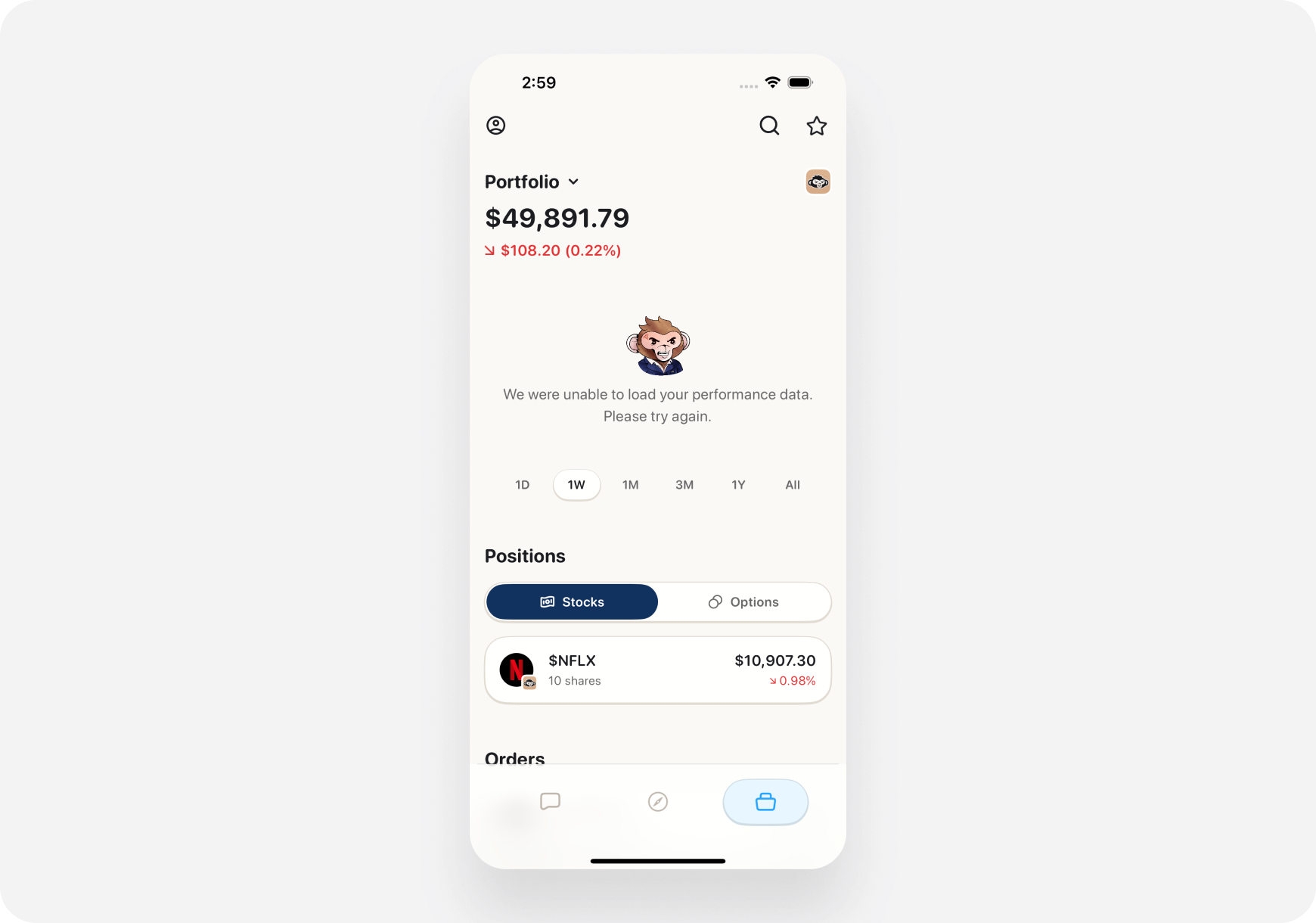
**1. Go to Portfolio Tab**
* Bottom navigation → Portfolio
* Scroll down past summary cards
* See "Your Positions" section
**2. Each Position Shows:**
* Ticker & company name
* Shares owned
* Current price & today's change
* Your profit/loss (\$ and %)
* AI grade badge
 ***
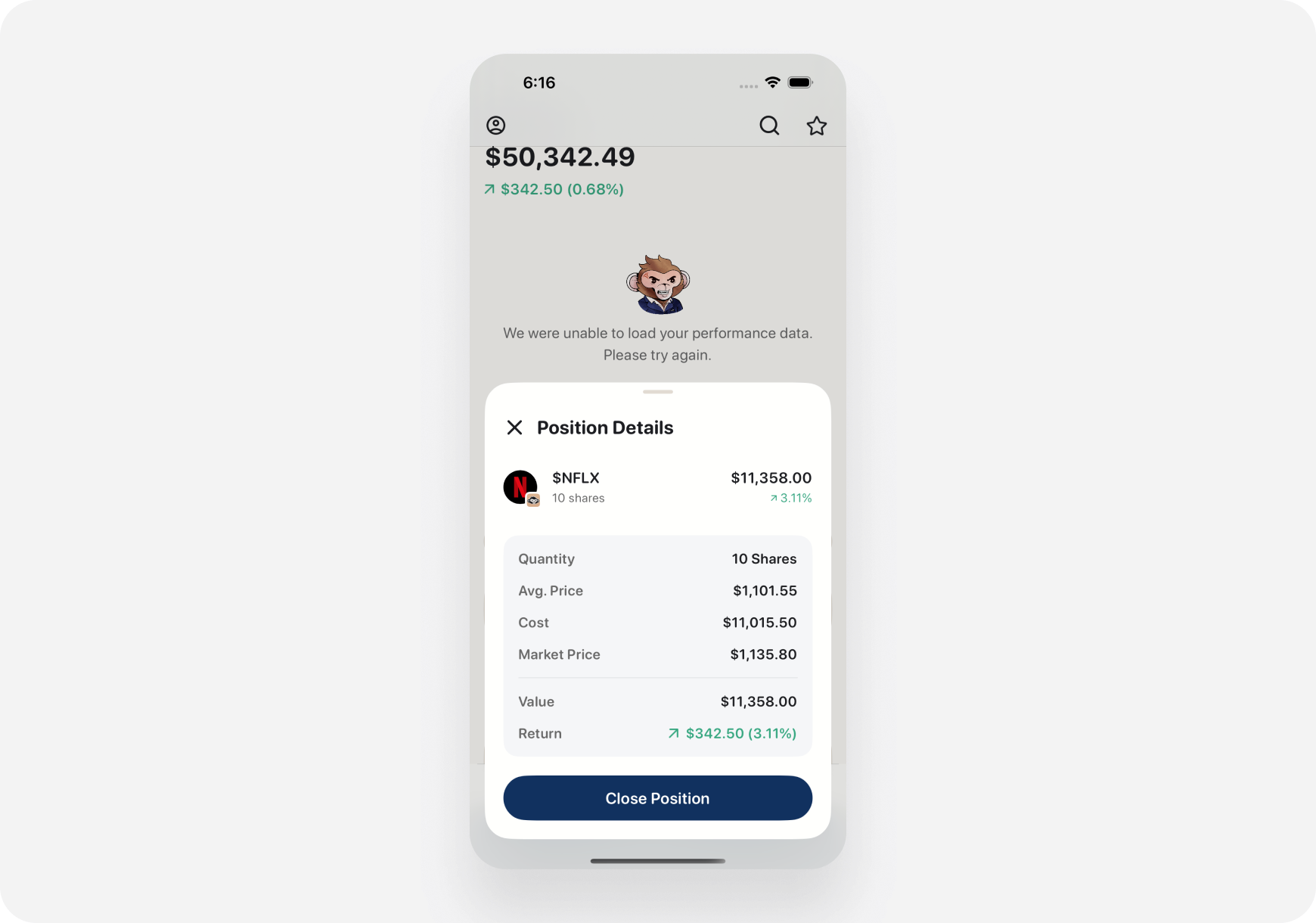
**3. Tap a Position for Details:**
* Full ticker page opens
* See complete analysis
* Company info
* AI insights
* Bulls vs Bears
* Performance charts
***
**3. Tap a Position for Details:**
* Full ticker page opens
* See complete analysis
* Company info
* AI insights
* Bulls vs Bears
* Performance charts
 ***
### Web
**1. Portfolio Page**
* Left sidebar → Portfolio
* Positions listed below summary
**2. More Detail on Web:**
* Wider screen = more info visible
* Multiple columns:
* Symbol
* Shares
* Avg Cost
* Current Price
* Day Change
* Total P\&L
* AI Grade
***
**3. Click Position:**
* Ticker page opens in main area
* Keep portfolio visible in sidebar
* Easy to compare multiple positions
***
## 📈 Position Details
### What Each Field Means
**Ticker Symbol**
* Stock abbreviation (TSLA, AAPL, NVDA)
* Tap/click to view full company page
**Shares/Contracts**
* How many you own
* For options: Number of contracts
**Average Cost**
* What you paid per share (average if multiple buys)
* Cost Basis = Avg Cost × Shares
**Current Price**
* Real-time market price
* Updates every few seconds
**Market Value**
* Current Price × Shares
* What you could sell for right now
**Day Change**
* How much stock moved today
* \$ change and % change
**Total Return**
* Profit or loss on this position
* (Current Value - Cost Basis)
* Shown in \$ and %
**Snapshot Grade**
* AI's A-F rating
* Quick health check
* A = Strong, F = Weak
***
## 🎯 Position Status Indicators
### Color Coding
**🟢 Green**
* Position is profitable
* Current price > Your cost
* Unrealized gain
**🔴 Red**
* Position is losing
* Current price \< Your cost
* Unrealized loss
**⚪ White/Gray**
* Break-even
* Current price ≈ Your cost
***
### Icons & Badges
**📈 Up Arrow**
* Stock up today
* Momentum positive
**📉 Down Arrow**
* Stock down today
* Momentum negative
**⚠️ Warning Icon**
* Risk alert
* Earnings soon
* News event
* High volatility
**💎 Diamond Icon**
* High-conviction pick
* AI rates highly
* Strong fundamentals
**⏰ Clock Icon**
* Options expiring soon
* Time-sensitive position
***
## 📊 Sorting & Filtering Positions
### Sort Options
**📱 iOS: Tap sort icon (top right)** **🌐 Web: Click column headers**
**Sort by:**
1. **% Gain** - Biggest winners first
2. **% Loss** - Biggest losers first
3. **Value** - Largest positions first
4. **Day Change** - Today's movers
5. **AI Grade** - Best grades first
6. **Alphabetical** - A to Z
**Example use cases:**
* Sort by % Gain → See your wins, consider profit-taking
* Sort by % Loss → See your losers, consider cutting
* Sort by AI Grade → See which holdings are strongest
***
### Filter Options
**Show/Hide:**
* **All Positions** - Everything
* **Stocks Only** - No options
* **Options Only** - No stocks
* **Profitable** - Green positions only
* **Losing** - Red positions only
* **Today's Movers** - Stocks with >2% change today
**By Account:**
* All accounts
* Specific brokerage (Robinhood, Webull, etc.)
* Paper trading only
***
## 💡 Managing Positions
### 1. Setting Exit Targets
**For each position, track:**
**Profit Target 🎯**
* Where you'll sell for gains
* Example: Bought TSLA at $450, target $500 (+11%)
**Stop Loss 🛑**
* Where you'll bail if wrong
* Example: Bought at $450, stop at $430 (-4.4%)
**How to set in Ape AI:**
1. Tap/click position
2. Go to ticker page
3. Set price alerts at your targets
4. Get notified when hit
***
### 2. Risk Management
**Position Size Check**
* Don't let any single stock be >20% of portfolio
* Ape AI shows % of portfolio for each holding
* AI alerts if you're too concentrated
**Example:**
> ⚠️ **Warning:** TSLA is now 35% of your portfolio. Consider trimming to reduce risk.
***
### 3. Reviewing Underperformers
**Weekly task:**
1. Sort by % Loss
2. Review bottom 3 positions
3. Ask yourself:
* Is my thesis still valid?
* Has anything changed?
* Should I cut losses?
**Portfolio AI:** "Should I hold or sell \[TICKER]?"
***
### 4. Profit Taking
**When a position is up big:**
1. Sort by % Gain
2. See top performers
3. Consider taking partial profits
4. "Nobody went broke taking profits"
**Example:**
* NVDA up 50% since purchase
* Sell half, lock in gains
* Let the rest ride
**Ask AI:** "NVDA is up 50%. Should I take profits?"
***
## 🤖 AI-Powered Position Insights
### Automatic Position Analysis
**AI watches your positions and alerts:**
**🚨 Risk Alerts**
> "AMD has earnings tomorrow. High volatility expected. Consider closing or hedging."
**💰 Profit Opportunities**
> "AAPL up 20% since your purchase. This is a good exit point based on historical patterns."
**⚠️ Deteriorating Fundamentals**
> "TSLA's Snapshot Grade dropped from A to C. Negative news and sentiment decline. Review position."
**📊 Rebalancing Suggestions**
> "Tech is 55% of your portfolio. Consider trimming to reduce concentration risk."
***
### Ask Portfolio AI About Positions
**Portfolio AI can answer:**
* "What's my best performing position?"
* "Which stock should I sell first?"
* "Is my TSLA position too large?"
* "Show me all losing positions"
* "Which holdings have earnings soon?"
[Learn more →](ask-maverick/)
***
## 📉 Options Positions
### Options Show Additional Info
**Beyond stock position data:**
* **Strike Price** - The contract strike
* **Expiration Date** - When it expires
* **Type** - Call or Put
* **Contracts** - How many
* **Premium Paid** - What you paid
* **Current Value** - What it's worth now
* **IV** (Implied Volatility) - Current IV
* **Greeks** - Delta, Theta, Gamma, Vega
***
### Options Expiration Tracking
**Time-sensitive alerts:**
**30 Days Out:**
> "Your AMD \$180 calls expire in 30 days. Monitor closely."
**7 Days Out:**
> "⚠️ TSLA \$470 calls expire in 7 days. Decision time: Hold, sell, or roll?"
**1 Day Out:**
> "🚨 AMD calls expire tomorrow! Current value \$350. Close today or let expire."
**Options require active management. Don't forget!**
***
## 📊 Position Performance Tracking
### Individual Position Charts
**Tap/click any position to see:**
**1. Your Entry vs Current**
* Line showing your cost basis
* Current price line
* Profit zone (green) or loss zone (red)
**2. Position P\&L Over Time**
* How your unrealized P\&L changed
* Day by day since purchase
**3. Stock Price Chart**
* Full technical chart
* Your entry point marked
* Resistance/support levels
***
### Trade Journal (Coming Soon)
**Track why you made trades:**
* Entry reason (thesis)
* Target price
* Stop loss
* Actual results
* Lessons learned
**Feature in development!**
***
## 💡 Pro Tips
### 1. Review Positions Sunday Evening
**Weekly routine:**
* Sort by % Gain → Celebrate wins
* Sort by % Loss → Review losers
* Check AI grades → See health
* Plan next week's moves
**15 minutes = stay on top of portfolio**
***
### 2. Use the 20% Rule
**Position sizing:**
* No single stock >20% of portfolio
* Reduces risk
* Forces diversification
* Sleep better at night
**If a stock grows to 25%:**
* Trim it back to 15-20%
* Take profits
* Rebalance
***
### 3. Set Alerts for Every Position
**When you buy:**
1. Set price alert at profit target
2. Set price alert at stop loss
3. Get notified when time to act
**Don't rely on memory. Let alerts work for you.**
***
### 4. Track Cost Basis for Taxes
**Important for tax time:**
* Cost basis = what you paid
* Determines capital gains
* Short-term vs long-term
**Ape AI tracks this automatically from your broker.**
***
### 5. Trim Winners, Cut Losers
**Winning position up 50%?**
* Take partial profits
* Lock in gains
* Reduce risk
**Losing position down 20%?**
* Re-evaluate thesis
* If broken, cut loss
* Don't hope it comes back
**"Cut losses short, let winners run"**
***
## 🎭 Position Management by Companion
### Blitz (Day Trader) 🚀
**Focus:**
* Intraday P\&L per position
* Close all positions by EOD
* Quick profit/loss recognition
* Move fast
**Position tracking:**
* Real-time updates critical
* Watch minute-by-minute
* Set tight stops
* Take quick profits
***
### Maverick (Momentum Trader) 📈
**Focus:**
* Multi-day position management
* Entry, target, stop clearly defined
* Hold 3-10 days average
* Momentum-based exits
**Position tracking:**
* Check 2-3 times daily
* Monitor swing targets
* Patient profit-taking
* Give trades room to breathe
***
### Sage (Long-Term) 🏦
**Focus:**
* Buy and hold quality
* Positions held months/years
* Dividend reinvestment
* Fundamental strength
**Position tracking:**
* Weekly check-ins sufficient
* Focus on business fundamentals
* Ignore day-to-day noise
* Long-term compound growth
***
## ❓ FAQ
**Q: How often do positions update?** A: Real-time during market hours (every few seconds).
**Q: Can I manually add a position?** A: No. Positions sync from connected brokerages. Use Ape Paper Trading for paper positions.
**Q: What if I buy more shares of a stock I own?** A: Position updates automatically. Average cost recalculates.
**Q: Do closed positions show up?** A: No. Once sold, they move to order history. Portfolio shows only open positions.
**Q: Can I see my position history?** A: Yes! Go to Settings → Order History to see all past trades.
**Q: Why is my profit/loss different from my broker?** A: Possible reasons:
* Broker includes fees, Ape AI may not
* Dividend reinvestment timing
* Cost basis calculation method (FIFO vs LIFO)
* Usually close, minor differences normal
***
## What's Next?
**Improve Position Management:**
* [Portfolio AI→](/features/portfolio/ask-maverick) - Get AI advice on positions
* [AI Analysis Tools →](/features/portfolio/ai-tools) - Advanced portfolio analysis
**Learn Workflows:**
* [Portfolio Health Check →](/features/portfolio/ask-maverick) - Review your positions
**Understand Stocks:**
* [Ticker Page Overview →](../Ticker/overview) - Deep dive on holdings
* [AI Snapshot Grades →](../Ticker/snapshot-grades) - How AI grades stocks
***
**Track Your Positions. Manage Your Risk. Grow Your Wealth! 📈🚀**
***
### Web
**1. Portfolio Page**
* Left sidebar → Portfolio
* Positions listed below summary
**2. More Detail on Web:**
* Wider screen = more info visible
* Multiple columns:
* Symbol
* Shares
* Avg Cost
* Current Price
* Day Change
* Total P\&L
* AI Grade
***
**3. Click Position:**
* Ticker page opens in main area
* Keep portfolio visible in sidebar
* Easy to compare multiple positions
***
## 📈 Position Details
### What Each Field Means
**Ticker Symbol**
* Stock abbreviation (TSLA, AAPL, NVDA)
* Tap/click to view full company page
**Shares/Contracts**
* How many you own
* For options: Number of contracts
**Average Cost**
* What you paid per share (average if multiple buys)
* Cost Basis = Avg Cost × Shares
**Current Price**
* Real-time market price
* Updates every few seconds
**Market Value**
* Current Price × Shares
* What you could sell for right now
**Day Change**
* How much stock moved today
* \$ change and % change
**Total Return**
* Profit or loss on this position
* (Current Value - Cost Basis)
* Shown in \$ and %
**Snapshot Grade**
* AI's A-F rating
* Quick health check
* A = Strong, F = Weak
***
## 🎯 Position Status Indicators
### Color Coding
**🟢 Green**
* Position is profitable
* Current price > Your cost
* Unrealized gain
**🔴 Red**
* Position is losing
* Current price \< Your cost
* Unrealized loss
**⚪ White/Gray**
* Break-even
* Current price ≈ Your cost
***
### Icons & Badges
**📈 Up Arrow**
* Stock up today
* Momentum positive
**📉 Down Arrow**
* Stock down today
* Momentum negative
**⚠️ Warning Icon**
* Risk alert
* Earnings soon
* News event
* High volatility
**💎 Diamond Icon**
* High-conviction pick
* AI rates highly
* Strong fundamentals
**⏰ Clock Icon**
* Options expiring soon
* Time-sensitive position
***
## 📊 Sorting & Filtering Positions
### Sort Options
**📱 iOS: Tap sort icon (top right)** **🌐 Web: Click column headers**
**Sort by:**
1. **% Gain** - Biggest winners first
2. **% Loss** - Biggest losers first
3. **Value** - Largest positions first
4. **Day Change** - Today's movers
5. **AI Grade** - Best grades first
6. **Alphabetical** - A to Z
**Example use cases:**
* Sort by % Gain → See your wins, consider profit-taking
* Sort by % Loss → See your losers, consider cutting
* Sort by AI Grade → See which holdings are strongest
***
### Filter Options
**Show/Hide:**
* **All Positions** - Everything
* **Stocks Only** - No options
* **Options Only** - No stocks
* **Profitable** - Green positions only
* **Losing** - Red positions only
* **Today's Movers** - Stocks with >2% change today
**By Account:**
* All accounts
* Specific brokerage (Robinhood, Webull, etc.)
* Paper trading only
***
## 💡 Managing Positions
### 1. Setting Exit Targets
**For each position, track:**
**Profit Target 🎯**
* Where you'll sell for gains
* Example: Bought TSLA at $450, target $500 (+11%)
**Stop Loss 🛑**
* Where you'll bail if wrong
* Example: Bought at $450, stop at $430 (-4.4%)
**How to set in Ape AI:**
1. Tap/click position
2. Go to ticker page
3. Set price alerts at your targets
4. Get notified when hit
***
### 2. Risk Management
**Position Size Check**
* Don't let any single stock be >20% of portfolio
* Ape AI shows % of portfolio for each holding
* AI alerts if you're too concentrated
**Example:**
> ⚠️ **Warning:** TSLA is now 35% of your portfolio. Consider trimming to reduce risk.
***
### 3. Reviewing Underperformers
**Weekly task:**
1. Sort by % Loss
2. Review bottom 3 positions
3. Ask yourself:
* Is my thesis still valid?
* Has anything changed?
* Should I cut losses?
**Portfolio AI:** "Should I hold or sell \[TICKER]?"
***
### 4. Profit Taking
**When a position is up big:**
1. Sort by % Gain
2. See top performers
3. Consider taking partial profits
4. "Nobody went broke taking profits"
**Example:**
* NVDA up 50% since purchase
* Sell half, lock in gains
* Let the rest ride
**Ask AI:** "NVDA is up 50%. Should I take profits?"
***
## 🤖 AI-Powered Position Insights
### Automatic Position Analysis
**AI watches your positions and alerts:**
**🚨 Risk Alerts**
> "AMD has earnings tomorrow. High volatility expected. Consider closing or hedging."
**💰 Profit Opportunities**
> "AAPL up 20% since your purchase. This is a good exit point based on historical patterns."
**⚠️ Deteriorating Fundamentals**
> "TSLA's Snapshot Grade dropped from A to C. Negative news and sentiment decline. Review position."
**📊 Rebalancing Suggestions**
> "Tech is 55% of your portfolio. Consider trimming to reduce concentration risk."
***
### Ask Portfolio AI About Positions
**Portfolio AI can answer:**
* "What's my best performing position?"
* "Which stock should I sell first?"
* "Is my TSLA position too large?"
* "Show me all losing positions"
* "Which holdings have earnings soon?"
[Learn more →](ask-maverick/)
***
## 📉 Options Positions
### Options Show Additional Info
**Beyond stock position data:**
* **Strike Price** - The contract strike
* **Expiration Date** - When it expires
* **Type** - Call or Put
* **Contracts** - How many
* **Premium Paid** - What you paid
* **Current Value** - What it's worth now
* **IV** (Implied Volatility) - Current IV
* **Greeks** - Delta, Theta, Gamma, Vega
***
### Options Expiration Tracking
**Time-sensitive alerts:**
**30 Days Out:**
> "Your AMD \$180 calls expire in 30 days. Monitor closely."
**7 Days Out:**
> "⚠️ TSLA \$470 calls expire in 7 days. Decision time: Hold, sell, or roll?"
**1 Day Out:**
> "🚨 AMD calls expire tomorrow! Current value \$350. Close today or let expire."
**Options require active management. Don't forget!**
***
## 📊 Position Performance Tracking
### Individual Position Charts
**Tap/click any position to see:**
**1. Your Entry vs Current**
* Line showing your cost basis
* Current price line
* Profit zone (green) or loss zone (red)
**2. Position P\&L Over Time**
* How your unrealized P\&L changed
* Day by day since purchase
**3. Stock Price Chart**
* Full technical chart
* Your entry point marked
* Resistance/support levels
***
### Trade Journal (Coming Soon)
**Track why you made trades:**
* Entry reason (thesis)
* Target price
* Stop loss
* Actual results
* Lessons learned
**Feature in development!**
***
## 💡 Pro Tips
### 1. Review Positions Sunday Evening
**Weekly routine:**
* Sort by % Gain → Celebrate wins
* Sort by % Loss → Review losers
* Check AI grades → See health
* Plan next week's moves
**15 minutes = stay on top of portfolio**
***
### 2. Use the 20% Rule
**Position sizing:**
* No single stock >20% of portfolio
* Reduces risk
* Forces diversification
* Sleep better at night
**If a stock grows to 25%:**
* Trim it back to 15-20%
* Take profits
* Rebalance
***
### 3. Set Alerts for Every Position
**When you buy:**
1. Set price alert at profit target
2. Set price alert at stop loss
3. Get notified when time to act
**Don't rely on memory. Let alerts work for you.**
***
### 4. Track Cost Basis for Taxes
**Important for tax time:**
* Cost basis = what you paid
* Determines capital gains
* Short-term vs long-term
**Ape AI tracks this automatically from your broker.**
***
### 5. Trim Winners, Cut Losers
**Winning position up 50%?**
* Take partial profits
* Lock in gains
* Reduce risk
**Losing position down 20%?**
* Re-evaluate thesis
* If broken, cut loss
* Don't hope it comes back
**"Cut losses short, let winners run"**
***
## 🎭 Position Management by Companion
### Blitz (Day Trader) 🚀
**Focus:**
* Intraday P\&L per position
* Close all positions by EOD
* Quick profit/loss recognition
* Move fast
**Position tracking:**
* Real-time updates critical
* Watch minute-by-minute
* Set tight stops
* Take quick profits
***
### Maverick (Momentum Trader) 📈
**Focus:**
* Multi-day position management
* Entry, target, stop clearly defined
* Hold 3-10 days average
* Momentum-based exits
**Position tracking:**
* Check 2-3 times daily
* Monitor swing targets
* Patient profit-taking
* Give trades room to breathe
***
### Sage (Long-Term) 🏦
**Focus:**
* Buy and hold quality
* Positions held months/years
* Dividend reinvestment
* Fundamental strength
**Position tracking:**
* Weekly check-ins sufficient
* Focus on business fundamentals
* Ignore day-to-day noise
* Long-term compound growth
***
## ❓ FAQ
**Q: How often do positions update?** A: Real-time during market hours (every few seconds).
**Q: Can I manually add a position?** A: No. Positions sync from connected brokerages. Use Ape Paper Trading for paper positions.
**Q: What if I buy more shares of a stock I own?** A: Position updates automatically. Average cost recalculates.
**Q: Do closed positions show up?** A: No. Once sold, they move to order history. Portfolio shows only open positions.
**Q: Can I see my position history?** A: Yes! Go to Settings → Order History to see all past trades.
**Q: Why is my profit/loss different from my broker?** A: Possible reasons:
* Broker includes fees, Ape AI may not
* Dividend reinvestment timing
* Cost basis calculation method (FIFO vs LIFO)
* Usually close, minor differences normal
***
## What's Next?
**Improve Position Management:**
* [Portfolio AI→](/features/portfolio/ask-maverick) - Get AI advice on positions
* [AI Analysis Tools →](/features/portfolio/ai-tools) - Advanced portfolio analysis
**Learn Workflows:**
* [Portfolio Health Check →](/features/portfolio/ask-maverick) - Review your positions
**Understand Stocks:**
* [Ticker Page Overview →](../Ticker/overview) - Deep dive on holdings
* [AI Snapshot Grades →](../Ticker/snapshot-grades) - How AI grades stocks
***
**Track Your Positions. Manage Your Risk. Grow Your Wealth! 📈🚀**