> ## Documentation Index
> Fetch the complete documentation index at: https://guide.askape.com/llms.txt
> Use this file to discover all available pages before exploring further.
# Personalized News
Breaking financial news filtered for what actually matters to YOU.
**⏱️ Time to read:** 4 minutes **📱🌐 Platform:** Both iOS & Web **👤 Best for:** Everyone
***
## 📰 What is Personalized News?
**Personalized News** shows you real-time financial news about stocks and topics you care about.
**Not just any news. YOUR news.**
**What makes it personalized:**
* Stocks in your portfolio
* Stocks you search/view
* Themes you create
* Your trading style (companion)
* Market sectors you follow
**You won't see:**
* Random stocks you don't care about
* Irrelevant market noise
* Clickbait headlines
* Off-topic content
**Only signal. No noise.**
***
## 📱 Where to Find News
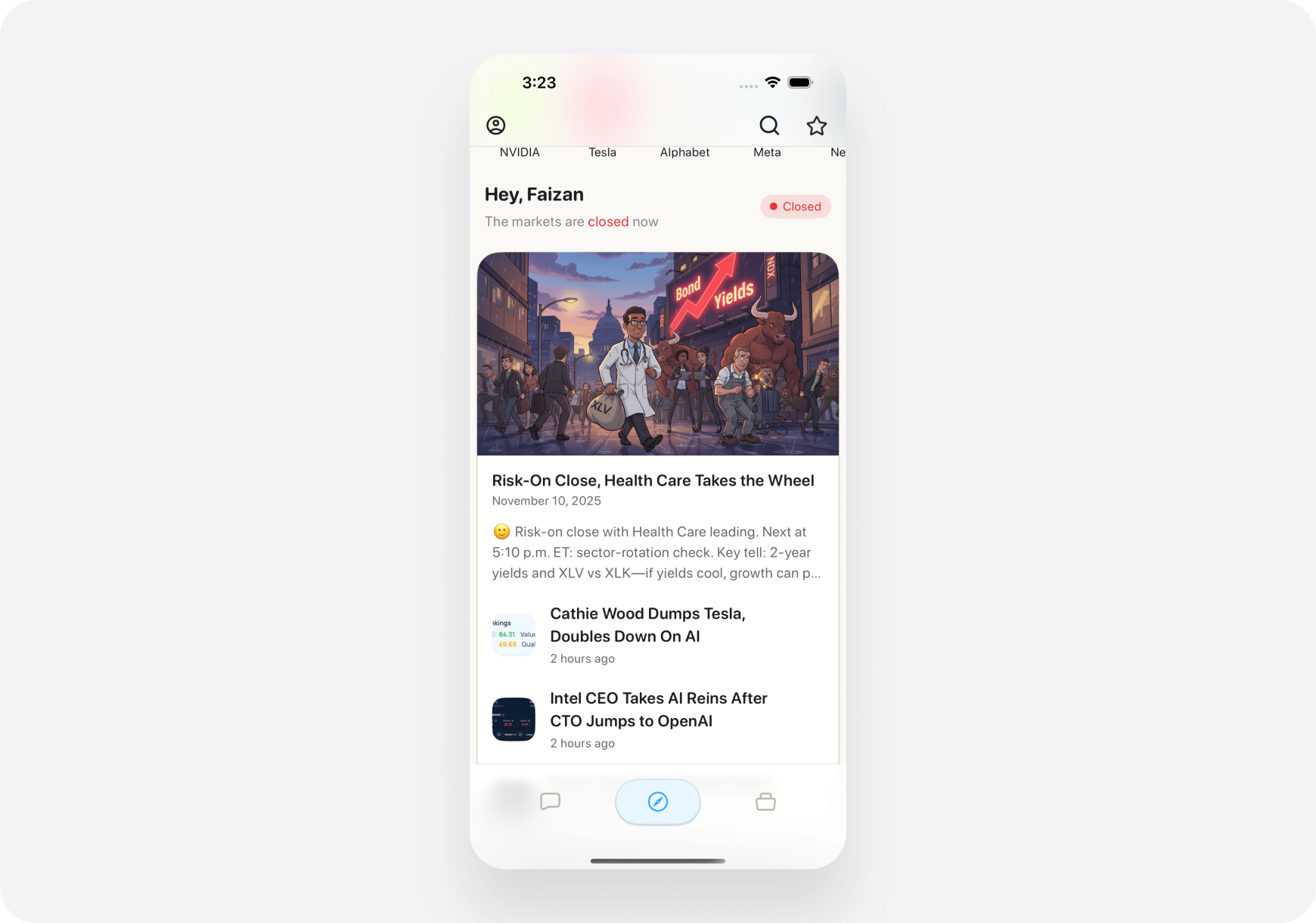
### iOS
1. Open **Discover tab** (bottom middle)
2. Scroll past the carousel
3. See **News Feed** section
4. Scroll to read more
 ***
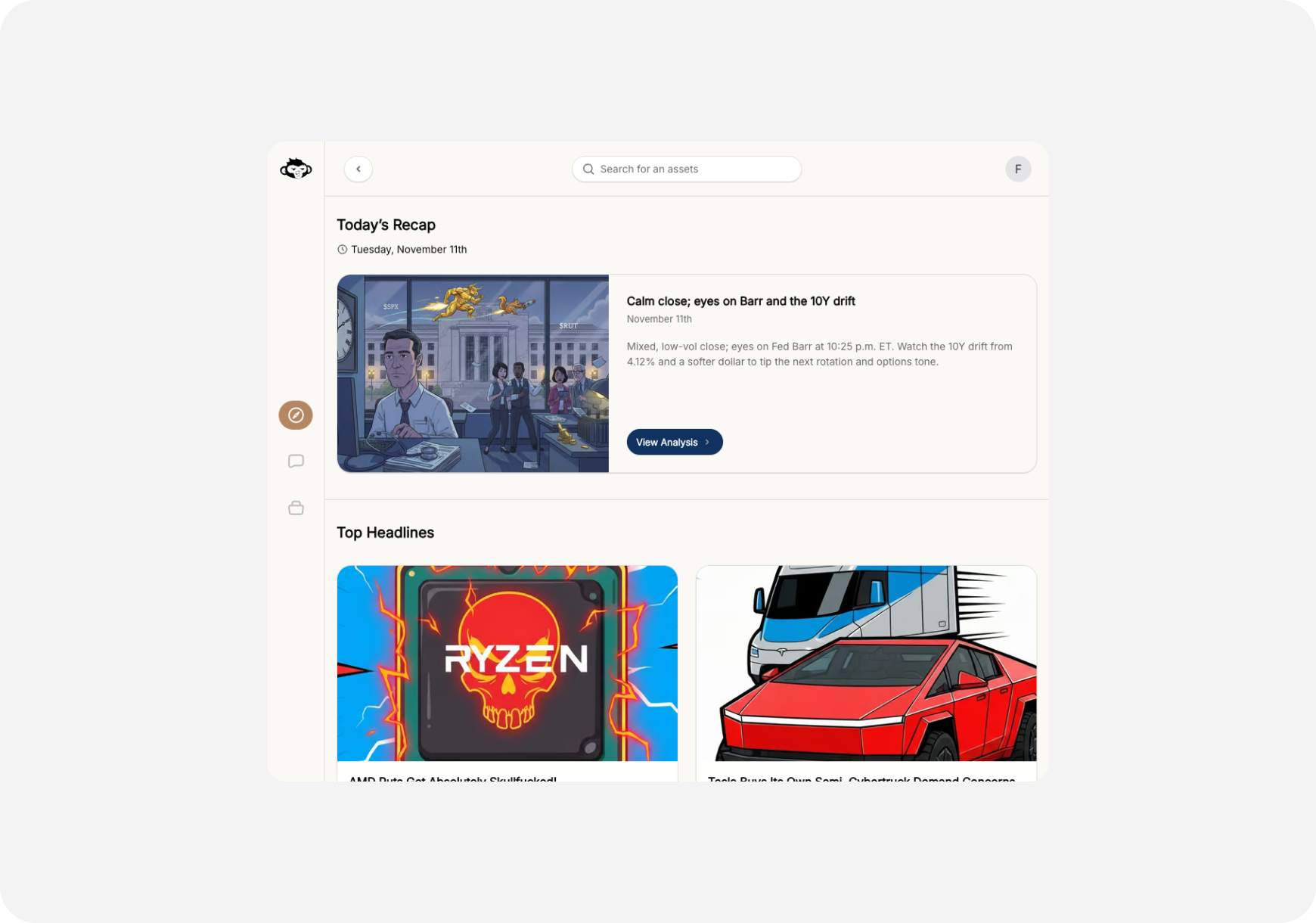
### Web
1. Go to **Home** page (dashboard)
2. Main feed shows news mixed with other content
3. Or click **News** filter at top to see only news
***
### Web
1. Go to **Home** page (dashboard)
2. Main feed shows news mixed with other content
3. Or click **News** filter at top to see only news
 ***
## 🎯 Types of News You'll See
### 1. Earnings Announcements 📊
**When a company reports quarterly earnings**
**What you'll see:**
* Company ticker
* Beat or miss (vs expectations)
* Revenue & EPS numbers
* Stock reaction (pre/post market)
* Key highlights
**Example Card:**
> **NVDA Earnings Beat 🚀** Revenue: $18.1B (expected $16.2B) - BEAT EPS: $4.02 vs $3.37 expected - BEAT Stock: +8% pre-market Key: Data center revenue up 112% YoY
***
### 2. Analyst Ratings 📈📉
**When analysts upgrade/downgrade stocks**
**What you'll see:**
* Analyst firm name
* Action (upgrade, downgrade, initiate)
* New rating & price target
* Previous rating
* Reasoning
**Example Card:**
> **Goldman Sachs Upgrades TSLA** Rating: Neutral → Buy Price Target: $500 (from $450) Reason: Strong delivery numbers, China growth Stock: +2.3%
***
### 3. Breaking Market News 🔥
**Major market-moving events**
**Types:**
* Fed announcements
* Economic data (jobs, inflation, GDP)
* Geopolitical events
* Sector-wide news
* Regulatory changes
**Example Card:**
> **Fed Holds Rates Steady 🏦** Decision: 5.25%-5.50% unchanged Powell: "Inflation still elevated"
* Market reaction: SPY -0.8%
> Impact: Growth stocks down, bonds up
***
### 4. Company-Specific News 🏢
**News about individual companies**
**Types:**
* Product launches
* FDA approvals
* Mergers & acquisitions
* Partnerships
* Management changes
* Legal/regulatory issues
**Example Card:**
> **Apple Announces Vision Pro Launch Date 🥽** Release: February 2, 2024 Price: \$3,499 Pre-orders start January 19 Analyst take: "Game changer for spatial computing" AAPL: +1.2%
***
### 5. Unusual Activity Alerts 🚨
**When something weird is happening**
**Types:**
* Unusual volume spikes
* Large options trades
* Insider buying/selling
* Short interest changes
* Halts/circuit breakers
**Example Card:**
> **GME Unusual Options Activity 🎯** Alert: 10x normal call volume Strikes: $30-$35 exp Friday Premium flow: \$15M+ into calls Possible catalyst: Earnings next week GME: +12% on the day
***
### 6. Sector News 🏭
**Industry-wide developments**
**Types:**
* Sector rotation
* Commodity price changes (oil, gold)
* Industry regulations
* Technology trends
* Economic sector shifts
**Example Card:**
> **Tech Sector Rally Continues 💻** QQQ: +2.1% this week Leaders: NVDA (+8%), AMD (+6%), MSFT (+4%) Driver: AI optimism, strong earnings Outlook: Momentum likely to continue
***
## 🎭 How News Changes by Companion
### Blitz (Day Trader) 🚀
**You see more:**
* Pre-market/after-hours movers
* Intraday catalysts
* Options flow alerts
* Technical breakout news
* High-volume spikes
**Example News Priority:**
> "TSLA breaking out: +5% on volume spike. Key level \$470 breached."
***
### Maverick (Momentum Trader) 📈
**You see more:**
* Earnings calendars
* Multi-day catalysts
* Analyst rating changes
* Trend-change news
* Momentum shifts
**Example News Priority:**
> "AMD upgraded by 3 analysts this week. Avg target: \$200. 10% upside."
***
### Sage (Long-Term) 🏦
**You see more:**
* Fundamental company news
* Long-term growth stories
* Dividend announcements
* Competitive moat news
* Management changes
**Example News Priority:**
> "MSFT raises dividend 10%. 21st consecutive year of increases. Dividend aristocrat status."
***
## 🔔 News Notifications
### Get Alerted to Important News
**📱 iOS: Push Notifications**
***
## 🎯 Types of News You'll See
### 1. Earnings Announcements 📊
**When a company reports quarterly earnings**
**What you'll see:**
* Company ticker
* Beat or miss (vs expectations)
* Revenue & EPS numbers
* Stock reaction (pre/post market)
* Key highlights
**Example Card:**
> **NVDA Earnings Beat 🚀** Revenue: $18.1B (expected $16.2B) - BEAT EPS: $4.02 vs $3.37 expected - BEAT Stock: +8% pre-market Key: Data center revenue up 112% YoY
***
### 2. Analyst Ratings 📈📉
**When analysts upgrade/downgrade stocks**
**What you'll see:**
* Analyst firm name
* Action (upgrade, downgrade, initiate)
* New rating & price target
* Previous rating
* Reasoning
**Example Card:**
> **Goldman Sachs Upgrades TSLA** Rating: Neutral → Buy Price Target: $500 (from $450) Reason: Strong delivery numbers, China growth Stock: +2.3%
***
### 3. Breaking Market News 🔥
**Major market-moving events**
**Types:**
* Fed announcements
* Economic data (jobs, inflation, GDP)
* Geopolitical events
* Sector-wide news
* Regulatory changes
**Example Card:**
> **Fed Holds Rates Steady 🏦** Decision: 5.25%-5.50% unchanged Powell: "Inflation still elevated"
* Market reaction: SPY -0.8%
> Impact: Growth stocks down, bonds up
***
### 4. Company-Specific News 🏢
**News about individual companies**
**Types:**
* Product launches
* FDA approvals
* Mergers & acquisitions
* Partnerships
* Management changes
* Legal/regulatory issues
**Example Card:**
> **Apple Announces Vision Pro Launch Date 🥽** Release: February 2, 2024 Price: \$3,499 Pre-orders start January 19 Analyst take: "Game changer for spatial computing" AAPL: +1.2%
***
### 5. Unusual Activity Alerts 🚨
**When something weird is happening**
**Types:**
* Unusual volume spikes
* Large options trades
* Insider buying/selling
* Short interest changes
* Halts/circuit breakers
**Example Card:**
> **GME Unusual Options Activity 🎯** Alert: 10x normal call volume Strikes: $30-$35 exp Friday Premium flow: \$15M+ into calls Possible catalyst: Earnings next week GME: +12% on the day
***
### 6. Sector News 🏭
**Industry-wide developments**
**Types:**
* Sector rotation
* Commodity price changes (oil, gold)
* Industry regulations
* Technology trends
* Economic sector shifts
**Example Card:**
> **Tech Sector Rally Continues 💻** QQQ: +2.1% this week Leaders: NVDA (+8%), AMD (+6%), MSFT (+4%) Driver: AI optimism, strong earnings Outlook: Momentum likely to continue
***
## 🎭 How News Changes by Companion
### Blitz (Day Trader) 🚀
**You see more:**
* Pre-market/after-hours movers
* Intraday catalysts
* Options flow alerts
* Technical breakout news
* High-volume spikes
**Example News Priority:**
> "TSLA breaking out: +5% on volume spike. Key level \$470 breached."
***
### Maverick (Momentum Trader) 📈
**You see more:**
* Earnings calendars
* Multi-day catalysts
* Analyst rating changes
* Trend-change news
* Momentum shifts
**Example News Priority:**
> "AMD upgraded by 3 analysts this week. Avg target: \$200. 10% upside."
***
### Sage (Long-Term) 🏦
**You see more:**
* Fundamental company news
* Long-term growth stories
* Dividend announcements
* Competitive moat news
* Management changes
**Example News Priority:**
> "MSFT raises dividend 10%. 21st consecutive year of increases. Dividend aristocrat status."
***
## 🔔 News Notifications
### Get Alerted to Important News
**📱 iOS: Push Notifications**
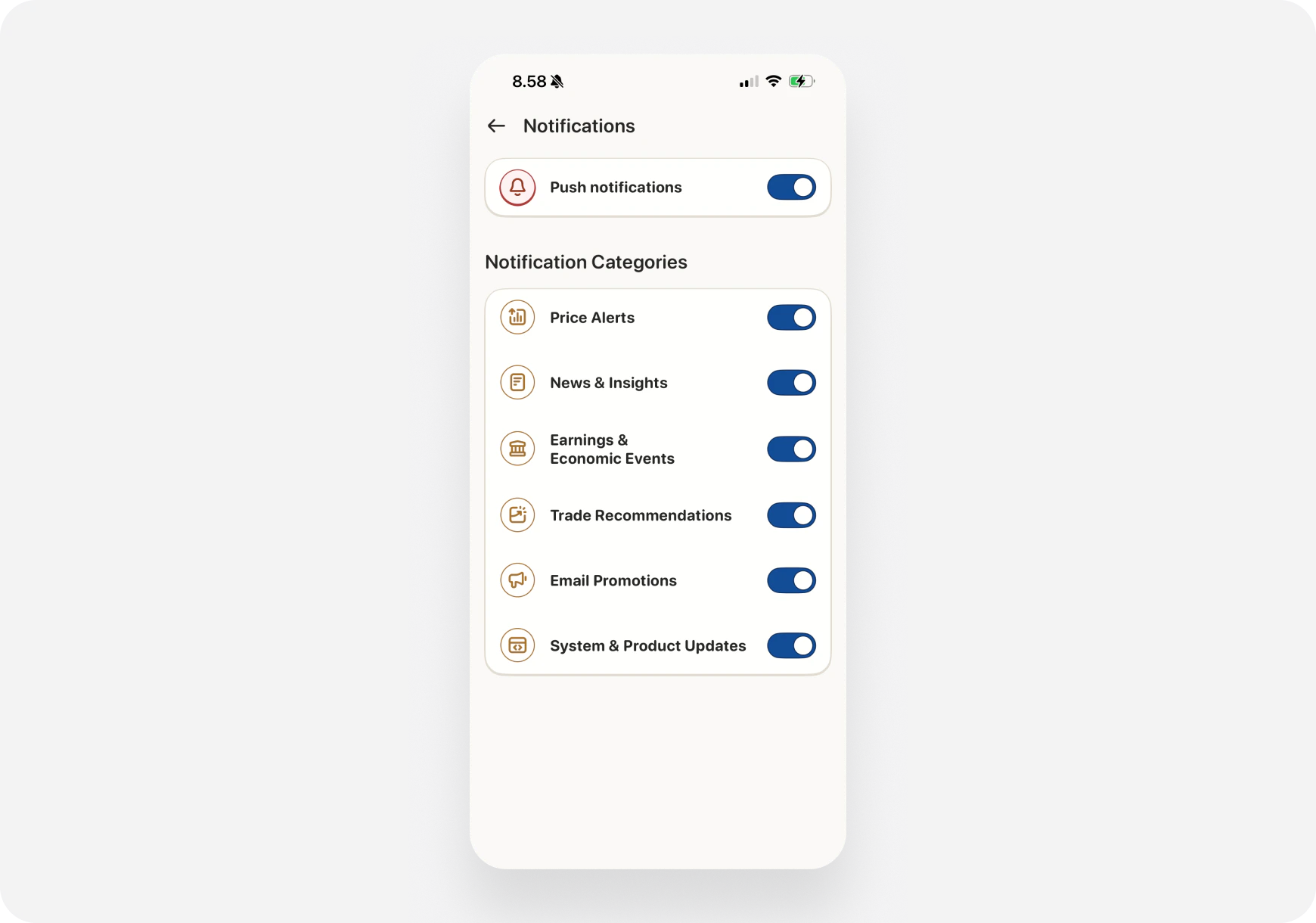 **Set up:**
1. Profile → Settings
2. Notifications
3. Toggle **"Push Notifications"** ON
4. Choose:
* Price Alerts
* News & Insights
* Earnings & Economic Events
**You'll get notified for:**
* Earnings announcements (your stocks)
* Major price moves (+/- 5%+)
* Analyst upgrades/downgrades
* Breaking market news
***
**🌐 Web: Browser Notifications**
**Set up:**
1. Profile → Settings
2. Notifications
3. Enable **"Browser Notifications"**
4. Allow in browser popup
**Notified when:**
* Tab is closed
* You're on another site
* Important news breaks
***
## 💡 How to Use News Effectively
### 1. Morning News Scan (3 minutes)
**Routine:**
1. Open Feed/Discover
2. Check **Breaking News** section
3. Scan headlines
4. Tap any relevant ones
5. Read full articles if interesting
**Look for:**
* Overnight news affecting your portfolio
* Pre-market movers with catalysts
* Sector trends
* Economic data releases
**Don't:**
* Read every single article
* Spend hours scrolling
* React to every headline
***
### 2. News → AI → Decision
**When you see interesting news:**
**Step 1: Read the headline**
> "TSLA Announces Cybertruck Delivery Event"
**Step 2: Ask AI about it** Go to Chat tab, ask:
* "What does the Cybertruck news mean for TSLA stock?"
* "Should I buy TSLA before the delivery event?"
* "What's the risk if Cybertruck disappoints?"
**Step 3: Get AI analysis**
> AI: "TSLA Cybertruck event is priced in. Stock up 15% this month on hype. Risk/reward not great here. Wait for post-event dip if you want entry."
**Step 4: Make informed decision**
**News → Context → Smart decision**
***
### 3. Filter Noise from Signal
**Not every headline matters.**
**Ask yourself:**
1. **Does this affect my portfolio?** If no, skip.
2. **Is this actionable?** If no, skip.
3. **Is this time-sensitive?** If no, save for later.
4. **Does this change my thesis?** If no, skip.
**You'll save hours filtering this way.**
***
## 🔍 Deep Dive on Any News
### Tap a News Card to:
**1. Read Full Article**
* Complete story
* Source link
* Publication date
* Related tickers
**2. See Related Stocks**
* Tickers mentioned in article
* Tap to go to ticker page
* See how they're reacting
**3. Ask AI About It**
* "Explain this news" button
* Get AI's take
* Understand implications
* Trading ideas based on news
**4. Share with Friends**
* Copy link
* Share to Twitter
* Send to Discord/Telegram
* Text to friends
***
## ⚙️ Customize Your News Feed
### What You Can Control:
**📱 iOS: Discover → ⚙️ Settings** **🌐 Web: Home → Customize Feed**
**Options:**
1. **News Sources**
* Bloomberg
* CNBC
* Financial Times
* MarketWatch
* Benzinga
* All sources
2. **Stock Focus**
* Portfolio holdings only
* Watchlist stocks
* Trending stocks
* Custom themes
* All personalized
3. **News Frequency**
* High: Every article
* Medium: Important news
* Low: Major events only
4. **Content Types**
* Earnings ✅
* Analyst ratings ✅
* Market news ✅
* Company news ✅
* Unusual activity ✅
***
## 📊 News Sources
### Where Ape AI Gets News:
**Premium Sources:**
* Bloomberg
* Financial Times
* Reuters
* Dow Jones
**Mainstream Financial:**
* CNBC
* MarketWatch
* Yahoo Finance
* Barron's
**Real-Time Data:**
* Benzinga
* PR Newswire
* SEC Filings (8-K, 10-Q)
**Social Intelligence:**
* Reddit r/WallStreetBets
* Twitter trending
* StockTwits sentiment
**All sources are aggregated, filtered, and personalized to you.**
***
## 💡 Pro Tips
### 1. Create a News Routine
**Morning (5 min):**
* Check overnight news
* Read earnings announcements
* Scan for catalysts
**Mid-day (2 min):**
* Quick scroll during lunch
* Check for breaking news
* Any portfolio alerts?
**Evening (3 min):**
* After-hours earnings
* Tomorrow's catalysts
* Prep for next day
### 2. Set Price Alerts + News Together
**Powerful combo:**
* Set price alert for \$100
* Get news notification when stock hits \$100
* See if news caused the move
* Make informed decision
### 3. Use News to Generate Trade Ideas
**Weekly routine:**
1. Review all news from past week
2. Identify trends (AI sector hot? Energy weak?)
3. Ask AI: "Based on this week's news, what are good swing trades?"
4. AI uses recent news context to suggest setups
### 4. Follow Earnings Season Closely
**Earnings weeks are gold mines:**
* 4-6 weeks per year (quarterly)
* Huge moves after announcements
* Easy trading opportunities
* News feed lights up
**Don't miss earnings season!**
***
## ❓ FAQ
**Q: Is news real-time?** A: Yes! Updates within seconds of being published.
**Q: Can I see news for stocks not in my portfolio?** A: Yes! Search any ticker → View ticker page → News tab shows all news for that stock.
**Q: Why don't I see all financial news?** A: Personalized = filtered for relevance. You only see news about stocks you care about.
**Q: Can I change news sources?** A: Yes! Settings → News Sources → Select which sources you want.
**Q: Do I get news on weekends?** A: Yes, if there's significant news. But most news happens Mon-Fri market hours.
**Q: Can I save news articles?** A: Coming soon! Bookmark feature in development.
***
## What's Next?
**Explore More Feed Features:**
* [Feed Overview →](../../features/feed/) - What's in the Feed
* [Daily Summary →](/features/feed/daily-summary) - AI market recap
* [Banana Bites →](/features/feed/banana-bites) - Educational content
* [Trending Stocks →](/features/feed/trending) - What's hot
***
**Personalized News = Your Competitive Edge. Stay informed, trade smarter! 📰🚀**
**Set up:**
1. Profile → Settings
2. Notifications
3. Toggle **"Push Notifications"** ON
4. Choose:
* Price Alerts
* News & Insights
* Earnings & Economic Events
**You'll get notified for:**
* Earnings announcements (your stocks)
* Major price moves (+/- 5%+)
* Analyst upgrades/downgrades
* Breaking market news
***
**🌐 Web: Browser Notifications**
**Set up:**
1. Profile → Settings
2. Notifications
3. Enable **"Browser Notifications"**
4. Allow in browser popup
**Notified when:**
* Tab is closed
* You're on another site
* Important news breaks
***
## 💡 How to Use News Effectively
### 1. Morning News Scan (3 minutes)
**Routine:**
1. Open Feed/Discover
2. Check **Breaking News** section
3. Scan headlines
4. Tap any relevant ones
5. Read full articles if interesting
**Look for:**
* Overnight news affecting your portfolio
* Pre-market movers with catalysts
* Sector trends
* Economic data releases
**Don't:**
* Read every single article
* Spend hours scrolling
* React to every headline
***
### 2. News → AI → Decision
**When you see interesting news:**
**Step 1: Read the headline**
> "TSLA Announces Cybertruck Delivery Event"
**Step 2: Ask AI about it** Go to Chat tab, ask:
* "What does the Cybertruck news mean for TSLA stock?"
* "Should I buy TSLA before the delivery event?"
* "What's the risk if Cybertruck disappoints?"
**Step 3: Get AI analysis**
> AI: "TSLA Cybertruck event is priced in. Stock up 15% this month on hype. Risk/reward not great here. Wait for post-event dip if you want entry."
**Step 4: Make informed decision**
**News → Context → Smart decision**
***
### 3. Filter Noise from Signal
**Not every headline matters.**
**Ask yourself:**
1. **Does this affect my portfolio?** If no, skip.
2. **Is this actionable?** If no, skip.
3. **Is this time-sensitive?** If no, save for later.
4. **Does this change my thesis?** If no, skip.
**You'll save hours filtering this way.**
***
## 🔍 Deep Dive on Any News
### Tap a News Card to:
**1. Read Full Article**
* Complete story
* Source link
* Publication date
* Related tickers
**2. See Related Stocks**
* Tickers mentioned in article
* Tap to go to ticker page
* See how they're reacting
**3. Ask AI About It**
* "Explain this news" button
* Get AI's take
* Understand implications
* Trading ideas based on news
**4. Share with Friends**
* Copy link
* Share to Twitter
* Send to Discord/Telegram
* Text to friends
***
## ⚙️ Customize Your News Feed
### What You Can Control:
**📱 iOS: Discover → ⚙️ Settings** **🌐 Web: Home → Customize Feed**
**Options:**
1. **News Sources**
* Bloomberg
* CNBC
* Financial Times
* MarketWatch
* Benzinga
* All sources
2. **Stock Focus**
* Portfolio holdings only
* Watchlist stocks
* Trending stocks
* Custom themes
* All personalized
3. **News Frequency**
* High: Every article
* Medium: Important news
* Low: Major events only
4. **Content Types**
* Earnings ✅
* Analyst ratings ✅
* Market news ✅
* Company news ✅
* Unusual activity ✅
***
## 📊 News Sources
### Where Ape AI Gets News:
**Premium Sources:**
* Bloomberg
* Financial Times
* Reuters
* Dow Jones
**Mainstream Financial:**
* CNBC
* MarketWatch
* Yahoo Finance
* Barron's
**Real-Time Data:**
* Benzinga
* PR Newswire
* SEC Filings (8-K, 10-Q)
**Social Intelligence:**
* Reddit r/WallStreetBets
* Twitter trending
* StockTwits sentiment
**All sources are aggregated, filtered, and personalized to you.**
***
## 💡 Pro Tips
### 1. Create a News Routine
**Morning (5 min):**
* Check overnight news
* Read earnings announcements
* Scan for catalysts
**Mid-day (2 min):**
* Quick scroll during lunch
* Check for breaking news
* Any portfolio alerts?
**Evening (3 min):**
* After-hours earnings
* Tomorrow's catalysts
* Prep for next day
### 2. Set Price Alerts + News Together
**Powerful combo:**
* Set price alert for \$100
* Get news notification when stock hits \$100
* See if news caused the move
* Make informed decision
### 3. Use News to Generate Trade Ideas
**Weekly routine:**
1. Review all news from past week
2. Identify trends (AI sector hot? Energy weak?)
3. Ask AI: "Based on this week's news, what are good swing trades?"
4. AI uses recent news context to suggest setups
### 4. Follow Earnings Season Closely
**Earnings weeks are gold mines:**
* 4-6 weeks per year (quarterly)
* Huge moves after announcements
* Easy trading opportunities
* News feed lights up
**Don't miss earnings season!**
***
## ❓ FAQ
**Q: Is news real-time?** A: Yes! Updates within seconds of being published.
**Q: Can I see news for stocks not in my portfolio?** A: Yes! Search any ticker → View ticker page → News tab shows all news for that stock.
**Q: Why don't I see all financial news?** A: Personalized = filtered for relevance. You only see news about stocks you care about.
**Q: Can I change news sources?** A: Yes! Settings → News Sources → Select which sources you want.
**Q: Do I get news on weekends?** A: Yes, if there's significant news. But most news happens Mon-Fri market hours.
**Q: Can I save news articles?** A: Coming soon! Bookmark feature in development.
***
## What's Next?
**Explore More Feed Features:**
* [Feed Overview →](../../features/feed/) - What's in the Feed
* [Daily Summary →](/features/feed/daily-summary) - AI market recap
* [Banana Bites →](/features/feed/banana-bites) - Educational content
* [Trending Stocks →](/features/feed/trending) - What's hot
***
**Personalized News = Your Competitive Edge. Stay informed, trade smarter! 📰🚀**