> ## Documentation Index
> Fetch the complete documentation index at: https://guide.askape.com/llms.txt
> Use this file to discover all available pages before exploring further.
# Sharing Conversations
Share AI insights with friends and fellow apes. One tap to generate a shareable link!
**⏱️ Time to read:** 3 minutes **📱🌐 Platform:** Both iOS & Web **👤 Best for:** Everyone
***
## 🎯 What is Conversation Sharing?
**Conversation Sharing** lets you share your AI chat conversations with anyone through a shareable link.
**Perfect for:**
* Sharing trade ideas with friends
* Discussing market analysis with your trading group
* Getting second opinions on AI insights
* Teaching others about stocks
* Collaborating on research
**Why share conversations?**
* 🔗 Easy link sharing
* 📱 Works on any device
* 👥 No login required for viewers
* 💬 Share complete context
* 🎓 Help others learn
***
## 📱 How to Share on iOS
### Step 1: Start a Conversation
1. Open **Chat tab**
2. Ask AI any question
3. Wait for response to complete
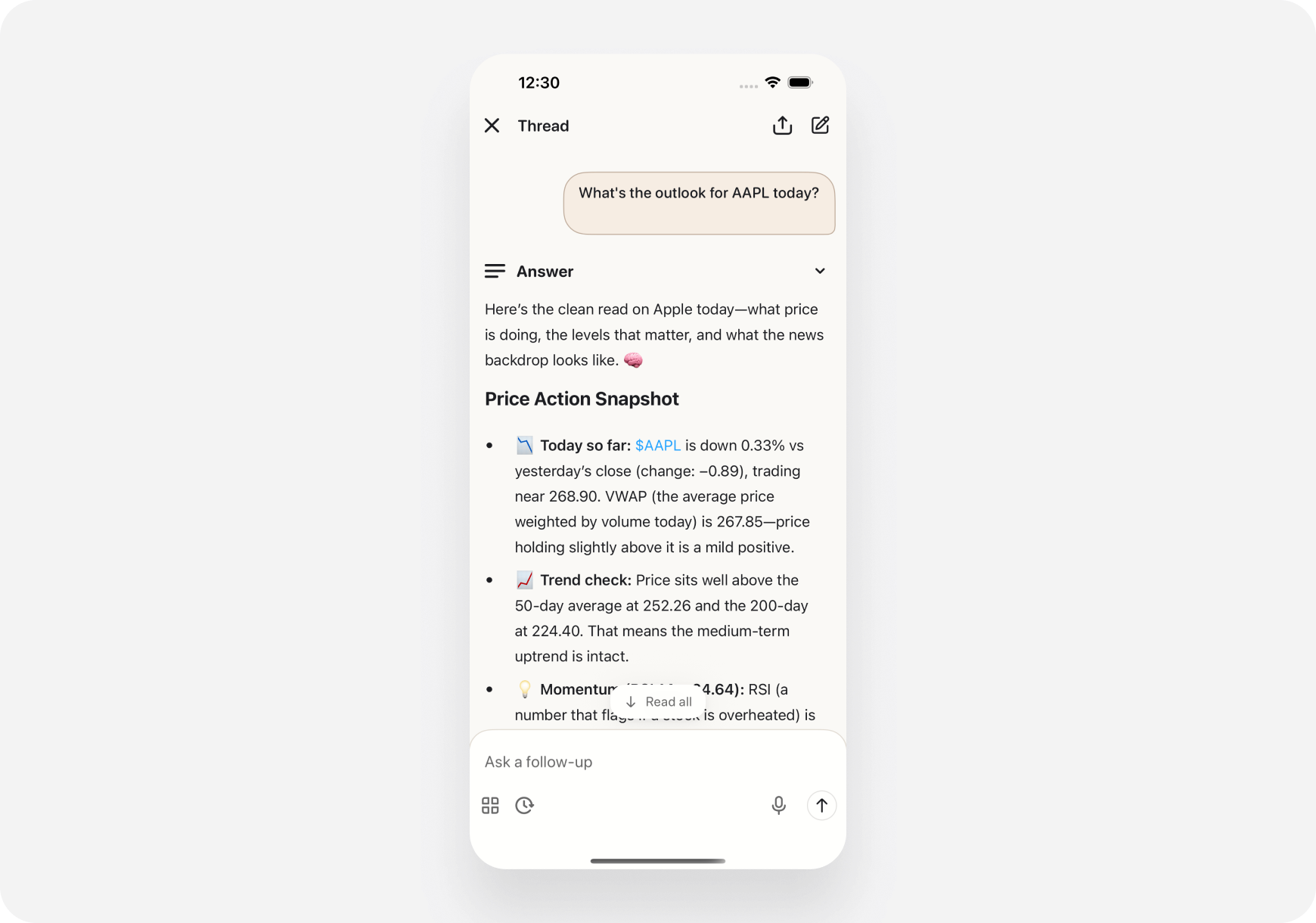 ### Step 2: Tap Share Button
1. Look for **share icon** (top right corner)
2. Tap the **share button**
3. Share dialog appears
### Step 2: Tap Share Button
1. Look for **share icon** (top right corner)
2. Tap the **share button**
3. Share dialog appears
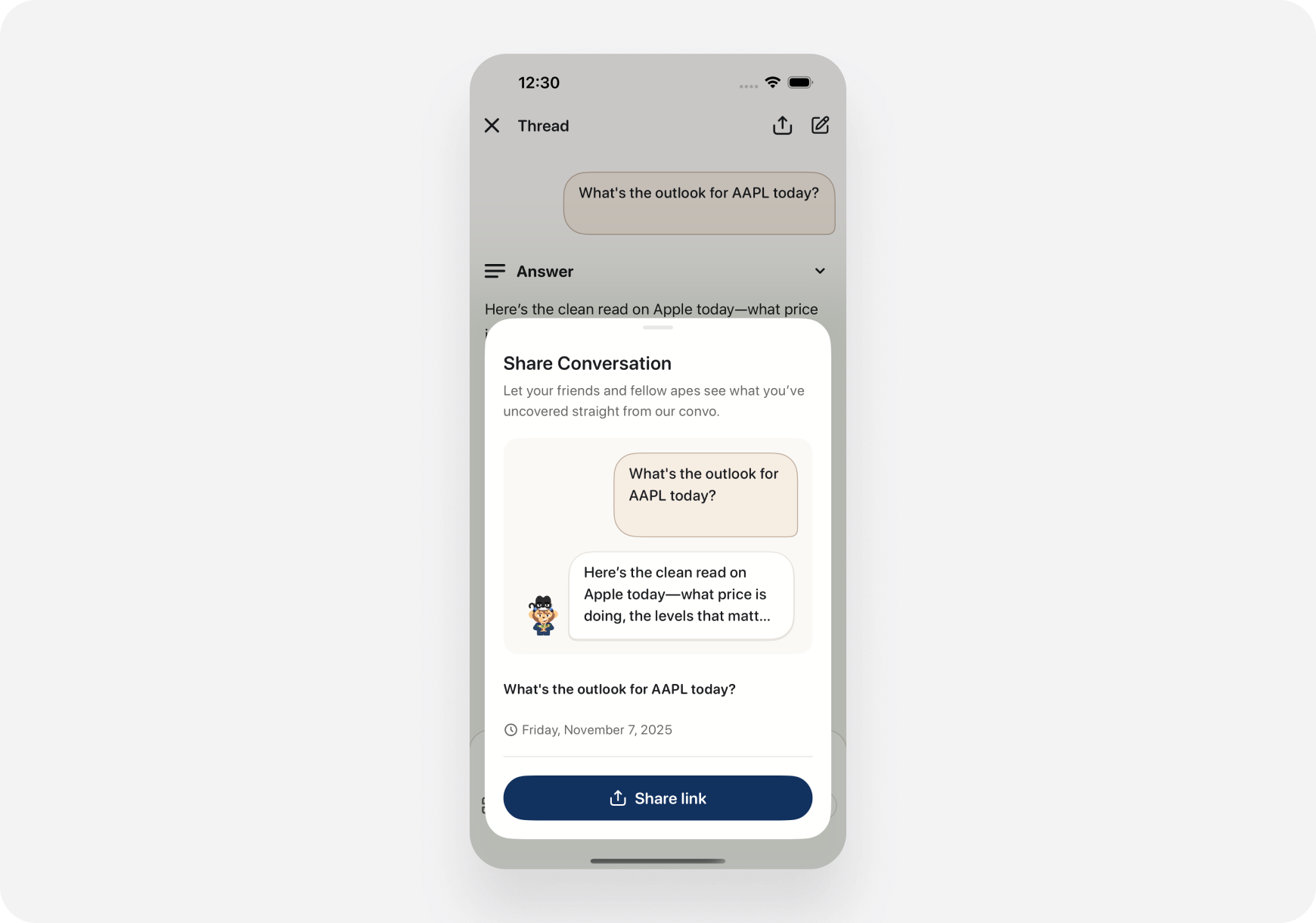 The share dialog shows:
* **Title:** "Share Conversation"
* **Description:** What sharing does
* **Preview:** Your question and AI response snippet
* **Share link button:** Generate shareable URL
### Step 3: Share the Link
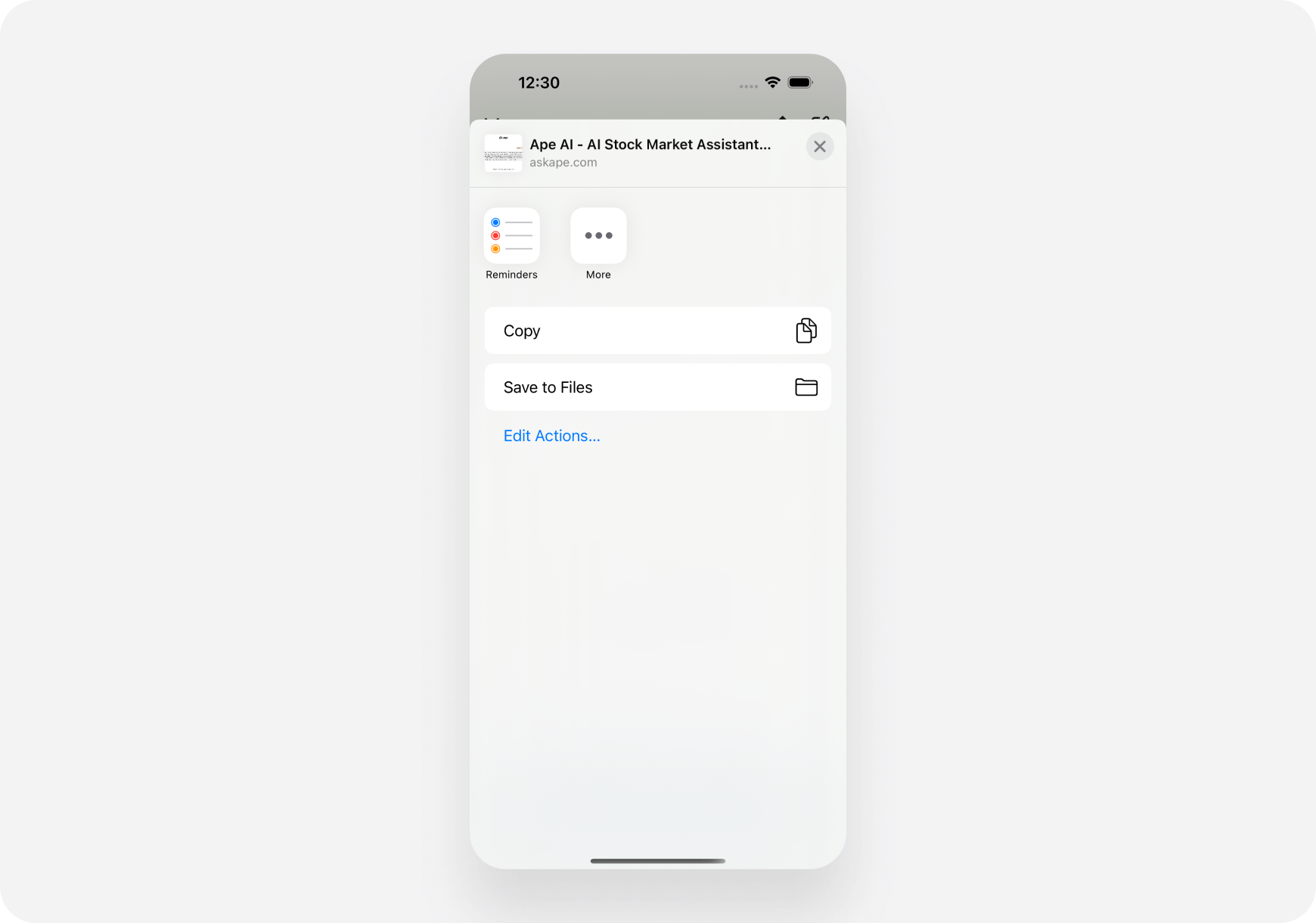
1. Tap **"Share link"** button
2. iOS **share sheet** opens
3. Choose how to share:
* **Copy** - Copy link to clipboard
* **Messages** - Send via iMessage
* **Mail** - Send via email
* **Other apps** - WhatsApp, Telegram, etc.
The share dialog shows:
* **Title:** "Share Conversation"
* **Description:** What sharing does
* **Preview:** Your question and AI response snippet
* **Share link button:** Generate shareable URL
### Step 3: Share the Link
1. Tap **"Share link"** button
2. iOS **share sheet** opens
3. Choose how to share:
* **Copy** - Copy link to clipboard
* **Messages** - Send via iMessage
* **Mail** - Send via email
* **Other apps** - WhatsApp, Telegram, etc.
 ✅ **Done!** Anyone with the link can view the conversation.
***
## 🌐 How to Share on Web
### Step 1: Start a Conversation
1. Open **Chat** page
2. Ask AI any question
3. Wait for response to complete
✅ **Done!** Anyone with the link can view the conversation.
***
## 🌐 How to Share on Web
### Step 1: Start a Conversation
1. Open **Chat** page
2. Ask AI any question
3. Wait for response to complete
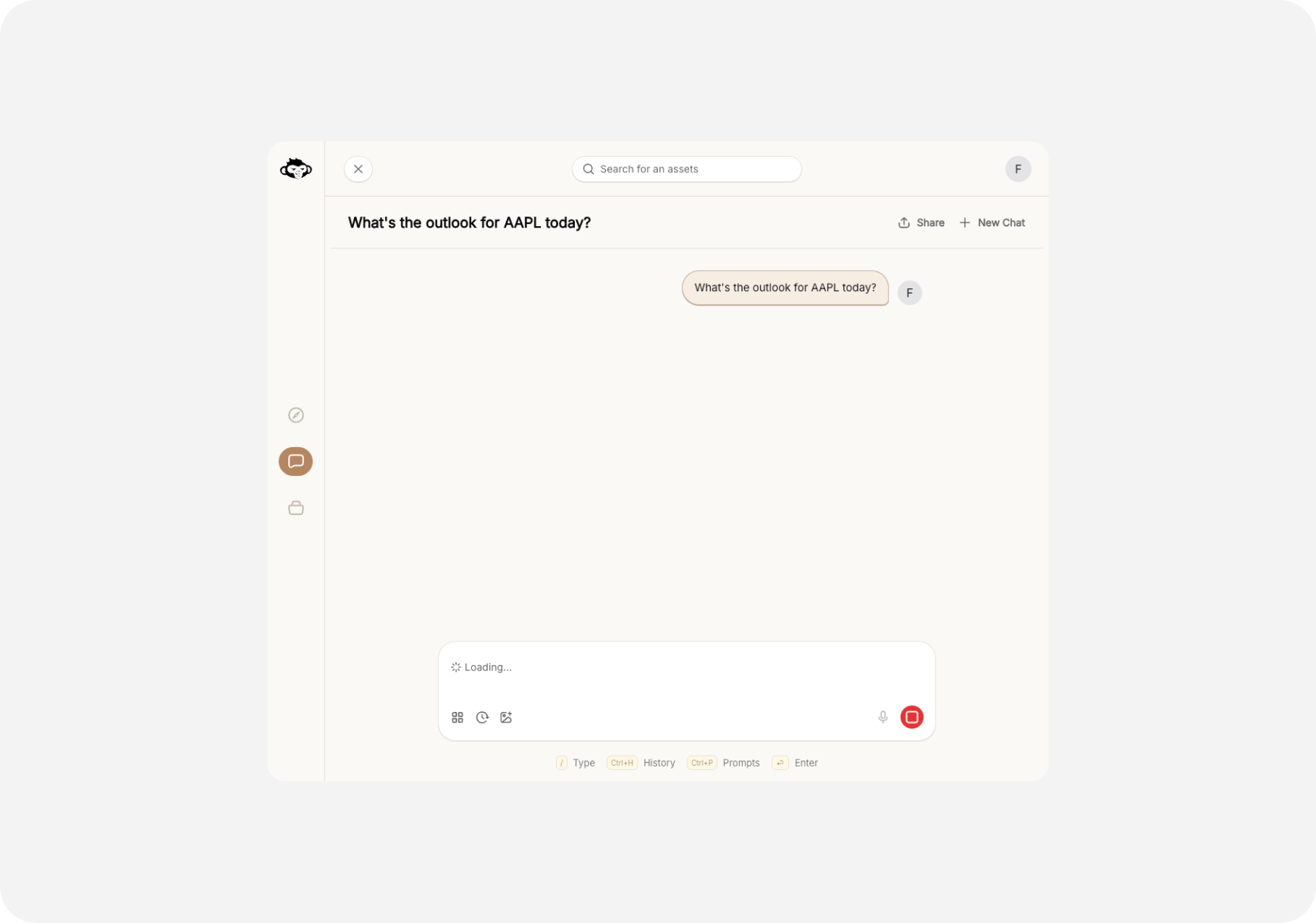 ### Step 2: Click Share Button
1. Look for **"Share"** button (top right)
2. Click the **Share** button
3. Share dialog appears
### Step 2: Click Share Button
1. Look for **"Share"** button (top right)
2. Click the **Share** button
3. Share dialog appears
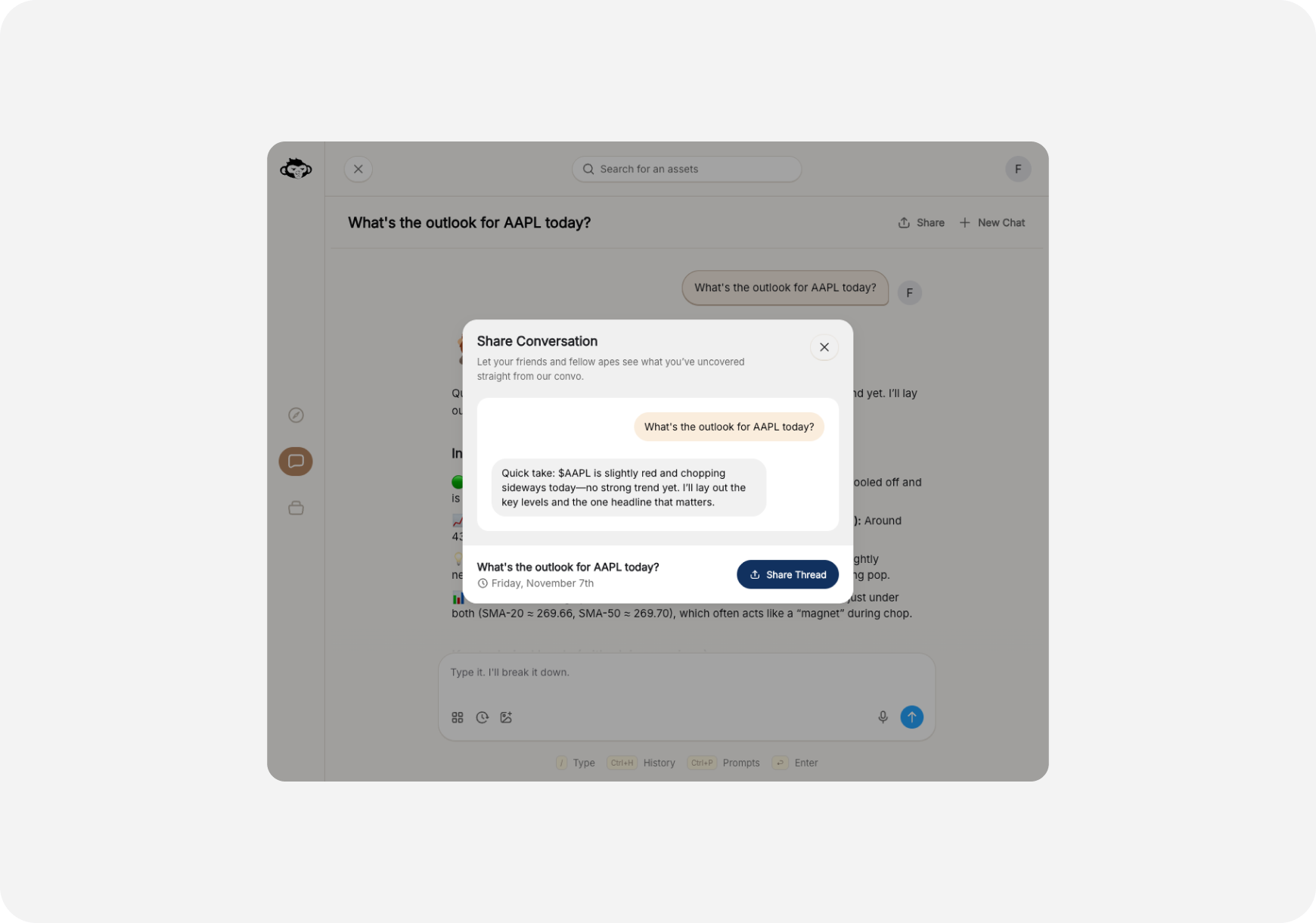 The share dialog shows:
* **Title:** "Share Conversation"
* **Description:** "Let your friends and fellow apes see what you've uncovered straight from our convo."
* **Preview:** Your question and AI response excerpt
* **Date:** When conversation took place
* **Share Thread button:** Generate and copy link
### Step 3: Copy and Share
1. Click **"Share Thread"** button
2. Link **automatically copied** to clipboard
3. Notification confirms: "Copied to clipboard"
4. **Paste the link** wherever you want:
* Discord
* Slack
* Twitter/X
* Reddit
* Email
* Text message
✅ **Done!** Share the link with anyone.
***
## 🔗 What Gets Shared?
When you share a conversation, the link includes:
**✅ Included:**
* Your original question
* Complete AI response
* Any follow-up Q\&A in that thread
* Timestamp
* Ticker symbols mentioned
**❌ Not Included:**
* Your personal information
* Your account details
* Your other conversations
* Your portfolio
* Your trading history
**The shared conversation is read-only** - viewers can see it but cannot edit or add to it.
***
## 👥 Who Can View Shared Links?
**Anyone with the link can view the conversation** - no login required!
**This means:**
* ✅ Great for sharing with non-users
* ✅ Easy to share on social media
* ✅ Perfect for teaching
* ⚠️ Anyone with link has access
* ⚠️ Consider what you're sharing
**Privacy tip:** Only share conversations you're comfortable making public!
***
## 💡 Common Use Cases
### 1. Trading Group Collaboration
**Scenario:** You found an interesting trade setup
**What to do:**
1. Ask AI: "What's the outlook for TSLA today?"
2. Review the analysis
3. Share link in your trading Discord/Slack
4. Discuss with group
**Why it works:** Everyone sees the same analysis, same context
***
### 2. Getting Second Opinions
**Scenario:** Unsure about AI's recommendation
**What to do:**
1. Ask AI complex question
2. Share conversation with experienced trader friend
3. Get their take on the analysis
**Why it works:** Share complete context, not just summary
***
### 3. Teaching New Traders
**Scenario:** Friend wants to learn technical analysis
**What to do:**
1. Ask AI: "Explain major support and resistance for NVDA"
2. AI provides detailed breakdown
3. Share link with your friend
4. They can reference it anytime
**Why it works:** Better than trying to explain yourself!
***
### 4. Social Media Sharing
**Scenario:** AI gave you alpha, want to share with community
**What to do:**
1. Get AI insights on hot stock
2. Share link on Twitter/Reddit with your commentary
3. Let community see the full analysis
**Why it works:** Transparent, verifiable, complete info
***
### 5. Documenting Research
**Scenario:** Want to keep track of AI analysis over time
**What to do:**
1. Ask AI about stock you're watching
2. Share link to yourself (email, notes app)
3. Compare over days/weeks
**Why it works:** Track how analysis evolves
***
## 🎯 Best Practices
### ✅ Do's
* ✅ **Share valuable insights** - Help others learn
* ✅ **Add context** - Explain why you're sharing
* ✅ **Credit the source** - Mention it's from Ape AI
* ✅ **Check link works** - Test before sharing widely
* ✅ **Share with purpose** - Have a reason
### ❌ Don'ts
* ❌ **Don't spam links** - Quality over quantity
* ❌ **Don't share sensitive info** - Review first
* ❌ **Don't use for financial advice** - AI is a tool, not advisor
* ❌ **Don't overshare** - Consider privacy
* ❌ **Don't misrepresent** - Don't claim it's your analysis
***
## 🔒 Privacy & Security
### What You Should Know
**Link Security:**
* Links are unique and hard to guess
* No personal info in the URL
* Viewers don't see your identity
* Conversation content is public once shared
**Managing Shared Links:**
* Currently, shared links remain active
* Delete conversation = link stops working
* No way to "unshare" specific link (yet)
* Feature coming soon: Revoke shared links
**Privacy Tips:**
* Review conversation before sharing
* Don't share sensitive portfolio details
* Remember: Anyone with link can access
* Consider what you ask AI if you plan to share
***
## ❓ FAQ
**Q: Can I see who viewed my shared conversation?** A: Not currently. This feature may be added in the future.
**Q: Do shared links expire?** A: No, shared links remain active unless you delete the conversation.
**Q: Can I unshare or revoke a link?** A: Not yet. Coming soon! For now, only share what you're comfortable making public.
**Q: Can viewers see my name or account?** A: No. Shared conversations are anonymous - viewers only see the Q\&A content.
**Q: Is there a limit to how many conversations I can share?** A: No limit! Share as many as you want.
**Q: What if I share then edit the conversation?** A: You cannot edit past conversations. Shared link shows the original conversation as-is.
**Q: Can I share individual messages or only full conversations?** A: Currently, you share the entire conversation thread. Message-level sharing coming soon.
**Q: Will the viewer see the same formatting and charts?** A: Yes! Shared conversations look the same as they do in your app.
**Q: Can non-users view shared links?** A: Yes! No login required. Perfect for sharing with anyone.
**Q: Can I share on social media?** A: Absolutely! Share on Twitter, Discord, Reddit, anywhere you can paste a link.
***
## 🎓 Pro Tips
### 1. Add Commentary When Sharing
Don't just drop the link - explain why it's valuable:
> "Check out this NVDA analysis from my AI - look at the risk/reward section! \[link]"
### 2. Use in Trading Journals
Keep a collection of shared links to track your research:
* Create document with dated links
* Review AI analysis from weeks ago
* See how predictions played out
### 3. Combo with Screenshots
For social media:
1. Share the link
2. Add screenshot of key insight
3. People click link for full context
### 4. Create Learning Library
Build collection of shared conversations:
* "Best AI explanations"
* "Top trade setups"
* "Market analysis archive" Share library link with friends!
### 5. Compare AI Analyses
Share multiple AI conversations about same stock:
* How analysis changed over time
* Different questions = different insights
* Show AI's consistency (or inconsistency)
***
## 🚀 Coming Soon
**Future sharing features:**
**Link Management:**
* View all your shared links
* Revoke/unshare specific links
* See view counts
* Set expiration dates
**Enhanced Sharing:**
* Share specific messages (not full thread)
* Add custom notes to shared links
* Create shareable AI response collections
* Export conversations as PDF
**Social Features:**
* See trending shared conversations
* Discover popular AI insights
* Follow other traders' shared analysis
* Community sharing feed
***
## What's Next?
**Explore More Chat Features:**
* [Chat Basics →](/features/chat/basics) - Learn to chat with AI
* [Quick Prompts →](/features/chat/quick-prompts) - Pre-built questions
* [Custom Prompts →](/features/chat/custom-prompts) - Create your templates
**Try These Workflows:**
* [My First Stock Research →](/use-cases/beginner/first-research)
* [Daily Trading Routine →](../../Use-Cases/Trader/swing-trading-routine)
***
**Share the alpha. Help fellow apes. Collaboration = strength! 🦍🤝🚀**
The share dialog shows:
* **Title:** "Share Conversation"
* **Description:** "Let your friends and fellow apes see what you've uncovered straight from our convo."
* **Preview:** Your question and AI response excerpt
* **Date:** When conversation took place
* **Share Thread button:** Generate and copy link
### Step 3: Copy and Share
1. Click **"Share Thread"** button
2. Link **automatically copied** to clipboard
3. Notification confirms: "Copied to clipboard"
4. **Paste the link** wherever you want:
* Discord
* Slack
* Twitter/X
* Reddit
* Email
* Text message
✅ **Done!** Share the link with anyone.
***
## 🔗 What Gets Shared?
When you share a conversation, the link includes:
**✅ Included:**
* Your original question
* Complete AI response
* Any follow-up Q\&A in that thread
* Timestamp
* Ticker symbols mentioned
**❌ Not Included:**
* Your personal information
* Your account details
* Your other conversations
* Your portfolio
* Your trading history
**The shared conversation is read-only** - viewers can see it but cannot edit or add to it.
***
## 👥 Who Can View Shared Links?
**Anyone with the link can view the conversation** - no login required!
**This means:**
* ✅ Great for sharing with non-users
* ✅ Easy to share on social media
* ✅ Perfect for teaching
* ⚠️ Anyone with link has access
* ⚠️ Consider what you're sharing
**Privacy tip:** Only share conversations you're comfortable making public!
***
## 💡 Common Use Cases
### 1. Trading Group Collaboration
**Scenario:** You found an interesting trade setup
**What to do:**
1. Ask AI: "What's the outlook for TSLA today?"
2. Review the analysis
3. Share link in your trading Discord/Slack
4. Discuss with group
**Why it works:** Everyone sees the same analysis, same context
***
### 2. Getting Second Opinions
**Scenario:** Unsure about AI's recommendation
**What to do:**
1. Ask AI complex question
2. Share conversation with experienced trader friend
3. Get their take on the analysis
**Why it works:** Share complete context, not just summary
***
### 3. Teaching New Traders
**Scenario:** Friend wants to learn technical analysis
**What to do:**
1. Ask AI: "Explain major support and resistance for NVDA"
2. AI provides detailed breakdown
3. Share link with your friend
4. They can reference it anytime
**Why it works:** Better than trying to explain yourself!
***
### 4. Social Media Sharing
**Scenario:** AI gave you alpha, want to share with community
**What to do:**
1. Get AI insights on hot stock
2. Share link on Twitter/Reddit with your commentary
3. Let community see the full analysis
**Why it works:** Transparent, verifiable, complete info
***
### 5. Documenting Research
**Scenario:** Want to keep track of AI analysis over time
**What to do:**
1. Ask AI about stock you're watching
2. Share link to yourself (email, notes app)
3. Compare over days/weeks
**Why it works:** Track how analysis evolves
***
## 🎯 Best Practices
### ✅ Do's
* ✅ **Share valuable insights** - Help others learn
* ✅ **Add context** - Explain why you're sharing
* ✅ **Credit the source** - Mention it's from Ape AI
* ✅ **Check link works** - Test before sharing widely
* ✅ **Share with purpose** - Have a reason
### ❌ Don'ts
* ❌ **Don't spam links** - Quality over quantity
* ❌ **Don't share sensitive info** - Review first
* ❌ **Don't use for financial advice** - AI is a tool, not advisor
* ❌ **Don't overshare** - Consider privacy
* ❌ **Don't misrepresent** - Don't claim it's your analysis
***
## 🔒 Privacy & Security
### What You Should Know
**Link Security:**
* Links are unique and hard to guess
* No personal info in the URL
* Viewers don't see your identity
* Conversation content is public once shared
**Managing Shared Links:**
* Currently, shared links remain active
* Delete conversation = link stops working
* No way to "unshare" specific link (yet)
* Feature coming soon: Revoke shared links
**Privacy Tips:**
* Review conversation before sharing
* Don't share sensitive portfolio details
* Remember: Anyone with link can access
* Consider what you ask AI if you plan to share
***
## ❓ FAQ
**Q: Can I see who viewed my shared conversation?** A: Not currently. This feature may be added in the future.
**Q: Do shared links expire?** A: No, shared links remain active unless you delete the conversation.
**Q: Can I unshare or revoke a link?** A: Not yet. Coming soon! For now, only share what you're comfortable making public.
**Q: Can viewers see my name or account?** A: No. Shared conversations are anonymous - viewers only see the Q\&A content.
**Q: Is there a limit to how many conversations I can share?** A: No limit! Share as many as you want.
**Q: What if I share then edit the conversation?** A: You cannot edit past conversations. Shared link shows the original conversation as-is.
**Q: Can I share individual messages or only full conversations?** A: Currently, you share the entire conversation thread. Message-level sharing coming soon.
**Q: Will the viewer see the same formatting and charts?** A: Yes! Shared conversations look the same as they do in your app.
**Q: Can non-users view shared links?** A: Yes! No login required. Perfect for sharing with anyone.
**Q: Can I share on social media?** A: Absolutely! Share on Twitter, Discord, Reddit, anywhere you can paste a link.
***
## 🎓 Pro Tips
### 1. Add Commentary When Sharing
Don't just drop the link - explain why it's valuable:
> "Check out this NVDA analysis from my AI - look at the risk/reward section! \[link]"
### 2. Use in Trading Journals
Keep a collection of shared links to track your research:
* Create document with dated links
* Review AI analysis from weeks ago
* See how predictions played out
### 3. Combo with Screenshots
For social media:
1. Share the link
2. Add screenshot of key insight
3. People click link for full context
### 4. Create Learning Library
Build collection of shared conversations:
* "Best AI explanations"
* "Top trade setups"
* "Market analysis archive" Share library link with friends!
### 5. Compare AI Analyses
Share multiple AI conversations about same stock:
* How analysis changed over time
* Different questions = different insights
* Show AI's consistency (or inconsistency)
***
## 🚀 Coming Soon
**Future sharing features:**
**Link Management:**
* View all your shared links
* Revoke/unshare specific links
* See view counts
* Set expiration dates
**Enhanced Sharing:**
* Share specific messages (not full thread)
* Add custom notes to shared links
* Create shareable AI response collections
* Export conversations as PDF
**Social Features:**
* See trending shared conversations
* Discover popular AI insights
* Follow other traders' shared analysis
* Community sharing feed
***
## What's Next?
**Explore More Chat Features:**
* [Chat Basics →](/features/chat/basics) - Learn to chat with AI
* [Quick Prompts →](/features/chat/quick-prompts) - Pre-built questions
* [Custom Prompts →](/features/chat/custom-prompts) - Create your templates
**Try These Workflows:**
* [My First Stock Research →](/use-cases/beginner/first-research)
* [Daily Trading Routine →](../../Use-Cases/Trader/swing-trading-routine)
***
**Share the alpha. Help fellow apes. Collaboration = strength! 🦍🤝🚀**