> ## Documentation Index
> Fetch the complete documentation index at: https://guide.askape.com/llms.txt
> Use this file to discover all available pages before exploring further.
# Quick Prompts
Pre-built questions for common trading scenarios. Faster than typing!
**⏱️ Time to read:** 5 minutes **📱🌐 Platform:** Both iOS & Web **👤 Best for:** Everyone (especially new users)
***
## 🎯 What Are Quick Prompts?
**Quick Prompts** are pre-written questions that you can use with one tap/click instead of typing everything out.
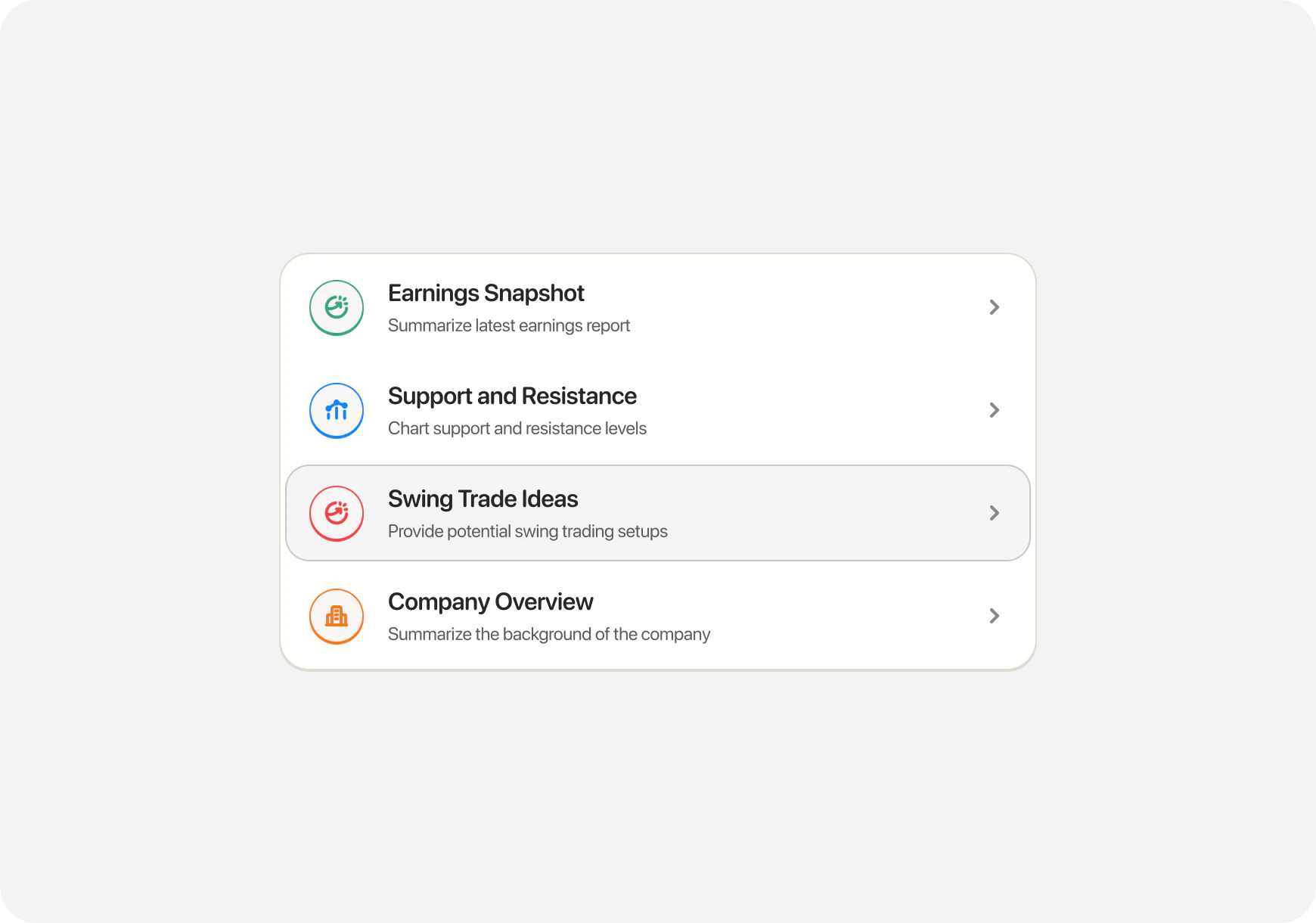 **Think of them as shortcuts for:**
* Common questions
* Popular analysis requests
* Frequent trading scenarios
* Learning topics
**Why use them?**
* ⚡ Faster than typing
* ✅ Properly formatted questions
* 🎯 Get better AI responses
* 💡 Discover what you can ask
***
## 📱 Where to Find Quick Prompts
### iOS (Two Ways)
**Method 1: Quick Action Cards (Home Screen)**
1. Open **Chat tab**
2. See **Quick Action cards** at top
3. **Swipe left/right** to see all options
4. **Tap a card** to use it
**Think of them as shortcuts for:**
* Common questions
* Popular analysis requests
* Frequent trading scenarios
* Learning topics
**Why use them?**
* ⚡ Faster than typing
* ✅ Properly formatted questions
* 🎯 Get better AI responses
* 💡 Discover what you can ask
***
## 📱 Where to Find Quick Prompts
### iOS (Two Ways)
**Method 1: Quick Action Cards (Home Screen)**
1. Open **Chat tab**
2. See **Quick Action cards** at top
3. **Swipe left/right** to see all options
4. **Tap a card** to use it
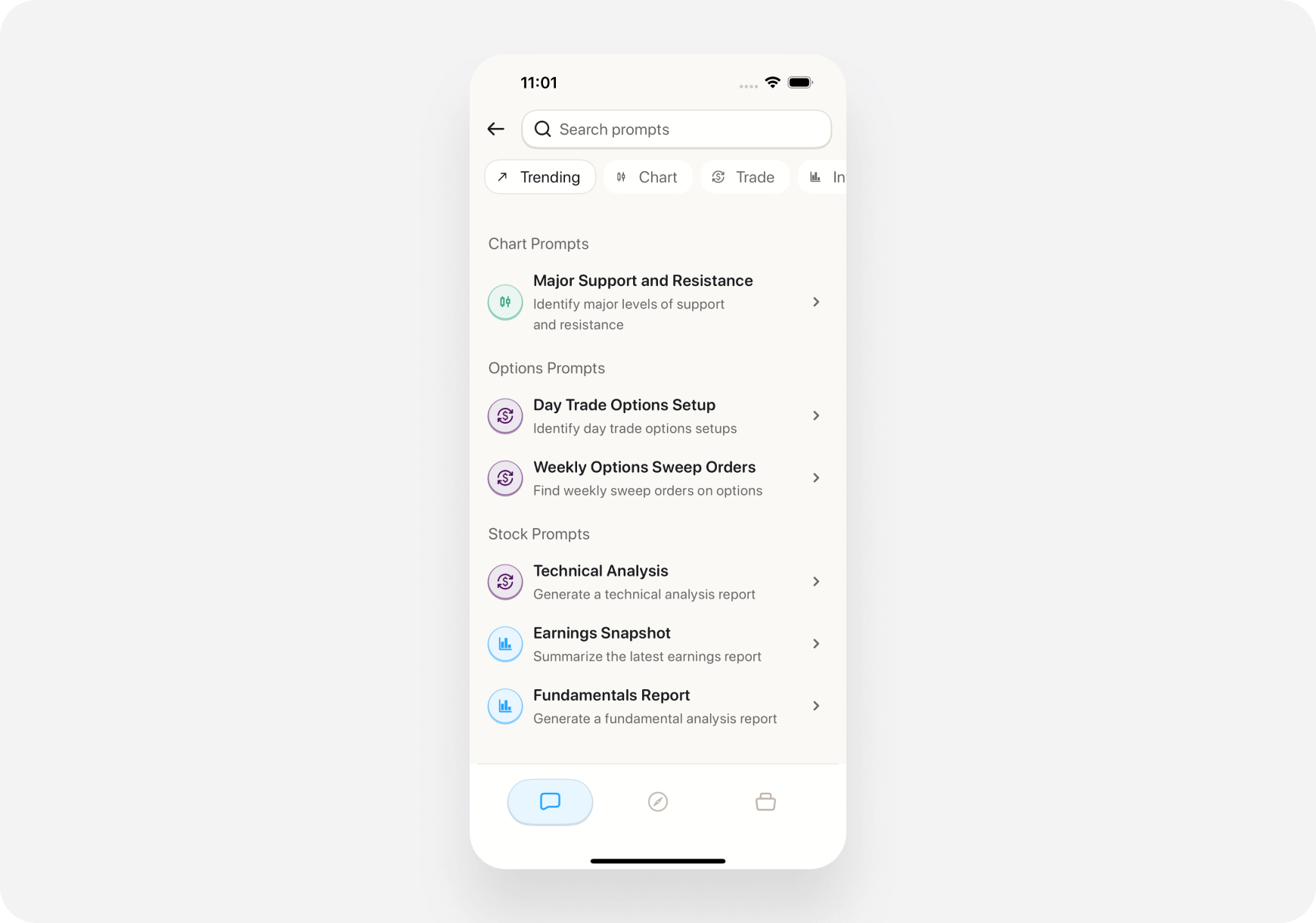
 **Method 2: Prompts Button**
1. In Chat tab
2. Tap **Prompts icon** (bottom toolbar)
3. See full list of prompts
4. Tap one to use
**Method 2: Prompts Button**
1. In Chat tab
2. Tap **Prompts icon** (bottom toolbar)
3. See full list of prompts
4. Tap one to use
 ***
### Web
**Method 1: Prompts Icon**
1. Open **Chat** page
2. Click **Prompts icon** in chat interface
3. Browse all prompts
4. Click to use
**Method 2: Keyboard Shortcut**
1. In Chat
2. Press **Ctrl+P**
3. Prompts menu opens
4. Select with arrow keys or mouse
***
## 🚀 Featured Quick Prompts
### 1. Find Strong Catalyst Stocks 💥
**What it does:** Surfaces stocks with credible near‑term catalysts (earnings, guidance, product launches, upgrades, macro).
**AI provides:**
* List of tickers with catalysts and why they matter
* Directional context (bullish/bearish) and timeframe
* Entry zones and risk considerations
**Best for:** Money Monty (generalist) and Maverick companions
**Example result:**
> "5 catalyst candidates: NVDA (AI demand), AMD (new GPUs), UBER (profitability focus), SHOP (e‑comm seasonality), ABNB (travel bookings). Entry near support; confirm volume."
***
### 2. Earnings Snapshot 📊
***
### 3. Major Support and Resistance 📈
**What it does:** Summarizes latest earnings report for a stock
**You'll be asked:** "Which ticker?"
**AI provides:**
* Revenue vs expectations
* EPS beat or miss
* Key highlights
* Stock reaction
* What it means for the stock
**Best for:** All companions
**Example result:**
> "NVDA Q3 earnings: Revenue $18.1B (expected $16.2B) - BEAT. EPS $4.02 vs $3.37 expected - BEAT. Data center revenue up 112% YoY. Guidance strong. Stock gapping up 8% pre-market."
***
### 3. Major Support and Resistance 📈
**What it does:** Identifies key price levels for a stock
**You'll be asked:** "Which ticker?"
**AI provides:**
* Support levels (where stock bounces)
* Resistance levels (where stock gets rejected)
* Current price position
* Key zones to watch
**Best for:** Money Monty, Maverick, and Blitz companions
**Example result:**
> "TSLA at $465. Support: $460 (strong), $450 (critical). Resistance: $470 (immediate), $485 (major). Currently testing $470. Break above = target $485. Break below $460 = bail."
***
### 4. Pricey or Cheap 💰
**What it does:** Analyzes if a stock is overvalued or undervalued
**You'll be asked:** "Which ticker?"
**AI provides:**
* Valuation metrics (P/E, P/S, etc.)
* Comparison to industry average
* Historical valuation
* Fair value estimate
* Buy/wait/sell assessment
**Best for:** Sage companion (long‑term investors) and Money Monty
**Example result:**
> "TSLA valuation analysis: P/E 75 (vs industry 15)—pricey; fair value \$380–420. Consider waiting for pullback or DCA."
***
### 5. Options Expiring Before Earnings 📅
**What it does:** Finds stocks with near-term earnings + options expiring before
**AI provides:**
* List of stocks with upcoming earnings
* Options that expire BEFORE earnings
* Why this matters (IV crush)
* Potential strategies
**Best for:** Options traders (advanced)
**Example result:**
> "5 stocks with options expiring before earnings:
>
> 1. AAPL - Earnings Nov 15, options exp Nov 10
> 2. MSFT - Earnings Nov 20, options exp Nov 17 ... Strategy: Sell options to capture IV premium before earnings announcement."
***
## 📝 Complete List of Quick Prompts
### Technical Analysis
* **Major Support and Resistance** - Key price levels
* **Technical Analysis Report** - Full chart analysis
* **Identify Chart Patterns** - Head & shoulders, triangles, etc.
* **Momentum Indicators** - RSI, MACD, momentum strength
### Fundamental Analysis
* **Earnings Snapshot** - Latest earnings summary
* **Fundamental Analysis Report** - Complete fundamental review
* **Pricey or Cheap** - Valuation analysis
* **Company Overview** - Business model, financials
### Options Trading
* **Day Trade Options Setup** - Intraday options plays
* **Options Expiring Before Earnings** - Pre-earnings option plays
* **Options Strategy Suggestion** - Best strategy for scenario
* **Explain the Greeks** - Delta, theta, gamma, vega
### Trade Ideas
* **Swing Trade Ideas** - Multi-day setups
* **Dividend Stock Finder** - Quality dividend payers
* **Undervalued Stock Screener** - Value opportunities
* **Momentum Stock Finder** - Trending stocks
### Risk Analysis
* **Risk Assessment** - What could go wrong
* **Downside Scenarios** - Bear case analysis
* **Position Sizing** - How much to invest
* **Stop Loss Calculator** - Where to set stops
### Market Overview
* **Today's Market Recap** - Daily market summary
* **Sector Performance** - Which sectors are hot
* **Pre-Market Movers** - Stocks moving before open
* **After-Hours Activity** - Post-market movers
***
## 🎭 Companion-Specific Prompts
Quick Prompts **change based on your companion**!
### Money Monty (Generalist) Sees:
* Find Strong Catalyst Stocks
* Swing Trade Ideas
* Pricey or Cheap
* Major Support & Resistance
* Momentum Stock Finder
### Blitz (Day Trader) Sees:
* Day Trade Options Setup
* Major Support and Resistance
* Pre-Market Movers
* Breakout Scanner
* Intraday Momentum
### Maverick (Momentum Trader) Sees:
* Swing Trade Ideas
* Multi-Day Setups
* Earnings Calendar
* Trend Strength
* Momentum Scanner
### Sage (Long-Term) Sees:
* Fundamental Analysis Report
* Pricey or Cheap
* Dividend Stock Finder
* Undervalued Screener
* Company Quality Check
**Your companion determines which prompts appear first!**
***
## 💡 How to Use Quick Prompts Effectively
### 1. Start Your Trading Day
Morning routine (Money Monty/Maverick):
* **"Today's Market Recap"** - Get market overview
* **"Pre‑Market Movers"** - See what's gapping
* **"Find Strong Catalyst Stocks"** or **"Swing Trade Ideas"**
### 2. Research a Stock
When you find an interesting ticker:
* **"Earnings Snapshot"** - Check latest earnings
* **"Major Support and Resistance"** - Get key levels
* **"Pricey or Cheap"** - Check valuation
### 3. Plan a Trade
Before entering:
* **"Technical Analysis Report"** - Chart review
* **"Risk Assessment"** - Understand risks
* **"Position Sizing"** - How much to buy
### 4. Learn While You Trade
Educational prompts:
* **"Explain the Greeks"** - Learn options
* **"What is \[concept]"** - Understand terms
***
## 🔄 Follow-Up Questions
**After using a prompt, you can ask follow-ups:**
**Initial prompt:** "Find Strong Catalyst Stocks" **AI suggests:** "NVDA (AI demand), UBER (profitability focus), SHOP (seasonality)"
**Follow-up questions:**
* "What's the downside risk?"
* "Should I wait for a pullback?"
* "What if volume fades?"
* "Compare this to AMD"
**AI remembers context** from the prompt!
***
## 📊 Real Example Workflow
**Scenario:** Morning prep for a generalist trader (Money Monty)
**Step 1:** Use **"Today's Market Recap"**
> AI: "Market modestly bullish. Tech leading; watch NVDA earnings after close."
**Step 2:** Use **"Find Strong Catalyst Stocks"**
> AI: "NVDA (AI demand), UBER (profit focus), SHOP (seasonality)."
**Step 3:** Open a ticker page and review Snapshot Grades
**Step 4:** Use **"Major Support and Resistance"** on your top pick
> AI: "Entry near support; confirm volume on break above resistance."
**Step 5:** If long‑term, run **"Pricey or Cheap"** for valuation context
**Step 6:** Size the position and plan the trade
**Total time:** \~5 minutes with Quick Prompts vs 30+ minutes manual research
***
## 💡 Pro Tips
### 1. Combine Prompts
Use multiple prompts for the same stock:
* Earnings Snapshot
* Technical Analysis
* Pricey or Cheap
* Risk Assessment
**Get complete picture!**
### 2. Use Morning & Evening Prompts
**Morning:**
* Today's Market Recap
* Pre-Market Movers
**Evening:**
* After-Hours Activity
* Tomorrow's Earnings
### 3. Learn from Prompts
**Don't understand something in the response?** Just ask: "Explain what \[term] means"
### 4. Explore All Categories
Try prompts outside your companion:
* Blitz user? Try "Dividend Stock Finder"
* Sage user? Try "Day Trade Options Setup"
Learn different perspectives!
***
## ❓ FAQ
**Q: Are Quick Prompts free?** A: Included with your subscription (Super Ape required for full access).
**Q: Can I customize prompts?** A: Not yet, but custom prompts are coming soon!
**Q: Do prompts work offline?** A: No, requires internet connection for AI processing.
**Q: How often are new prompts added?** A: Regularly! Check What's New for updates.
**Q: Can I request new prompts?** A: Yes! Contact support with suggestions.
***
## What's Next?
**Explore Chat Features:**
* [Chat Basics →](basics/) - How to use AI Chat
* [Custom Prompts →](custom-prompts/) - Create your own
* [Execute Trades →](execute-trades/) - Trade from chat
**Try Workflows:**
* [Premarket Routine →](../../Use-Cases/Advanced/premarket-routine/) - Uses multiple prompts
* [My First Stock Research →](../../Use-Cases/Beginner/first-research/) - Pricey or Cheap prompt
***
**Quick Prompts = Your shortcut to smart trading. Tap once, get instant analysis! ⚡🚀**
***
### Web
**Method 1: Prompts Icon**
1. Open **Chat** page
2. Click **Prompts icon** in chat interface
3. Browse all prompts
4. Click to use
**Method 2: Keyboard Shortcut**
1. In Chat
2. Press **Ctrl+P**
3. Prompts menu opens
4. Select with arrow keys or mouse
***
## 🚀 Featured Quick Prompts
### 1. Find Strong Catalyst Stocks 💥
**What it does:** Surfaces stocks with credible near‑term catalysts (earnings, guidance, product launches, upgrades, macro).
**AI provides:**
* List of tickers with catalysts and why they matter
* Directional context (bullish/bearish) and timeframe
* Entry zones and risk considerations
**Best for:** Money Monty (generalist) and Maverick companions
**Example result:**
> "5 catalyst candidates: NVDA (AI demand), AMD (new GPUs), UBER (profitability focus), SHOP (e‑comm seasonality), ABNB (travel bookings). Entry near support; confirm volume."
***
### 2. Earnings Snapshot 📊
***
### 3. Major Support and Resistance 📈
**What it does:** Summarizes latest earnings report for a stock
**You'll be asked:** "Which ticker?"
**AI provides:**
* Revenue vs expectations
* EPS beat or miss
* Key highlights
* Stock reaction
* What it means for the stock
**Best for:** All companions
**Example result:**
> "NVDA Q3 earnings: Revenue $18.1B (expected $16.2B) - BEAT. EPS $4.02 vs $3.37 expected - BEAT. Data center revenue up 112% YoY. Guidance strong. Stock gapping up 8% pre-market."
***
### 3. Major Support and Resistance 📈
**What it does:** Identifies key price levels for a stock
**You'll be asked:** "Which ticker?"
**AI provides:**
* Support levels (where stock bounces)
* Resistance levels (where stock gets rejected)
* Current price position
* Key zones to watch
**Best for:** Money Monty, Maverick, and Blitz companions
**Example result:**
> "TSLA at $465. Support: $460 (strong), $450 (critical). Resistance: $470 (immediate), $485 (major). Currently testing $470. Break above = target $485. Break below $460 = bail."
***
### 4. Pricey or Cheap 💰
**What it does:** Analyzes if a stock is overvalued or undervalued
**You'll be asked:** "Which ticker?"
**AI provides:**
* Valuation metrics (P/E, P/S, etc.)
* Comparison to industry average
* Historical valuation
* Fair value estimate
* Buy/wait/sell assessment
**Best for:** Sage companion (long‑term investors) and Money Monty
**Example result:**
> "TSLA valuation analysis: P/E 75 (vs industry 15)—pricey; fair value \$380–420. Consider waiting for pullback or DCA."
***
### 5. Options Expiring Before Earnings 📅
**What it does:** Finds stocks with near-term earnings + options expiring before
**AI provides:**
* List of stocks with upcoming earnings
* Options that expire BEFORE earnings
* Why this matters (IV crush)
* Potential strategies
**Best for:** Options traders (advanced)
**Example result:**
> "5 stocks with options expiring before earnings:
>
> 1. AAPL - Earnings Nov 15, options exp Nov 10
> 2. MSFT - Earnings Nov 20, options exp Nov 17 ... Strategy: Sell options to capture IV premium before earnings announcement."
***
## 📝 Complete List of Quick Prompts
### Technical Analysis
* **Major Support and Resistance** - Key price levels
* **Technical Analysis Report** - Full chart analysis
* **Identify Chart Patterns** - Head & shoulders, triangles, etc.
* **Momentum Indicators** - RSI, MACD, momentum strength
### Fundamental Analysis
* **Earnings Snapshot** - Latest earnings summary
* **Fundamental Analysis Report** - Complete fundamental review
* **Pricey or Cheap** - Valuation analysis
* **Company Overview** - Business model, financials
### Options Trading
* **Day Trade Options Setup** - Intraday options plays
* **Options Expiring Before Earnings** - Pre-earnings option plays
* **Options Strategy Suggestion** - Best strategy for scenario
* **Explain the Greeks** - Delta, theta, gamma, vega
### Trade Ideas
* **Swing Trade Ideas** - Multi-day setups
* **Dividend Stock Finder** - Quality dividend payers
* **Undervalued Stock Screener** - Value opportunities
* **Momentum Stock Finder** - Trending stocks
### Risk Analysis
* **Risk Assessment** - What could go wrong
* **Downside Scenarios** - Bear case analysis
* **Position Sizing** - How much to invest
* **Stop Loss Calculator** - Where to set stops
### Market Overview
* **Today's Market Recap** - Daily market summary
* **Sector Performance** - Which sectors are hot
* **Pre-Market Movers** - Stocks moving before open
* **After-Hours Activity** - Post-market movers
***
## 🎭 Companion-Specific Prompts
Quick Prompts **change based on your companion**!
### Money Monty (Generalist) Sees:
* Find Strong Catalyst Stocks
* Swing Trade Ideas
* Pricey or Cheap
* Major Support & Resistance
* Momentum Stock Finder
### Blitz (Day Trader) Sees:
* Day Trade Options Setup
* Major Support and Resistance
* Pre-Market Movers
* Breakout Scanner
* Intraday Momentum
### Maverick (Momentum Trader) Sees:
* Swing Trade Ideas
* Multi-Day Setups
* Earnings Calendar
* Trend Strength
* Momentum Scanner
### Sage (Long-Term) Sees:
* Fundamental Analysis Report
* Pricey or Cheap
* Dividend Stock Finder
* Undervalued Screener
* Company Quality Check
**Your companion determines which prompts appear first!**
***
## 💡 How to Use Quick Prompts Effectively
### 1. Start Your Trading Day
Morning routine (Money Monty/Maverick):
* **"Today's Market Recap"** - Get market overview
* **"Pre‑Market Movers"** - See what's gapping
* **"Find Strong Catalyst Stocks"** or **"Swing Trade Ideas"**
### 2. Research a Stock
When you find an interesting ticker:
* **"Earnings Snapshot"** - Check latest earnings
* **"Major Support and Resistance"** - Get key levels
* **"Pricey or Cheap"** - Check valuation
### 3. Plan a Trade
Before entering:
* **"Technical Analysis Report"** - Chart review
* **"Risk Assessment"** - Understand risks
* **"Position Sizing"** - How much to buy
### 4. Learn While You Trade
Educational prompts:
* **"Explain the Greeks"** - Learn options
* **"What is \[concept]"** - Understand terms
***
## 🔄 Follow-Up Questions
**After using a prompt, you can ask follow-ups:**
**Initial prompt:** "Find Strong Catalyst Stocks" **AI suggests:** "NVDA (AI demand), UBER (profitability focus), SHOP (seasonality)"
**Follow-up questions:**
* "What's the downside risk?"
* "Should I wait for a pullback?"
* "What if volume fades?"
* "Compare this to AMD"
**AI remembers context** from the prompt!
***
## 📊 Real Example Workflow
**Scenario:** Morning prep for a generalist trader (Money Monty)
**Step 1:** Use **"Today's Market Recap"**
> AI: "Market modestly bullish. Tech leading; watch NVDA earnings after close."
**Step 2:** Use **"Find Strong Catalyst Stocks"**
> AI: "NVDA (AI demand), UBER (profit focus), SHOP (seasonality)."
**Step 3:** Open a ticker page and review Snapshot Grades
**Step 4:** Use **"Major Support and Resistance"** on your top pick
> AI: "Entry near support; confirm volume on break above resistance."
**Step 5:** If long‑term, run **"Pricey or Cheap"** for valuation context
**Step 6:** Size the position and plan the trade
**Total time:** \~5 minutes with Quick Prompts vs 30+ minutes manual research
***
## 💡 Pro Tips
### 1. Combine Prompts
Use multiple prompts for the same stock:
* Earnings Snapshot
* Technical Analysis
* Pricey or Cheap
* Risk Assessment
**Get complete picture!**
### 2. Use Morning & Evening Prompts
**Morning:**
* Today's Market Recap
* Pre-Market Movers
**Evening:**
* After-Hours Activity
* Tomorrow's Earnings
### 3. Learn from Prompts
**Don't understand something in the response?** Just ask: "Explain what \[term] means"
### 4. Explore All Categories
Try prompts outside your companion:
* Blitz user? Try "Dividend Stock Finder"
* Sage user? Try "Day Trade Options Setup"
Learn different perspectives!
***
## ❓ FAQ
**Q: Are Quick Prompts free?** A: Included with your subscription (Super Ape required for full access).
**Q: Can I customize prompts?** A: Not yet, but custom prompts are coming soon!
**Q: Do prompts work offline?** A: No, requires internet connection for AI processing.
**Q: How often are new prompts added?** A: Regularly! Check What's New for updates.
**Q: Can I request new prompts?** A: Yes! Contact support with suggestions.
***
## What's Next?
**Explore Chat Features:**
* [Chat Basics →](basics/) - How to use AI Chat
* [Custom Prompts →](custom-prompts/) - Create your own
* [Execute Trades →](execute-trades/) - Trade from chat
**Try Workflows:**
* [Premarket Routine →](../../Use-Cases/Advanced/premarket-routine/) - Uses multiple prompts
* [My First Stock Research →](../../Use-Cases/Beginner/first-research/) - Pricey or Cheap prompt
***
**Quick Prompts = Your shortcut to smart trading. Tap once, get instant analysis! ⚡🚀**