> ## Documentation Index
> Fetch the complete documentation index at: https://guide.askape.com/llms.txt
> Use this file to discover all available pages before exploring further.
# Execute Trades from Chat
Go from AI trade idea to actual order in seconds. No app switching required.
**⏱️ Time to read:** 5 minutes **📱🌐 Platform:** Both iOS & Web **👤 Best for:** Active traders with connected brokerages
***
## 🎯 What is Trade Execution from Chat?
**Trade Execution** lets you place real trades directly from the AI Chat interface after getting trade recommendations.
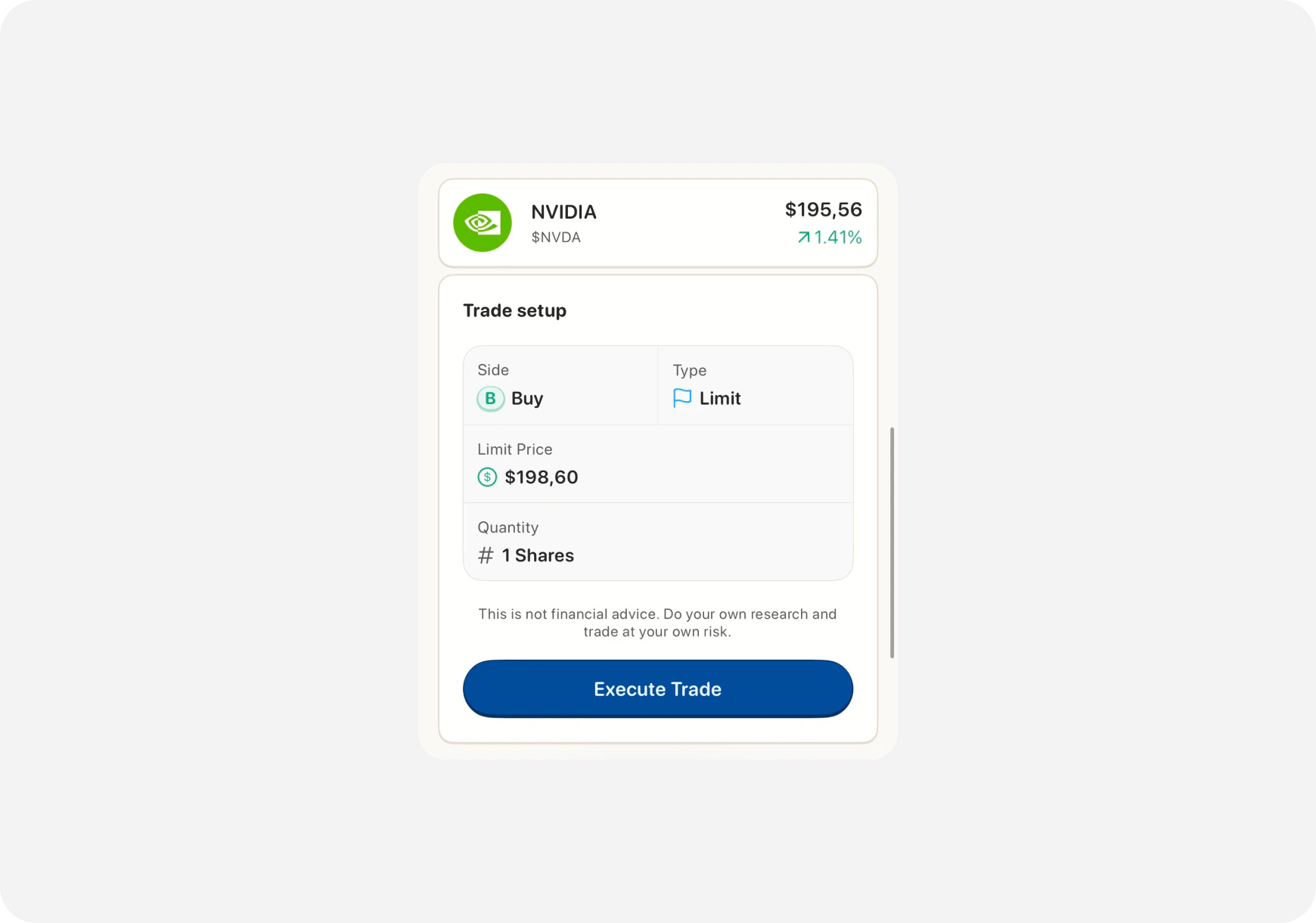 **The Flow:**
1. Ask AI for trade ideas
2. AI suggests a setup
3. Tap/click **"Execute Trade"** button
4. Review order details
5. Confirm and place order
**No app switching. No manual entry. Just tap and trade.**
***
## ⚡ Why Execute from Chat?
### Speed
* AI finds setup → You trade it instantly
* No copying ticker, strike, expiration
* No switching between chat and trading screens
### Accuracy
* Order details pre-filled from AI recommendation
* No typos or wrong strikes
* Exactly what AI suggested
### Confidence
* See the trade idea and rationale
* Review everything before confirming
* One-tap execution when ready
**Perfect for:** Day traders who need speed, swing traders who want precision, anyone who values efficiency.
***
## 🔧 Setup Requirements
### Before You Can Execute Trades:
**1. Connect a Brokerage** You need a connected brokerage account.
**Supported for Trading:**
* Robinhood
* Webull
* TD Ameritrade
* E\*TRADE
* Interactive Brokers
* Others (check [Supported Brokerages →](../Brokerage/supported))
**Paper Trading:**
* Ape Paper Trading Account works too!
* Practice risk-free
[Learn how to connect →](../Brokerage/why-connect)
***
**2. Enable Trading Permissions**
**📱 iOS:**
1. Tap **Profile** (top left)
2. Go to **Settings**
3. Find **"Trading Permissions"**
4. Toggle **ON**
5. Confirm with Face ID / Touch ID
**🌐 Web:**
1. Click **Profile icon**
2. Go to **Settings**
3. Navigate to **"Integrations"**
4. Enable **"Execute Trades from Chat"**
5. Confirm
**Why this matters:** Safety. We want you to explicitly enable trading to avoid accidental orders.
***
## 📱 How to Execute a Trade
### Step 1: Get AI Trade Recommendation
Ask AI for a trade setup:
**Examples:**
* "Find me a day trade options setup for TSLA"
* "What's a good swing trade entry for NVDA?"
* "Show me high-probability call options expiring this week"
AI responds with a recommendation:
> **AI (Blitz):** "TSLA day trade setup:
>
> **Stock:** TSLA **Setup:** Momentum breakout **Entry:** $470 calls expiring Friday **Premium:** \~$5.50 **Target:** $8.00 (45% gain) **Stop:** $4.50 (18% loss) **Risk/Reward:** 3:1
>
> Reasoning: TSLA breaking resistance at $470 with volume. Strong intraday momentum. Target $478 by EOD."
***
### Step 2: Tap "Execute Trade" Button
You'll see an **"Execute Trade"** button below AI's recommendation.
**📱 iOS:** Tap the button **🌐 Web:** Click the button
***
### Step 3: Review Order Details
**The Flow:**
1. Ask AI for trade ideas
2. AI suggests a setup
3. Tap/click **"Execute Trade"** button
4. Review order details
5. Confirm and place order
**No app switching. No manual entry. Just tap and trade.**
***
## ⚡ Why Execute from Chat?
### Speed
* AI finds setup → You trade it instantly
* No copying ticker, strike, expiration
* No switching between chat and trading screens
### Accuracy
* Order details pre-filled from AI recommendation
* No typos or wrong strikes
* Exactly what AI suggested
### Confidence
* See the trade idea and rationale
* Review everything before confirming
* One-tap execution when ready
**Perfect for:** Day traders who need speed, swing traders who want precision, anyone who values efficiency.
***
## 🔧 Setup Requirements
### Before You Can Execute Trades:
**1. Connect a Brokerage** You need a connected brokerage account.
**Supported for Trading:**
* Robinhood
* Webull
* TD Ameritrade
* E\*TRADE
* Interactive Brokers
* Others (check [Supported Brokerages →](../Brokerage/supported))
**Paper Trading:**
* Ape Paper Trading Account works too!
* Practice risk-free
[Learn how to connect →](../Brokerage/why-connect)
***
**2. Enable Trading Permissions**
**📱 iOS:**
1. Tap **Profile** (top left)
2. Go to **Settings**
3. Find **"Trading Permissions"**
4. Toggle **ON**
5. Confirm with Face ID / Touch ID
**🌐 Web:**
1. Click **Profile icon**
2. Go to **Settings**
3. Navigate to **"Integrations"**
4. Enable **"Execute Trades from Chat"**
5. Confirm
**Why this matters:** Safety. We want you to explicitly enable trading to avoid accidental orders.
***
## 📱 How to Execute a Trade
### Step 1: Get AI Trade Recommendation
Ask AI for a trade setup:
**Examples:**
* "Find me a day trade options setup for TSLA"
* "What's a good swing trade entry for NVDA?"
* "Show me high-probability call options expiring this week"
AI responds with a recommendation:
> **AI (Blitz):** "TSLA day trade setup:
>
> **Stock:** TSLA **Setup:** Momentum breakout **Entry:** $470 calls expiring Friday **Premium:** \~$5.50 **Target:** $8.00 (45% gain) **Stop:** $4.50 (18% loss) **Risk/Reward:** 3:1
>
> Reasoning: TSLA breaking resistance at $470 with volume. Strong intraday momentum. Target $478 by EOD."
***
### Step 2: Tap "Execute Trade" Button
You'll see an **"Execute Trade"** button below AI's recommendation.
**📱 iOS:** Tap the button **🌐 Web:** Click the button
***
### Step 3: Review Order Details
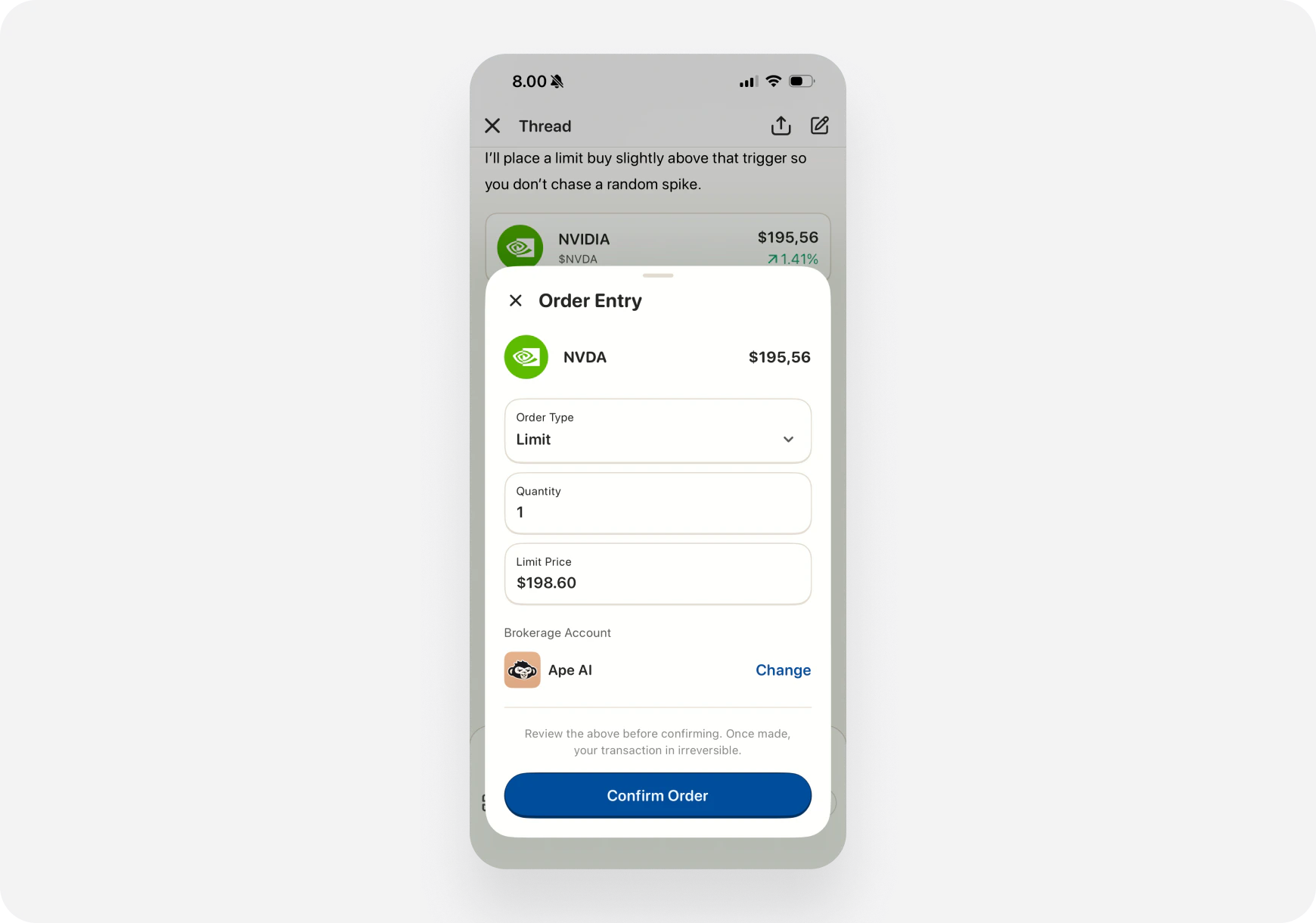 Order preview screen opens with all details pre-filled:
**What You'll See:**
* **Ticker:** TSLA
* **Action:** Buy to Open
* **Quantity:** (You choose)
* **Order Type:** Limit / Market
* **Price:** \$5.50 (pre-filled)
* **Expiration:** Friday (pre-filled)
* **Strike:** \$470 (pre-filled)
* **Estimated Cost:** \$550 (for 1 contract)
**You can adjust:**
* Quantity (how many contracts/shares)
* Order type (market vs limit)
* Price (if limit order)
***
### Step 4: Confirm and Place Order
Order preview screen opens with all details pre-filled:
**What You'll See:**
* **Ticker:** TSLA
* **Action:** Buy to Open
* **Quantity:** (You choose)
* **Order Type:** Limit / Market
* **Price:** \$5.50 (pre-filled)
* **Expiration:** Friday (pre-filled)
* **Strike:** \$470 (pre-filled)
* **Estimated Cost:** \$550 (for 1 contract)
**You can adjust:**
* Quantity (how many contracts/shares)
* Order type (market vs limit)
* Price (if limit order)
***
### Step 4: Confirm and Place Order
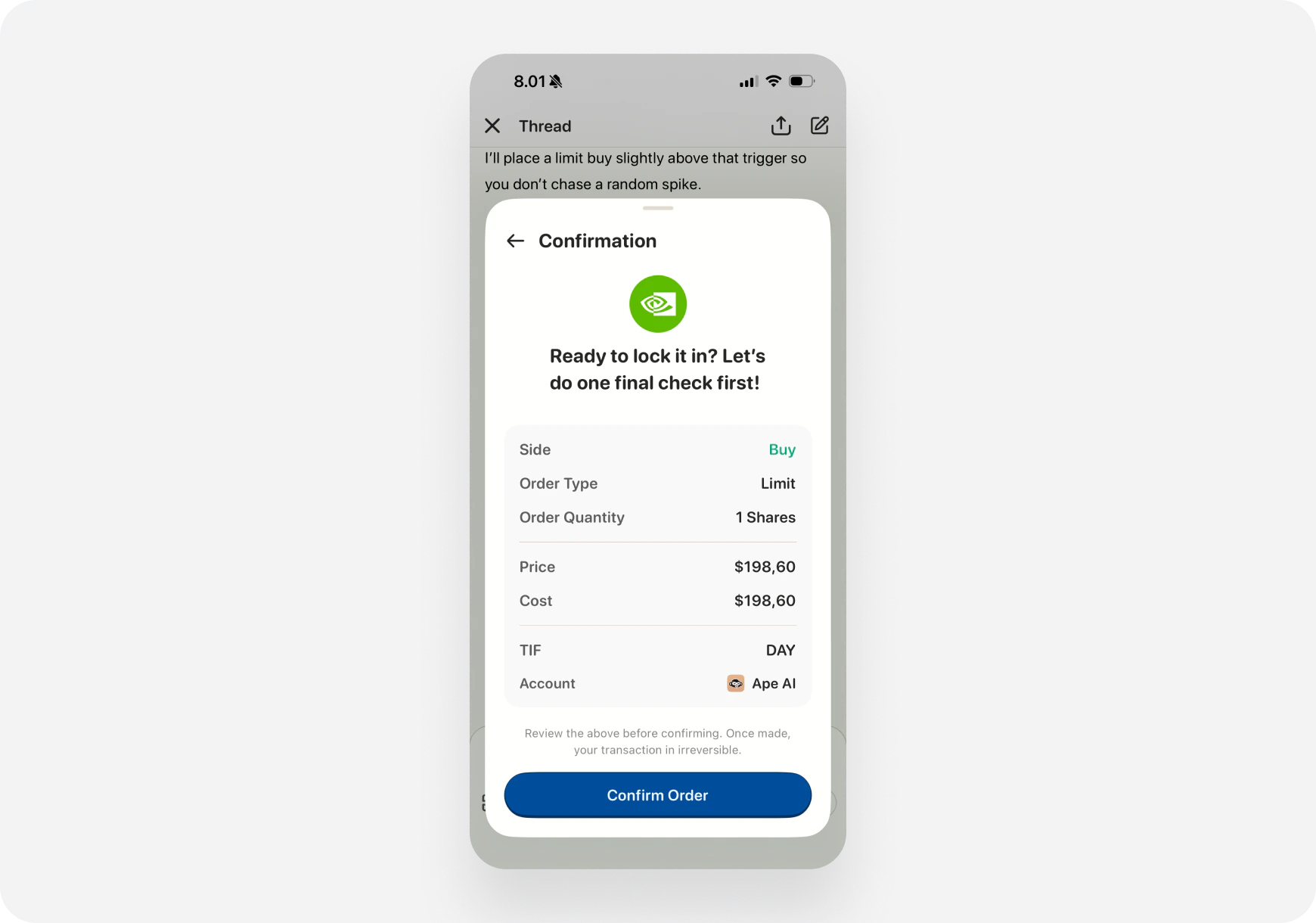 **Review everything carefully:**
* ✅ Ticker is correct
* ✅ Strike and expiration match AI's recommendation
* ✅ Quantity fits your risk tolerance
* ✅ Price is acceptable
* ✅ You have buying power
**Then:**
**📱 iOS:** Tap **"Place Order"** **🌐 Web:** Click **"Confirm & Place Order"**
**Authentication:**
* iOS: Face ID / Touch ID
* Web: Re-enter password or 2FA
***
### Step 5: Order Placed! 🎉
**Success screen shows:**
**Review everything carefully:**
* ✅ Ticker is correct
* ✅ Strike and expiration match AI's recommendation
* ✅ Quantity fits your risk tolerance
* ✅ Price is acceptable
* ✅ You have buying power
**Then:**
**📱 iOS:** Tap **"Place Order"** **🌐 Web:** Click **"Confirm & Place Order"**
**Authentication:**
* iOS: Face ID / Touch ID
* Web: Re-enter password or 2FA
***
### Step 5: Order Placed! 🎉
**Success screen shows:**
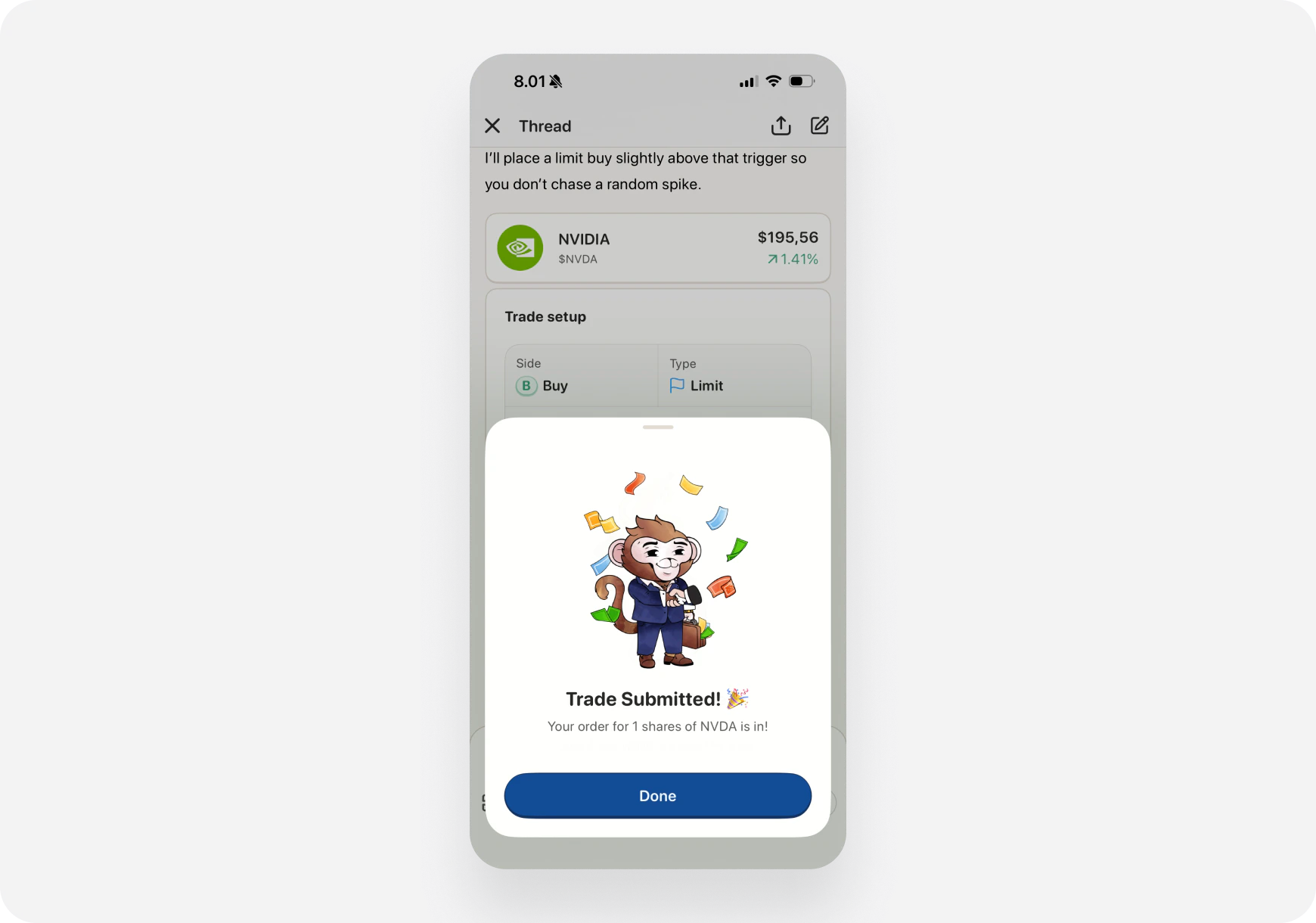 * ✅ Order placed
* Order ID
* Details of the trade
* Link to view in Portfolio
**AI Chat also updates:**
> "✅ Order placed: Bought 1 TSLA $470 call exp 11/10 at $5.50. Good luck! 🚀"
***
## 🎯 Trade Types You Can Execute
### Stocks (Shares)
**Example AI Recommendation:**
> "NVDA swing entry: Buy 10 shares at $875-880. Target $920, stop \$860."
**Execute Trade:**
* Action: Buy
* Quantity: 10 shares
* Order: Limit at \$878
***
### Options (Calls & Puts)
**Example AI Recommendation:**
> "AMD $180 calls exp Friday. Entry $3.50, target \$5.00."
**Execute Trade:**
* Action: Buy to Open
* Ticker: AMD
* Strike: \$180
* Expiration: Friday
* Type: Call
* Quantity: 1 contract
* Price: \$3.50 limit
***
### Multi-Leg Strategies (Advanced)
**Example AI Recommendation:**
> "SPY bull call spread: Buy $450 call, sell $455 call, both exp Friday. Net debit \$2.50."
**Execute Trade:**
* Strategy: Bull Call Spread
* Legs: 2 (buy + sell)
* All details pre-filled
* Review and confirm
**Note:** Multi-leg strategies may require options approval level 2+ with your broker.
***
## ⚙️ Order Types Explained
### Market Order
* **Executes immediately** at current market price
* **Fast** but price not guaranteed
* **Best for:** Liquid stocks, urgent entries
### Limit Order
* **Executes at your price or better**
* May not fill if price doesn't reach your limit
* **Best for:** Precise entries, illiquid options
### Stop Loss (After Entry)
* AI recommendations include stop loss levels
* You can set stop loss after trade is filled
* Do this in your brokerage's interface or Portfolio tab
***
## 💡 Pro Tips
### 1. Always Review Before Confirming
AI is smart but not perfect:
* Check the strike and expiration
* Verify quantity fits your risk
* Confirm you have buying power
* Make sure it's the right ticker!
**You have final control.** Don't blindly execute.
***
### 2. Adjust Quantity for Your Risk Tolerance
**AI might suggest:** "Buy 5 contracts"
**Your decision:**
* New trader? Start with 1
* Experienced? Maybe 5 is fine
* Small account? Buy fewer
* Large account? Scale up
**Never risk more than you're comfortable losing.**
***
### 3. Use Limit Orders for Options
Options spreads can be wide:
* Market order might get bad fill
* Limit order ensures your price
* Wait for your price to get hit
**Exception:** Very liquid options (SPY, QQQ, AAPL) might be okay with market orders.
***
### 4. Set Stop Losses Immediately
After trade fills:
1. Go to Portfolio tab
2. Find your position
3. Set stop loss at AI's recommended level
4. Protect your downside
**Don't forget this step!** Stop losses save accounts.
***
### 5. Paper Trade First
**Not sure about executing from chat?**
* Connect Ape Paper Trading Account
* Practice with fake money
* Get comfortable with the flow
* Then graduate to real money
[Learn about Paper Trading →](../Brokerage/paper-trading/)
***
## ⚠️ Important Warnings
### You Are Responsible
* AI provides suggestions, **not financial advice**
* You make the final decision
* Review every order carefully
* Understand the risks
### Options Are Risky
* Options can expire worthless
* You can lose 100% of your investment
* Don't trade options unless you understand them
### Check Your Buying Power
* Make sure you have funds available
* Orders may be rejected if insufficient funds
* Don't overleverage
### Execution Speed Doesn't Mean Good Trade
* Fast execution is convenient
* But **still do your own analysis**
* Don't FOMO into trades
* Stick to your strategy
**Trade smart, not just fast.**
***
## 🔒 Security & Safety
### How We Keep Your Trades Safe:
**1. Two-Factor Confirmation**
* Every trade requires authentication
* Face ID / Touch ID on iOS
* Password / 2FA on Web
**2. Trade Permissions**
* You explicitly enable trading
* Can disable anytime in Settings
* Off by default for new accounts
**3. No Automatic Execution**
* AI **never** places trades automatically
* You always review and confirm
* Full control at every step
**4. Secure Brokerage Integration**
* OAuth 2.0 for connection
* Tokens encrypted
* No passwords stored
**5. Order Limits**
* Can set max order size in Settings
* Prevents accidental large orders
* Safety guardrails
***
## 🎯 Real Example Workflow
### Scenario: Day Trading TSLA Calls
**9:15 AM - Ask AI:**
> "Find me a day trade options setup for TSLA"
**AI Response (Blitz):**
> "TSLA $470 calls exp today. Entry $5.50, target \$8.00. Strong momentum."
**9:16 AM - Execute:**
1. Tap **"Execute Trade"**
2. Review: 1 contract, limit \$5.50
3. Confirm with Face ID
4. Order placed ✅
**11:30 AM - Check Position:**
* TSLA calls now at \$7.20
* Up 31% 🚀
* AI: "Consider taking profits at \$8.00 target"
**11:45 AM - Exit:**
1. Ask AI: "Should I close my TSLA call?"
2. AI: "TSLA hitting resistance. Take profits now."
3. Tap **"Execute Trade"** (Sell to Close)
4. Sold at \$7.80 ✅
**Result:**
* Entry: \$5.50
* Exit: \$7.80
* Profit: \$230 (42%)
* Time: 2.5 hours
* Clicks: 6 (2 executions from chat)
**Without chat execution:**
* Switch to brokerage app
* Find TSLA
* Navigate to options chain
* Find correct strike/expiration
* Enter order details manually
* Way more time and clicks
***
## 📊 Execution from Chat vs Manual Entry
| Feature | Execute from Chat | Manual Entry |
| --------------- | ---------------------- | ----------------- |
| **Speed** | ⚡ Seconds | 🐌 Minutes |
| **Accuracy** | ✅ Pre-filled correctly | ⚠️ Manual typing |
| **Context** | 📝 See AI reasoning | ❌ Lose context |
| **Convenience** | ✅ One screen | ❌ Switch apps |
| **Mistakes** | 🔒 Less likely | ⚠️ Typos possible |
| **Learning** | 📚 See AI's logic | ❌ Just execute |
**Chat execution wins on every metric.**
***
## ❓ FAQ
**Q: Does executing from chat cost extra?** A: No! Same brokerage commissions apply. No Ape AI fees.
**Q: Can I cancel an order after placing it?** A: Yes, go to Portfolio → Orders → Cancel (if order hasn't filled yet).
**Q: What if I don't have enough buying power?** A: Order will be rejected. AI doesn't check your buying power beforehand.
**Q: Can I execute trades on Ape Paper Trading Account?** A: Yes! Great for practice.
**Q: Do all AI recommendations have "Execute Trade" button?** A: Only if:
* You have connected brokerage
* Trading permissions enabled
* AI gives specific trade recommendation with entry price
**Q: Can I modify the order before confirming?** A: Yes! Change quantity, order type, price before placing.
**Q: What brokerages support this?** A: Most major brokers. See [Supported Brokerages →](../Brokerage/supported)
**Q: Is this safe?** A: Yes. Multiple confirmation steps, authentication required, you review everything.
***
## 🚧 Troubleshooting
### "Execute Trade" Button Not Showing
**Possible reasons:**
1. No brokerage connected → [Connect one](../Brokerage/connecting)
2. Trading permissions disabled → Enable in Settings
3. AI response wasn't a specific trade setup → Ask for specific entry
4. Your brokerage doesn't support this feature → Check supported list
***
### Order Rejected
**Common causes:**
1. Insufficient buying power
2. Options trading not approved (upgrade brokerage account)
3. Market closed (can only place orders during market hours)
4. Incorrect order details (review and fix)
***
### Order Filled at Different Price
**Why:**
* Market orders fill at current market price (can vary)
* Limit orders fill at your price or better
* Fast-moving stocks can have slippage
**Solution:** Use limit orders for more control.
***
## What's Next?
**Learn More About Chat:**
* [Chat Basics →](/features/chat/basics) - How to use AI Chat
* [Quick Prompts →](/features/chat/quick-prompts) - Pre-built prompts
* [Custom Prompts →](/features/chat/custom-prompts) - Create your own
**Connect Your Brokerage:**
* [Why Connect? →](../Brokerage/why-connect)
* [Supported Brokerages →](../Brokerage/supported)
* [How to Connect →](../Brokerage/connecting)
**Try These Workflows:**
* [My First Day Trade →](../../Use-Cases/Trader/first-day-trade) - Execute from chat
* [Premarket Routine →](/use-cases/advanced/premarket-routine) - Morning setups
***
**Execute from Chat = Idea to Order in Seconds. Trade smarter, not harder! ⚡🚀**
* ✅ Order placed
* Order ID
* Details of the trade
* Link to view in Portfolio
**AI Chat also updates:**
> "✅ Order placed: Bought 1 TSLA $470 call exp 11/10 at $5.50. Good luck! 🚀"
***
## 🎯 Trade Types You Can Execute
### Stocks (Shares)
**Example AI Recommendation:**
> "NVDA swing entry: Buy 10 shares at $875-880. Target $920, stop \$860."
**Execute Trade:**
* Action: Buy
* Quantity: 10 shares
* Order: Limit at \$878
***
### Options (Calls & Puts)
**Example AI Recommendation:**
> "AMD $180 calls exp Friday. Entry $3.50, target \$5.00."
**Execute Trade:**
* Action: Buy to Open
* Ticker: AMD
* Strike: \$180
* Expiration: Friday
* Type: Call
* Quantity: 1 contract
* Price: \$3.50 limit
***
### Multi-Leg Strategies (Advanced)
**Example AI Recommendation:**
> "SPY bull call spread: Buy $450 call, sell $455 call, both exp Friday. Net debit \$2.50."
**Execute Trade:**
* Strategy: Bull Call Spread
* Legs: 2 (buy + sell)
* All details pre-filled
* Review and confirm
**Note:** Multi-leg strategies may require options approval level 2+ with your broker.
***
## ⚙️ Order Types Explained
### Market Order
* **Executes immediately** at current market price
* **Fast** but price not guaranteed
* **Best for:** Liquid stocks, urgent entries
### Limit Order
* **Executes at your price or better**
* May not fill if price doesn't reach your limit
* **Best for:** Precise entries, illiquid options
### Stop Loss (After Entry)
* AI recommendations include stop loss levels
* You can set stop loss after trade is filled
* Do this in your brokerage's interface or Portfolio tab
***
## 💡 Pro Tips
### 1. Always Review Before Confirming
AI is smart but not perfect:
* Check the strike and expiration
* Verify quantity fits your risk
* Confirm you have buying power
* Make sure it's the right ticker!
**You have final control.** Don't blindly execute.
***
### 2. Adjust Quantity for Your Risk Tolerance
**AI might suggest:** "Buy 5 contracts"
**Your decision:**
* New trader? Start with 1
* Experienced? Maybe 5 is fine
* Small account? Buy fewer
* Large account? Scale up
**Never risk more than you're comfortable losing.**
***
### 3. Use Limit Orders for Options
Options spreads can be wide:
* Market order might get bad fill
* Limit order ensures your price
* Wait for your price to get hit
**Exception:** Very liquid options (SPY, QQQ, AAPL) might be okay with market orders.
***
### 4. Set Stop Losses Immediately
After trade fills:
1. Go to Portfolio tab
2. Find your position
3. Set stop loss at AI's recommended level
4. Protect your downside
**Don't forget this step!** Stop losses save accounts.
***
### 5. Paper Trade First
**Not sure about executing from chat?**
* Connect Ape Paper Trading Account
* Practice with fake money
* Get comfortable with the flow
* Then graduate to real money
[Learn about Paper Trading →](../Brokerage/paper-trading/)
***
## ⚠️ Important Warnings
### You Are Responsible
* AI provides suggestions, **not financial advice**
* You make the final decision
* Review every order carefully
* Understand the risks
### Options Are Risky
* Options can expire worthless
* You can lose 100% of your investment
* Don't trade options unless you understand them
### Check Your Buying Power
* Make sure you have funds available
* Orders may be rejected if insufficient funds
* Don't overleverage
### Execution Speed Doesn't Mean Good Trade
* Fast execution is convenient
* But **still do your own analysis**
* Don't FOMO into trades
* Stick to your strategy
**Trade smart, not just fast.**
***
## 🔒 Security & Safety
### How We Keep Your Trades Safe:
**1. Two-Factor Confirmation**
* Every trade requires authentication
* Face ID / Touch ID on iOS
* Password / 2FA on Web
**2. Trade Permissions**
* You explicitly enable trading
* Can disable anytime in Settings
* Off by default for new accounts
**3. No Automatic Execution**
* AI **never** places trades automatically
* You always review and confirm
* Full control at every step
**4. Secure Brokerage Integration**
* OAuth 2.0 for connection
* Tokens encrypted
* No passwords stored
**5. Order Limits**
* Can set max order size in Settings
* Prevents accidental large orders
* Safety guardrails
***
## 🎯 Real Example Workflow
### Scenario: Day Trading TSLA Calls
**9:15 AM - Ask AI:**
> "Find me a day trade options setup for TSLA"
**AI Response (Blitz):**
> "TSLA $470 calls exp today. Entry $5.50, target \$8.00. Strong momentum."
**9:16 AM - Execute:**
1. Tap **"Execute Trade"**
2. Review: 1 contract, limit \$5.50
3. Confirm with Face ID
4. Order placed ✅
**11:30 AM - Check Position:**
* TSLA calls now at \$7.20
* Up 31% 🚀
* AI: "Consider taking profits at \$8.00 target"
**11:45 AM - Exit:**
1. Ask AI: "Should I close my TSLA call?"
2. AI: "TSLA hitting resistance. Take profits now."
3. Tap **"Execute Trade"** (Sell to Close)
4. Sold at \$7.80 ✅
**Result:**
* Entry: \$5.50
* Exit: \$7.80
* Profit: \$230 (42%)
* Time: 2.5 hours
* Clicks: 6 (2 executions from chat)
**Without chat execution:**
* Switch to brokerage app
* Find TSLA
* Navigate to options chain
* Find correct strike/expiration
* Enter order details manually
* Way more time and clicks
***
## 📊 Execution from Chat vs Manual Entry
| Feature | Execute from Chat | Manual Entry |
| --------------- | ---------------------- | ----------------- |
| **Speed** | ⚡ Seconds | 🐌 Minutes |
| **Accuracy** | ✅ Pre-filled correctly | ⚠️ Manual typing |
| **Context** | 📝 See AI reasoning | ❌ Lose context |
| **Convenience** | ✅ One screen | ❌ Switch apps |
| **Mistakes** | 🔒 Less likely | ⚠️ Typos possible |
| **Learning** | 📚 See AI's logic | ❌ Just execute |
**Chat execution wins on every metric.**
***
## ❓ FAQ
**Q: Does executing from chat cost extra?** A: No! Same brokerage commissions apply. No Ape AI fees.
**Q: Can I cancel an order after placing it?** A: Yes, go to Portfolio → Orders → Cancel (if order hasn't filled yet).
**Q: What if I don't have enough buying power?** A: Order will be rejected. AI doesn't check your buying power beforehand.
**Q: Can I execute trades on Ape Paper Trading Account?** A: Yes! Great for practice.
**Q: Do all AI recommendations have "Execute Trade" button?** A: Only if:
* You have connected brokerage
* Trading permissions enabled
* AI gives specific trade recommendation with entry price
**Q: Can I modify the order before confirming?** A: Yes! Change quantity, order type, price before placing.
**Q: What brokerages support this?** A: Most major brokers. See [Supported Brokerages →](../Brokerage/supported)
**Q: Is this safe?** A: Yes. Multiple confirmation steps, authentication required, you review everything.
***
## 🚧 Troubleshooting
### "Execute Trade" Button Not Showing
**Possible reasons:**
1. No brokerage connected → [Connect one](../Brokerage/connecting)
2. Trading permissions disabled → Enable in Settings
3. AI response wasn't a specific trade setup → Ask for specific entry
4. Your brokerage doesn't support this feature → Check supported list
***
### Order Rejected
**Common causes:**
1. Insufficient buying power
2. Options trading not approved (upgrade brokerage account)
3. Market closed (can only place orders during market hours)
4. Incorrect order details (review and fix)
***
### Order Filled at Different Price
**Why:**
* Market orders fill at current market price (can vary)
* Limit orders fill at your price or better
* Fast-moving stocks can have slippage
**Solution:** Use limit orders for more control.
***
## What's Next?
**Learn More About Chat:**
* [Chat Basics →](/features/chat/basics) - How to use AI Chat
* [Quick Prompts →](/features/chat/quick-prompts) - Pre-built prompts
* [Custom Prompts →](/features/chat/custom-prompts) - Create your own
**Connect Your Brokerage:**
* [Why Connect? →](../Brokerage/why-connect)
* [Supported Brokerages →](../Brokerage/supported)
* [How to Connect →](../Brokerage/connecting)
**Try These Workflows:**
* [My First Day Trade →](../../Use-Cases/Trader/first-day-trade) - Execute from chat
* [Premarket Routine →](/use-cases/advanced/premarket-routine) - Morning setups
***
**Execute from Chat = Idea to Order in Seconds. Trade smarter, not harder! ⚡🚀**