> ## Documentation Index
> Fetch the complete documentation index at: https://guide.askape.com/llms.txt
> Use this file to discover all available pages before exploring further.
# AI Chat Basics
Your AI trading companion. Ask anything about stocks, get instant analysis.
**⏱️ Time to read:** 5 minutes **📱🌐 Platform:** Both iOS & Web **👤 Best for:** Everyone
***
## 🤖 What is AI Chat?
AI Chat is your personal trading assistant powered by artificial intelligence. Think of it like having a smart trader friend who:
* Answers any question about stocks
* Finds trade setups for you
* Analyzes companies in seconds
* Explains complex concepts simply
* Helps with strategy decisions
**No more hours of research.** Just ask and get answers.
***
## 📱 Where to Find It
### iOS
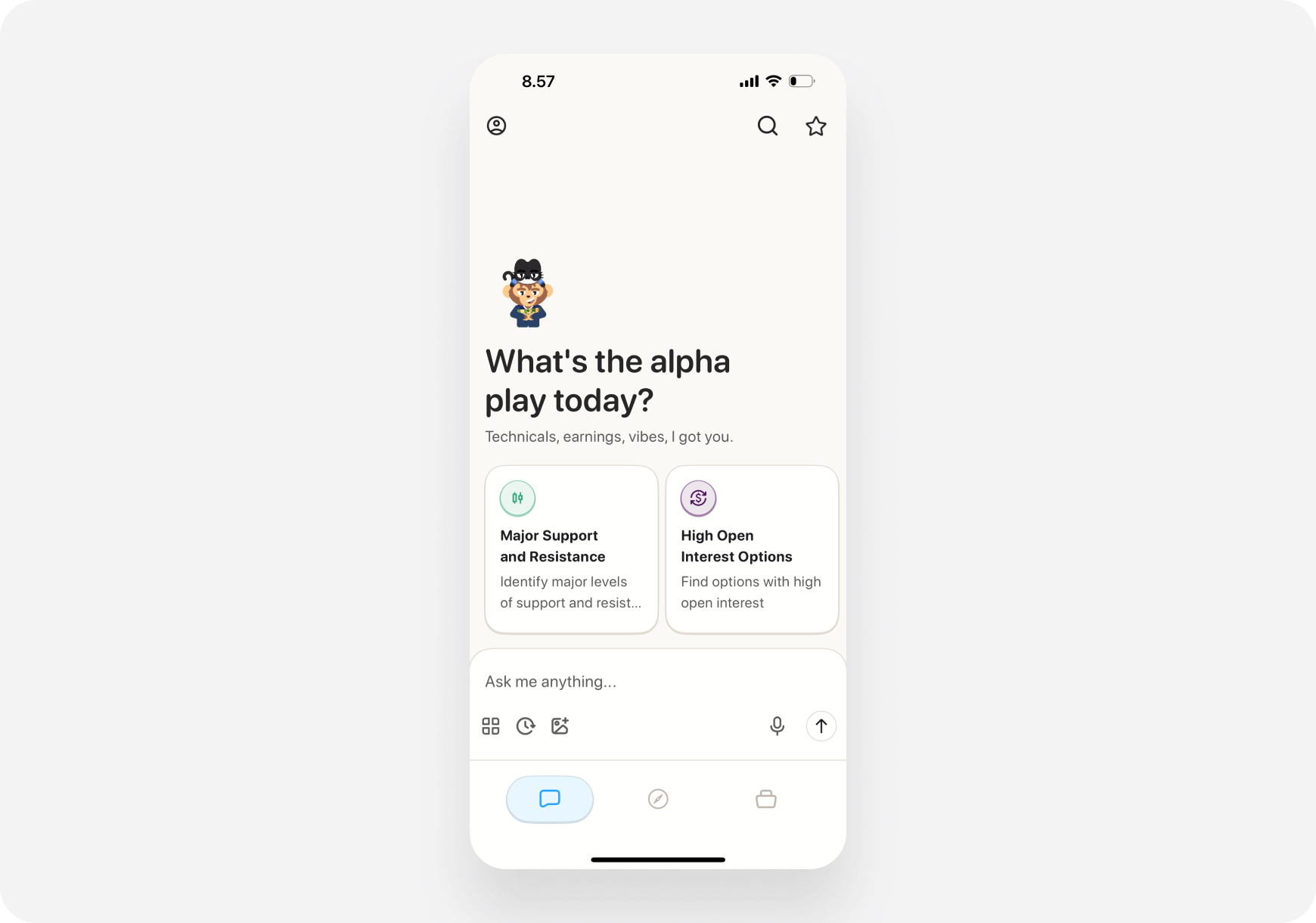
1. Open Ape AI app
2. Tap **Chat tab** (bottom left)
3. You'll see the chat interface
 ### Web
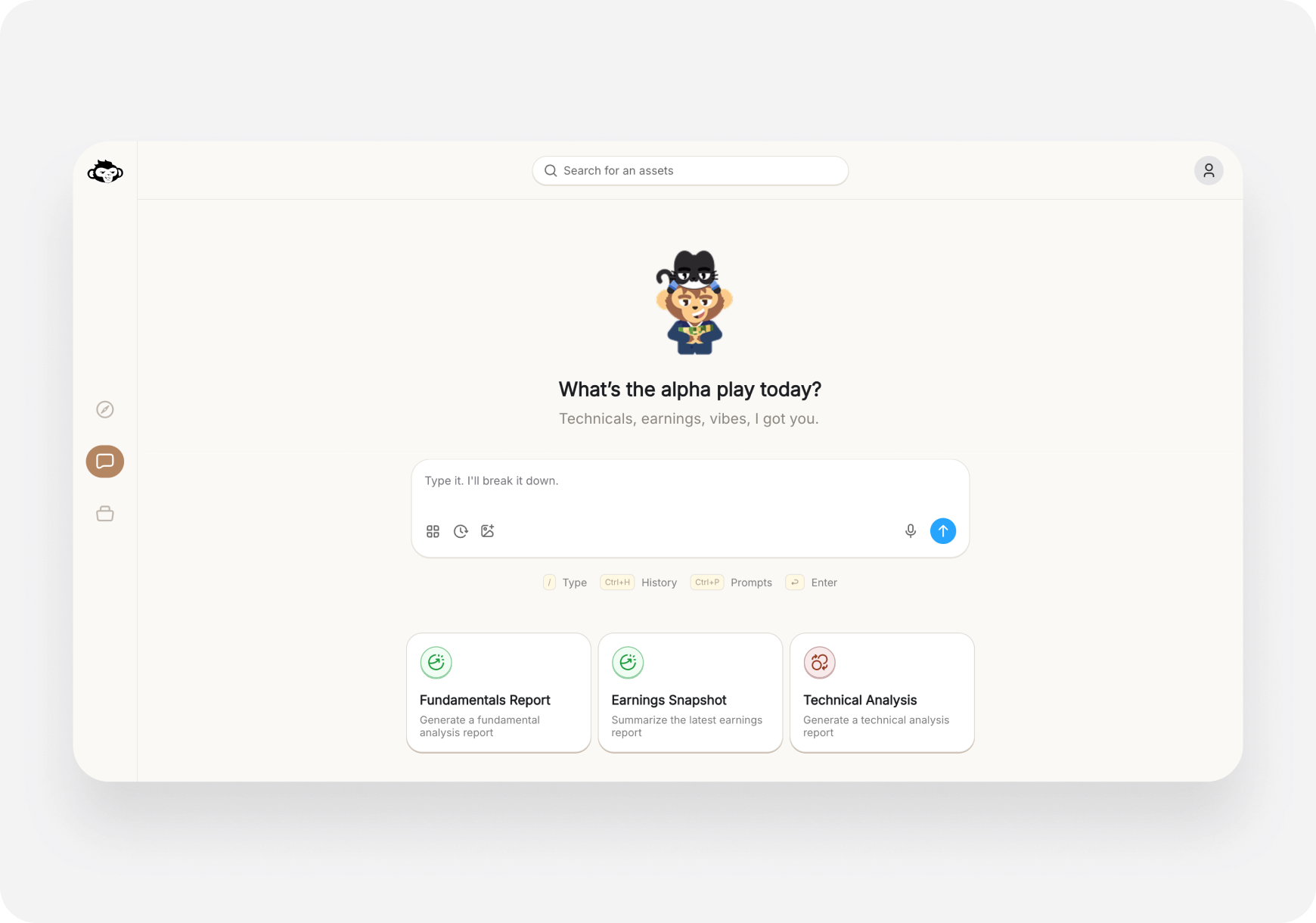
1. Go to app.askape.com
2. Click **Chat** in left sidebar
3. Chat interface opens
### Web
1. Go to app.askape.com
2. Click **Chat** in left sidebar
3. Chat interface opens
 ***
## 💬 Chat Interface Overview
### Main Elements
**📱 iOS Layout:**
* **Top:** Your chosen companion
* **Middle:** Chat conversation history
* **Bottom:** Text input + icons (Prompts, History, Voice, Send)
* **Quick Action Cards:** Swipeable prompts at top
**🌐 Web Layout:**
* **Top:** Companion indicator
* **Middle:** Chat conversation
* **Bottom:** Text input box
* **Sidebar:** Prompts button (or Ctrl+P)
***
## 🎯 What You Can Ask
### Stock Analysis
* "Is TSLA overvalued?"
* "Analyze AAPL fundamentals"
* "What's the technical setup for NVDA?"
* "Should I buy or sell \[ticker]?"
### Trade Ideas
* "What are good swing trades this week?"
* "Find strong catalyst stocks under \$50"
* "Show me undervalued stocks"
* "What's hot in tech right now?"
* "Find me day trade setups" (advanced)
### Strategy Questions
* "What's a good entry point for \[ticker]?"
* "When should I take profits?"
* "How do I know if it's a breakout or fakeout?"
* "What's the risk in holding \[ticker] through earnings?"
### Learning Questions
* "Explain what a call option is"
* "What's theta decay?"
* "How do I read RSI?"
* "What's a P/E ratio?"
### Portfolio Questions
* "Should I diversify more?"
* "Is my portfolio too risky?"
* "What should I add to balance my holdings?"
* "Analyze my portfolio" (if Maverick AI is enabled)
**Basically anything trading-related!**
***
## ⌨️ How to Use Chat
### Type a Question
**📱 iOS:**
1. Tap the text box at bottom
2. Type your question
3. Tap **Send arrow** (or voice icon for voice input)
**🌐 Web:**
1. Click the text box
2. Type your question
3. Press **Enter** or click Send
### Use Quick Prompts
Instead of typing, use pre-built prompts:
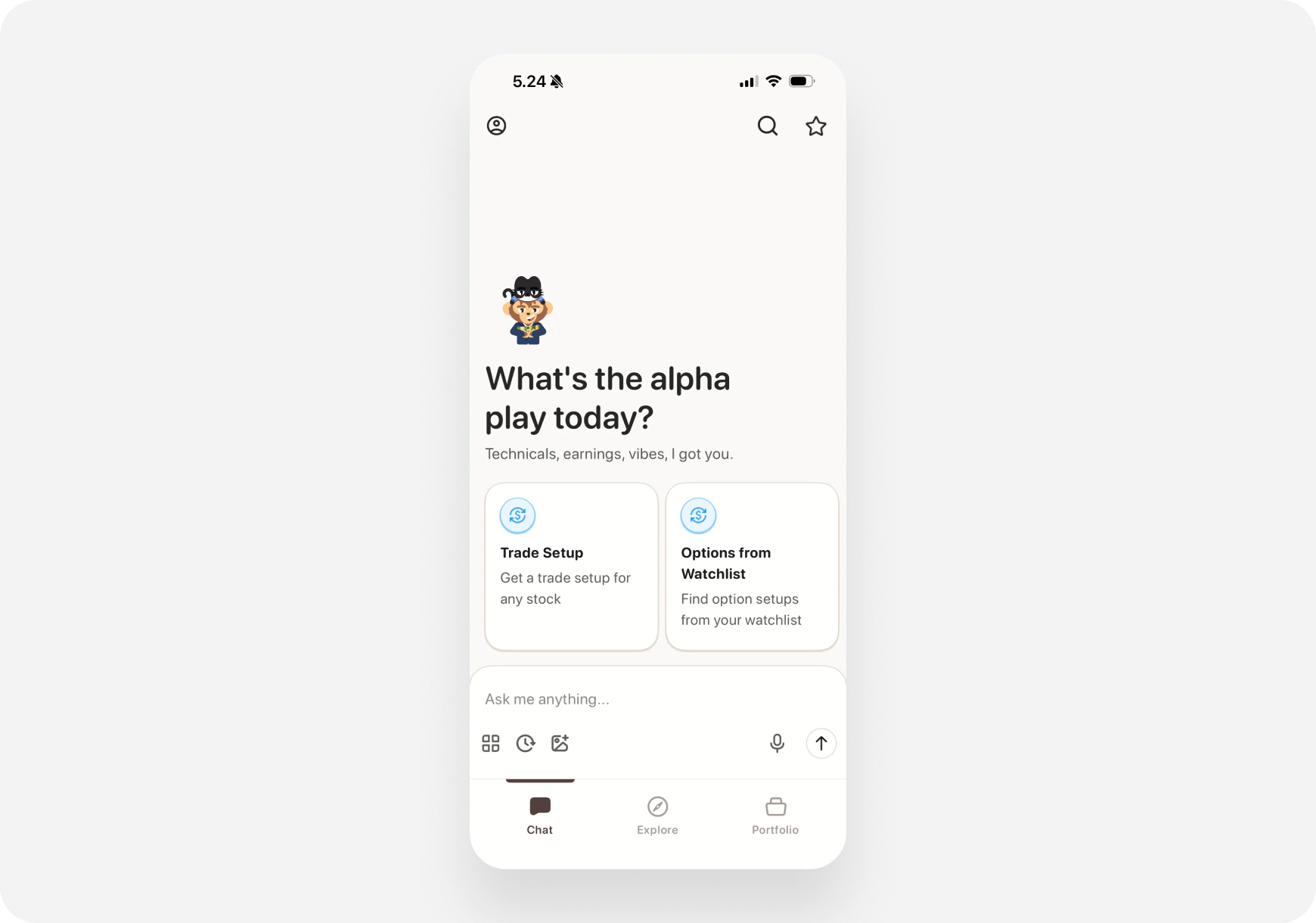
**📱 iOS:**
* Swipe through **Quick Action cards** at top
* Tap a card to use that prompt
* Or tap **Prompts icon** (bottom toolbar)
***
## 💬 Chat Interface Overview
### Main Elements
**📱 iOS Layout:**
* **Top:** Your chosen companion
* **Middle:** Chat conversation history
* **Bottom:** Text input + icons (Prompts, History, Voice, Send)
* **Quick Action Cards:** Swipeable prompts at top
**🌐 Web Layout:**
* **Top:** Companion indicator
* **Middle:** Chat conversation
* **Bottom:** Text input box
* **Sidebar:** Prompts button (or Ctrl+P)
***
## 🎯 What You Can Ask
### Stock Analysis
* "Is TSLA overvalued?"
* "Analyze AAPL fundamentals"
* "What's the technical setup for NVDA?"
* "Should I buy or sell \[ticker]?"
### Trade Ideas
* "What are good swing trades this week?"
* "Find strong catalyst stocks under \$50"
* "Show me undervalued stocks"
* "What's hot in tech right now?"
* "Find me day trade setups" (advanced)
### Strategy Questions
* "What's a good entry point for \[ticker]?"
* "When should I take profits?"
* "How do I know if it's a breakout or fakeout?"
* "What's the risk in holding \[ticker] through earnings?"
### Learning Questions
* "Explain what a call option is"
* "What's theta decay?"
* "How do I read RSI?"
* "What's a P/E ratio?"
### Portfolio Questions
* "Should I diversify more?"
* "Is my portfolio too risky?"
* "What should I add to balance my holdings?"
* "Analyze my portfolio" (if Maverick AI is enabled)
**Basically anything trading-related!**
***
## ⌨️ How to Use Chat
### Type a Question
**📱 iOS:**
1. Tap the text box at bottom
2. Type your question
3. Tap **Send arrow** (or voice icon for voice input)
**🌐 Web:**
1. Click the text box
2. Type your question
3. Press **Enter** or click Send
### Use Quick Prompts
Instead of typing, use pre-built prompts:
**📱 iOS:**
* Swipe through **Quick Action cards** at top
* Tap a card to use that prompt
* Or tap **Prompts icon** (bottom toolbar)
 **🌐 Web:**
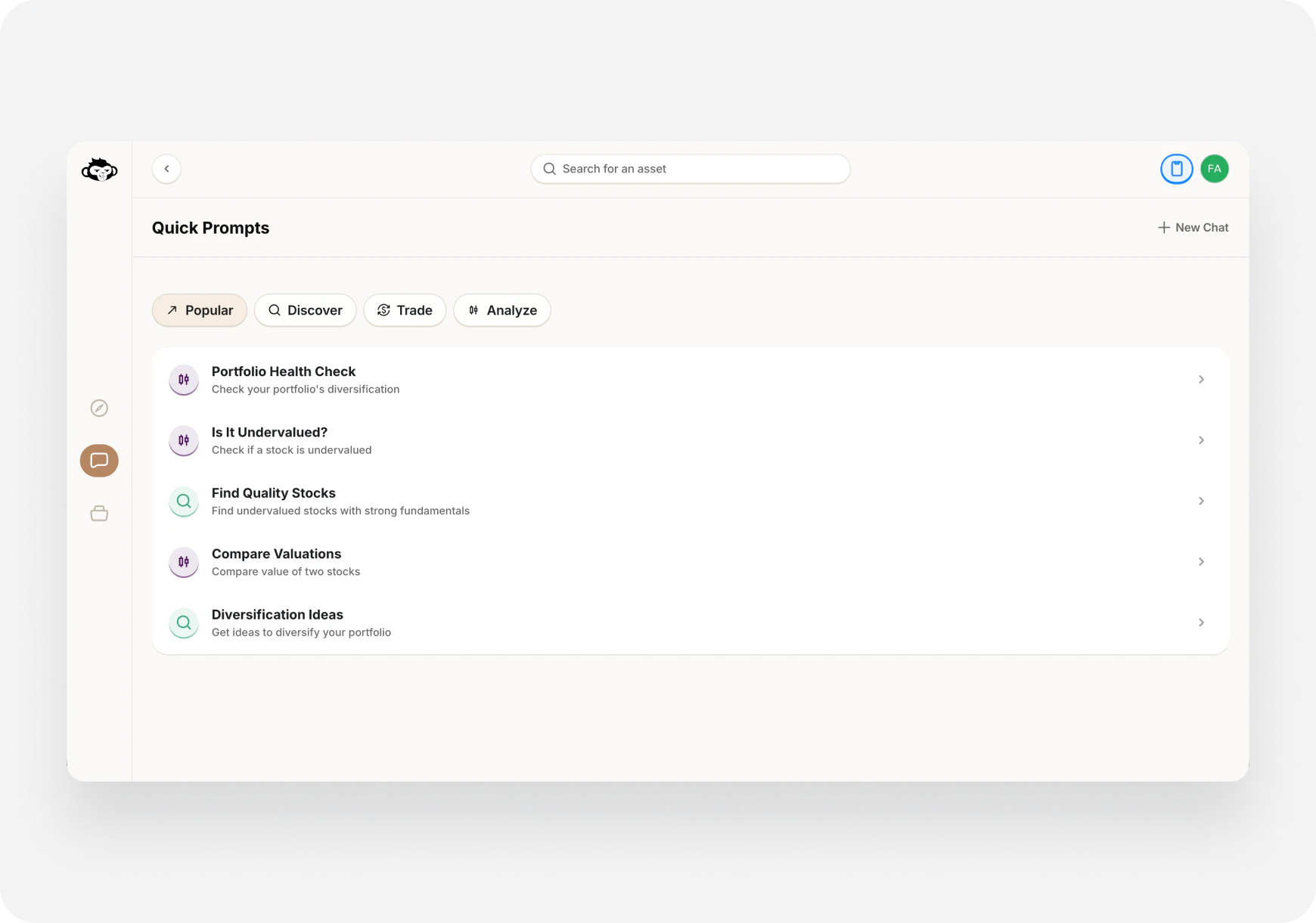
* Click **Prompts icon** in chat
* Or press **Ctrl+P**
* Select a prompt from the list
**🌐 Web:**
* Click **Prompts icon** in chat
* Or press **Ctrl+P**
* Select a prompt from the list
 [More on Quick Prompts →](/features/chat/quick-prompts)
***
### Voice Input (iOS)
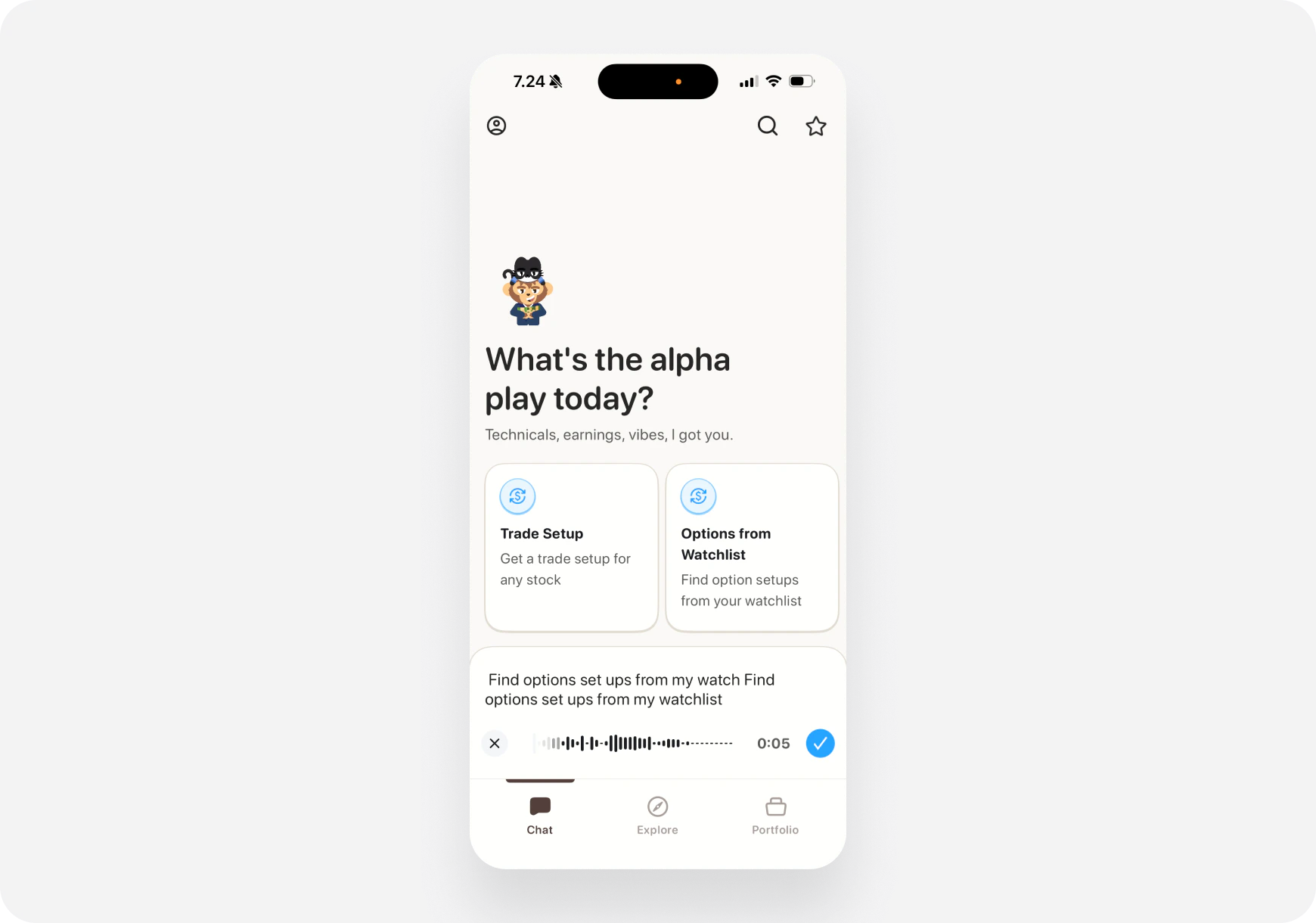
**📱 iOS only:**
1. Tap the **microphone icon**
2. Speak your question
3. AI transcribes and responds
[More on Quick Prompts →](/features/chat/quick-prompts)
***
### Voice Input (iOS)
**📱 iOS only:**
1. Tap the **microphone icon**
2. Speak your question
3. AI transcribes and responds
 ***
## 🧠 How the AI Works
### Companion-Based Responses
Your AI adapts to your [chosen companion](/features/companions):
**Example:** "Should I buy TSLA?"
**Money Monty (Generalist):**
> "TSLA looks solid from multiple angles. Technical strength with volume; fundamentals improving. Entry $465–470, target $490 in \~10 days. Risk: stretched valuation; size 2–3%."
**Maverick (Momentum Trader):**
> "TSLA breaking out with volume. Entry $465–470, target $490 in 7–10 days. Good swing setup."
**Sage (Long‑Term):**
> "TSLA Fundamental B-. Quality company, stretched valuation (P/E \~75). For long‑term: Wait for pullback to \$400–420 or DCA."
**Blitz (Day Trader, advanced):**
> "TSLA near $470. Break with volume → $478 intraday. Consider short‑dated calls; stop at \$458."
**Same question, companion‑specific answers—matching your style and timeframe.**
***
### What AI Analyzes
When you ask about a stock, AI looks at:
* **Price action** - Current and historical
* **Technical indicators** - RSI, MACD, moving averages
* **Fundamentals** - Earnings, P/E, growth
* **News** - Recent headlines and catalysts
* **Sentiment** - Analyst ratings, social chatter
* **Market context** - Overall market conditions
Then gives you a personalized answer.
***
## 💡 Pro Tips for Better Responses
### 1. Be Specific
❌ **Vague:** "Tell me about TSLA"
✅ **Specific:** "Is TSLA a good swing trade entry at \$465?"
### 2. Include Your Timeframe
❌ "Should I buy AAPL?"
✅ "Should I buy AAPL for a 2-week swing trade?"
### 3. Mention Your Risk Tolerance
"Find me low-risk dividend stocks" "Show me high-risk options plays"
### 4. Ask Follow-Up Questions
**First:** "Analyze NVDA" **Follow-up:** "What's the downside risk?" **Follow-up:** "When should I exit?"
### 5. Use Context from Previous Messages
AI remembers your conversation: "What about compared to AMD?" "Should I wait for a pullback?"
***
## 📊 Response Types
### Text Analysis
Most common - AI writes detailed analysis.
### Trade Setups
Structured trade recommendations:
* Entry price
* Target price
* Stop loss
* Timeframe
* Reasoning
### Lists
When you ask for multiple options:
* "Top 5 tech stocks"
* "3 dividend stocks under \$100"
### Educational Explanations
When learning:
* Definitions
* Examples
* Step-by-step guides
***
## 🔄 Chat History
### Access Past Conversations
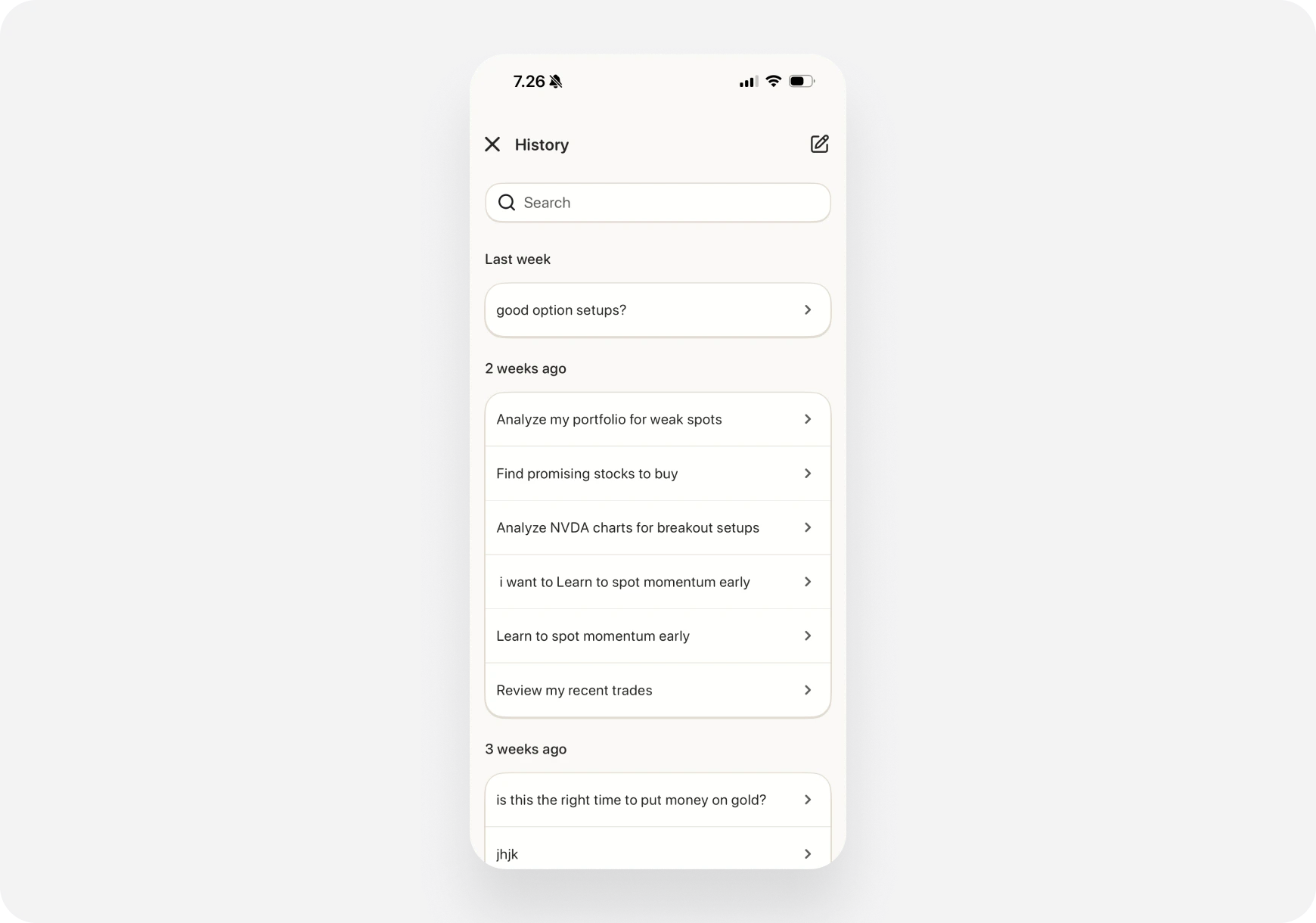
**📱 iOS:**
1. Tap **History icon** (bottom toolbar)
2. See list of past chats
3. Tap to view/continue
***
## 🧠 How the AI Works
### Companion-Based Responses
Your AI adapts to your [chosen companion](/features/companions):
**Example:** "Should I buy TSLA?"
**Money Monty (Generalist):**
> "TSLA looks solid from multiple angles. Technical strength with volume; fundamentals improving. Entry $465–470, target $490 in \~10 days. Risk: stretched valuation; size 2–3%."
**Maverick (Momentum Trader):**
> "TSLA breaking out with volume. Entry $465–470, target $490 in 7–10 days. Good swing setup."
**Sage (Long‑Term):**
> "TSLA Fundamental B-. Quality company, stretched valuation (P/E \~75). For long‑term: Wait for pullback to \$400–420 or DCA."
**Blitz (Day Trader, advanced):**
> "TSLA near $470. Break with volume → $478 intraday. Consider short‑dated calls; stop at \$458."
**Same question, companion‑specific answers—matching your style and timeframe.**
***
### What AI Analyzes
When you ask about a stock, AI looks at:
* **Price action** - Current and historical
* **Technical indicators** - RSI, MACD, moving averages
* **Fundamentals** - Earnings, P/E, growth
* **News** - Recent headlines and catalysts
* **Sentiment** - Analyst ratings, social chatter
* **Market context** - Overall market conditions
Then gives you a personalized answer.
***
## 💡 Pro Tips for Better Responses
### 1. Be Specific
❌ **Vague:** "Tell me about TSLA"
✅ **Specific:** "Is TSLA a good swing trade entry at \$465?"
### 2. Include Your Timeframe
❌ "Should I buy AAPL?"
✅ "Should I buy AAPL for a 2-week swing trade?"
### 3. Mention Your Risk Tolerance
"Find me low-risk dividend stocks" "Show me high-risk options plays"
### 4. Ask Follow-Up Questions
**First:** "Analyze NVDA" **Follow-up:** "What's the downside risk?" **Follow-up:** "When should I exit?"
### 5. Use Context from Previous Messages
AI remembers your conversation: "What about compared to AMD?" "Should I wait for a pullback?"
***
## 📊 Response Types
### Text Analysis
Most common - AI writes detailed analysis.
### Trade Setups
Structured trade recommendations:
* Entry price
* Target price
* Stop loss
* Timeframe
* Reasoning
### Lists
When you ask for multiple options:
* "Top 5 tech stocks"
* "3 dividend stocks under \$100"
### Educational Explanations
When learning:
* Definitions
* Examples
* Step-by-step guides
***
## 🔄 Chat History
### Access Past Conversations
**📱 iOS:**
1. Tap **History icon** (bottom toolbar)
2. See list of past chats
3. Tap to view/continue
 **🌐 Web:**
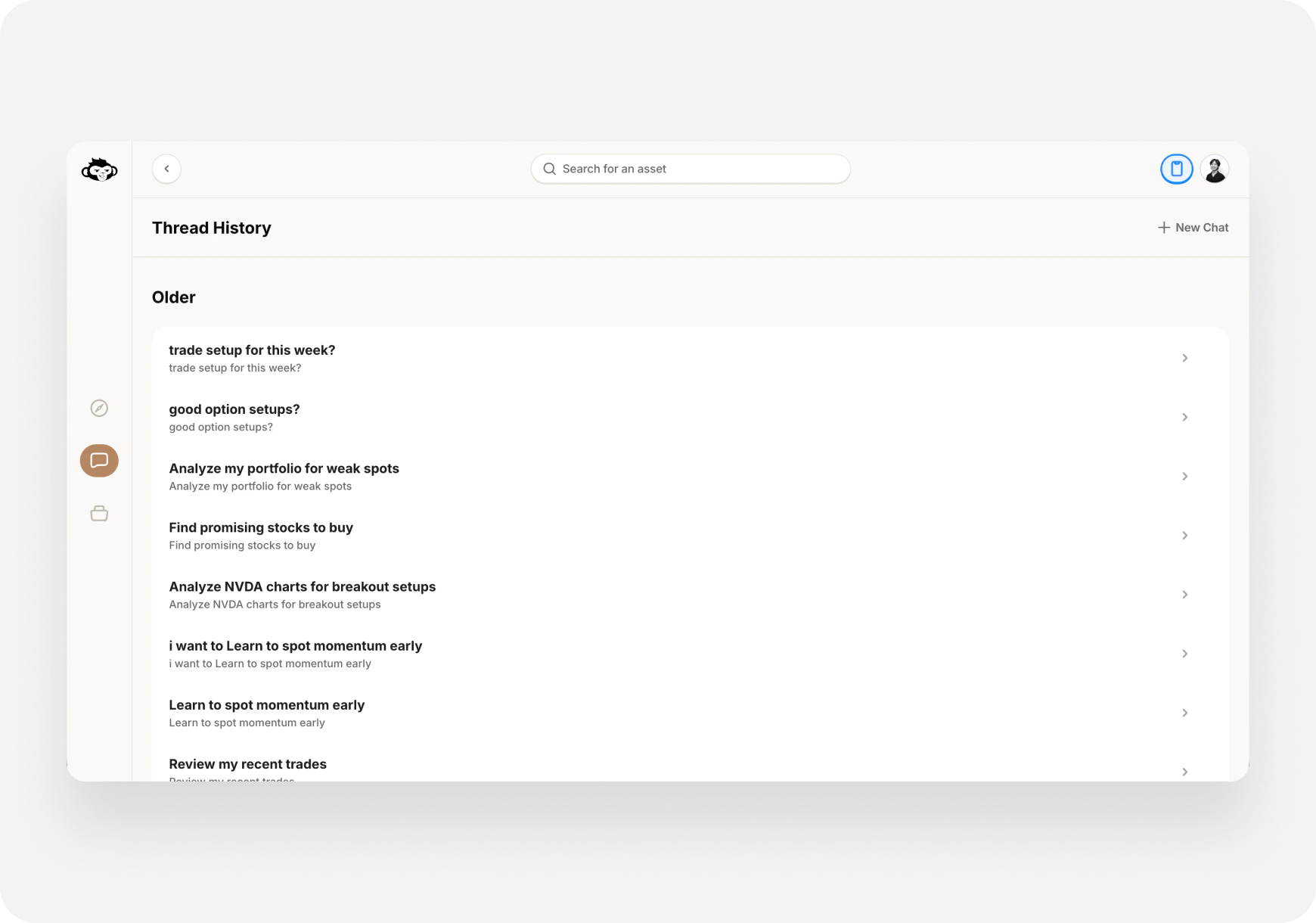
1. Press **Ctrl+H**
2. Or click History icon
3. Select conversation to continue
**🌐 Web:**
1. Press **Ctrl+H**
2. Or click History icon
3. Select conversation to continue
 ### Start New Chat
* Fresh conversation, no context from previous
* Useful for switching topics
***
## ⚡ Keyboard Shortcuts (Web)
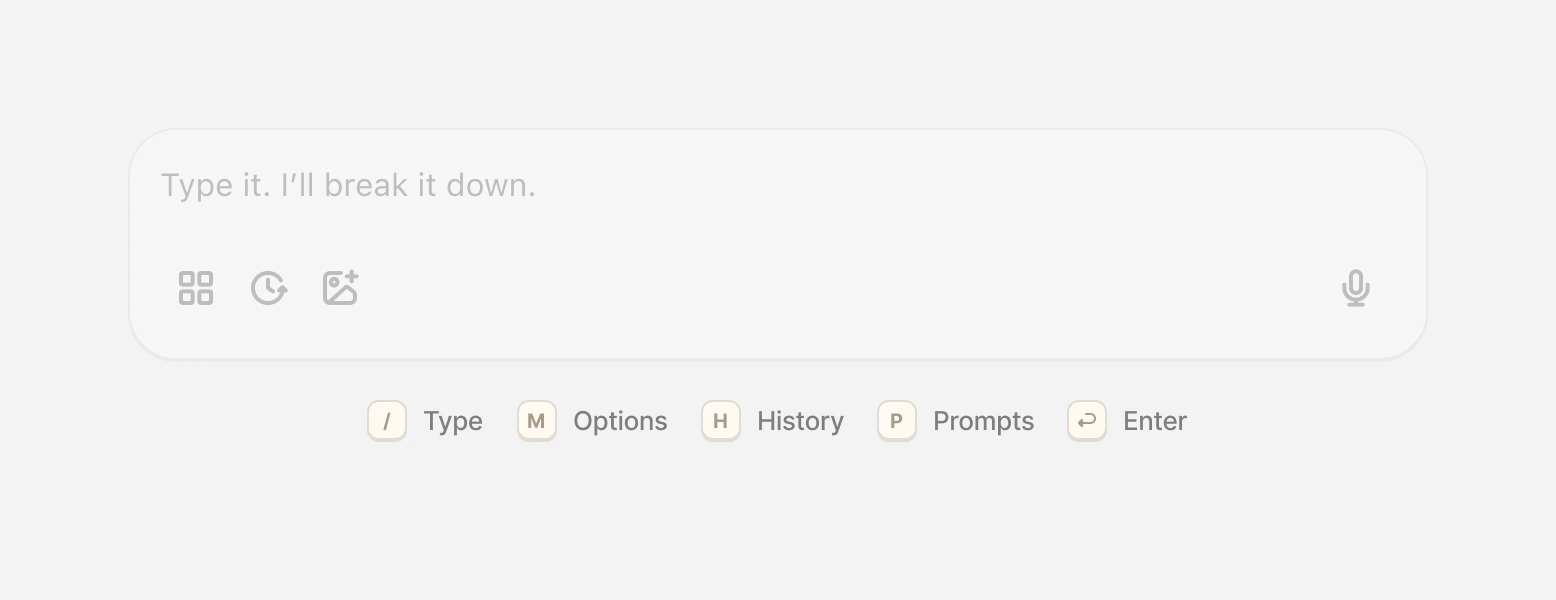
Make chatting faster on web:
* **`/`** - Focus search (find stock)
* **`Ctrl+P`** - Open prompts
* **`Ctrl+H`** - Chat history
* **`Enter`** - Send message
* **`Shift+Enter`** - New line (without sending)
* **`Esc`** - Close modals
### Start New Chat
* Fresh conversation, no context from previous
* Useful for switching topics
***
## ⚡ Keyboard Shortcuts (Web)
Make chatting faster on web:
* **`/`** - Focus search (find stock)
* **`Ctrl+P`** - Open prompts
* **`Ctrl+H`** - Chat history
* **`Enter`** - Send message
* **`Shift+Enter`** - New line (without sending)
* **`Esc`** - Close modals
 ***
## ⚠️ What AI Can't Do
### AI is NOT:
❌ A magic crystal ball (can't predict the future)
❌ 100% accurate (markets are unpredictable)
❌ Financial advice (you make final decisions)
❌ A replacement for your own research
### AI CAN:
✅ Analyze data quickly
✅ Provide informed perspectives
✅ Find opportunities you might miss
✅ Explain complex concepts
✅ Help with strategy decisions
**Always do your own due diligence!**
***
## 🎯 Common Use Cases
### Morning Routine
"What's the market outlook today?" "Show me pre-market movers" "Any important news overnight?"
### Stock Research
"Analyze \[ticker] for me" "Is \[ticker] overvalued?" "What are the risks?"
### Trade Planning
"What's a good entry for \[ticker]?" "When should I take profits?" "Where should I set my stop loss?"
### Learning
"Explain \[concept] to me" "How does \[indicator] work?" "What's the difference between \[A] and \[B]?"
***
## 📚 Related Features
### Quick Prompts
Pre-built questions for common scenarios. [Learn more →](/features/chat/quick-prompts)
### Custom Prompts
Write your own prompts and save them. [Learn more →](/features/chat/custom-prompts)
### Execute Trades from Chat
AI finds setups, you execute from chat. [Learn more →](/features/chat/execute-trades)
### Portfolio AI
AI specifically for portfolio questions. [Learn more →](/features/portfolio/ask-maverick)
***
## ❓ FAQ
**Q: Is the AI always available?** A: Yes! 24/7 access (though markets are only open Mon-Fri).
**Q: How fast are responses?** A: Usually 3-10 seconds depending on complexity.
**Q: Can I ask unlimited questions?** A: Depends on your plan. Super Ape = unlimited.
**Q: Does it remember past conversations?** A: Within the same chat, yes. Access history anytime.
**Q: Can I chat in other languages?** A: Currently English only.
**Q: Is my chat private?** A: Yes, conversations are private to your account.
***
## What's Next?
**Explore Chat Features:**
* [Quick Prompts →](/features/chat/quick-prompts) - Pre-built questions
* [Custom Prompts →](/features/chat/custom-prompts) - Create your own
* [Execute Trades →](/features/chat/execute-trades) - Trade from chat
**Try Workflows:**
* [My First Stock Research →](/use-cases/beginner/first-research)
* [Premarket Routine →](/use-cases/advanced/premarket-routine)
**Learn About Companions:**
* [What Are Companions? →](/features/companions/meet-the-companions)
* [Meet the Companions →](/features/companions)
***
**Your AI companion is ready. Just ask! 🤖🚀**
***
## ⚠️ What AI Can't Do
### AI is NOT:
❌ A magic crystal ball (can't predict the future)
❌ 100% accurate (markets are unpredictable)
❌ Financial advice (you make final decisions)
❌ A replacement for your own research
### AI CAN:
✅ Analyze data quickly
✅ Provide informed perspectives
✅ Find opportunities you might miss
✅ Explain complex concepts
✅ Help with strategy decisions
**Always do your own due diligence!**
***
## 🎯 Common Use Cases
### Morning Routine
"What's the market outlook today?" "Show me pre-market movers" "Any important news overnight?"
### Stock Research
"Analyze \[ticker] for me" "Is \[ticker] overvalued?" "What are the risks?"
### Trade Planning
"What's a good entry for \[ticker]?" "When should I take profits?" "Where should I set my stop loss?"
### Learning
"Explain \[concept] to me" "How does \[indicator] work?" "What's the difference between \[A] and \[B]?"
***
## 📚 Related Features
### Quick Prompts
Pre-built questions for common scenarios. [Learn more →](/features/chat/quick-prompts)
### Custom Prompts
Write your own prompts and save them. [Learn more →](/features/chat/custom-prompts)
### Execute Trades from Chat
AI finds setups, you execute from chat. [Learn more →](/features/chat/execute-trades)
### Portfolio AI
AI specifically for portfolio questions. [Learn more →](/features/portfolio/ask-maverick)
***
## ❓ FAQ
**Q: Is the AI always available?** A: Yes! 24/7 access (though markets are only open Mon-Fri).
**Q: How fast are responses?** A: Usually 3-10 seconds depending on complexity.
**Q: Can I ask unlimited questions?** A: Depends on your plan. Super Ape = unlimited.
**Q: Does it remember past conversations?** A: Within the same chat, yes. Access history anytime.
**Q: Can I chat in other languages?** A: Currently English only.
**Q: Is my chat private?** A: Yes, conversations are private to your account.
***
## What's Next?
**Explore Chat Features:**
* [Quick Prompts →](/features/chat/quick-prompts) - Pre-built questions
* [Custom Prompts →](/features/chat/custom-prompts) - Create your own
* [Execute Trades →](/features/chat/execute-trades) - Trade from chat
**Try Workflows:**
* [My First Stock Research →](/use-cases/beginner/first-research)
* [Premarket Routine →](/use-cases/advanced/premarket-routine)
**Learn About Companions:**
* [What Are Companions? →](/features/companions/meet-the-companions)
* [Meet the Companions →](/features/companions)
***
**Your AI companion is ready. Just ask! 🤖🚀**