> ## Documentation Index
> Fetch the complete documentation index at: https://guide.askape.com/llms.txt
> Use this file to discover all available pages before exploring further.
# Profile Management
Your account settings and preferences in one place.
**⏱️ Time to read:** 3 minutes **📱🌐 Platform:** Both iOS & Web **👤 Best for:** Everyone
***
## 👤 Accessing Your Profile
### iOS
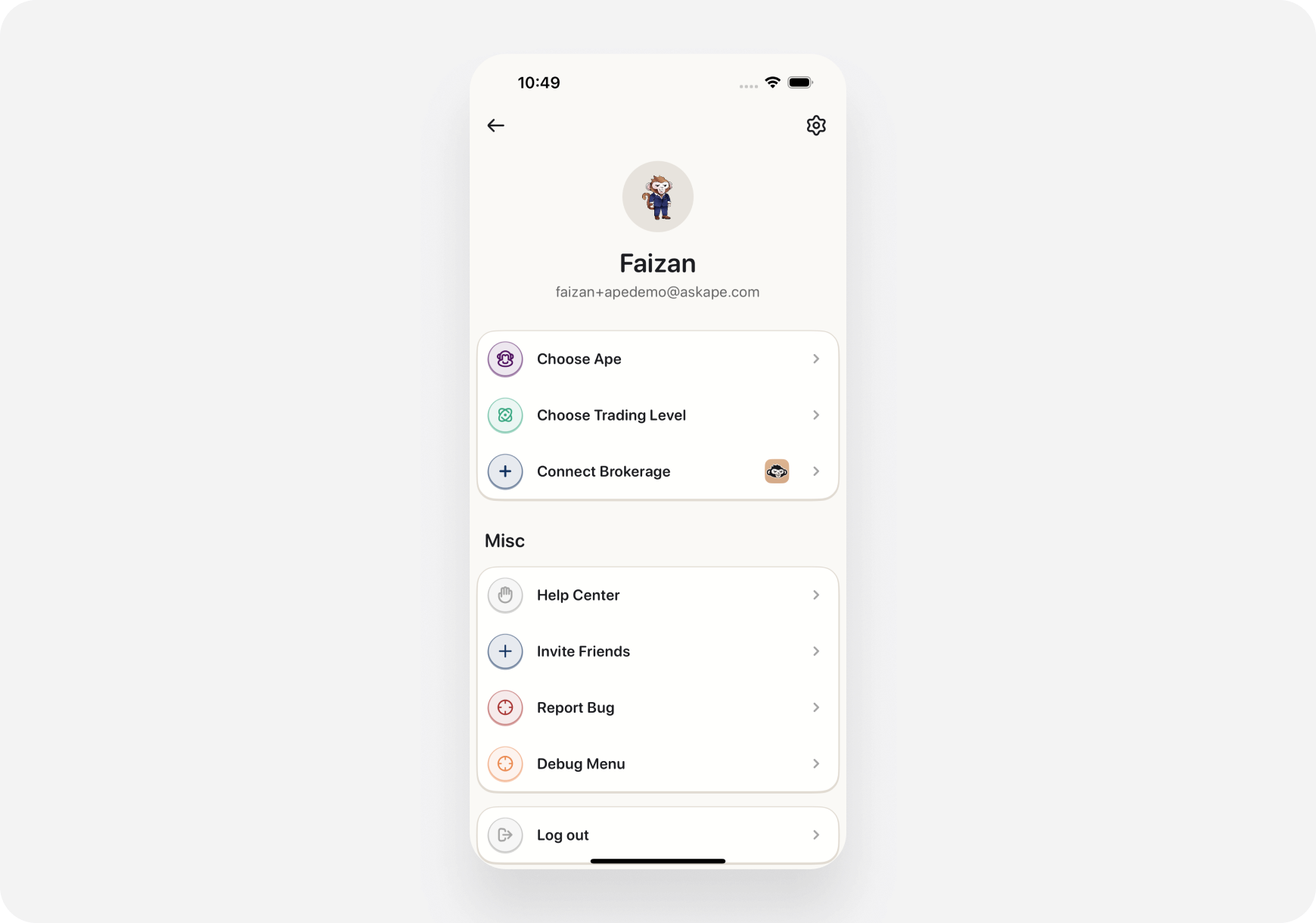
**Tap Profile icon** (top left of any screen)
**Shows:**
* Your name/email
* Subscription status
* Settings menu
* Brokerages
* Help & Support
 ***
### Web
**Click Profile icon** (top right)
**Dropdown shows:**
* Account info
* Settings link
* Subscription
* Sign out
***
## ⚙️ Settings Sections
### Account Settings
**Personal Info:**
* Name
* Email address
* Password (change)
* Phone number (optional)
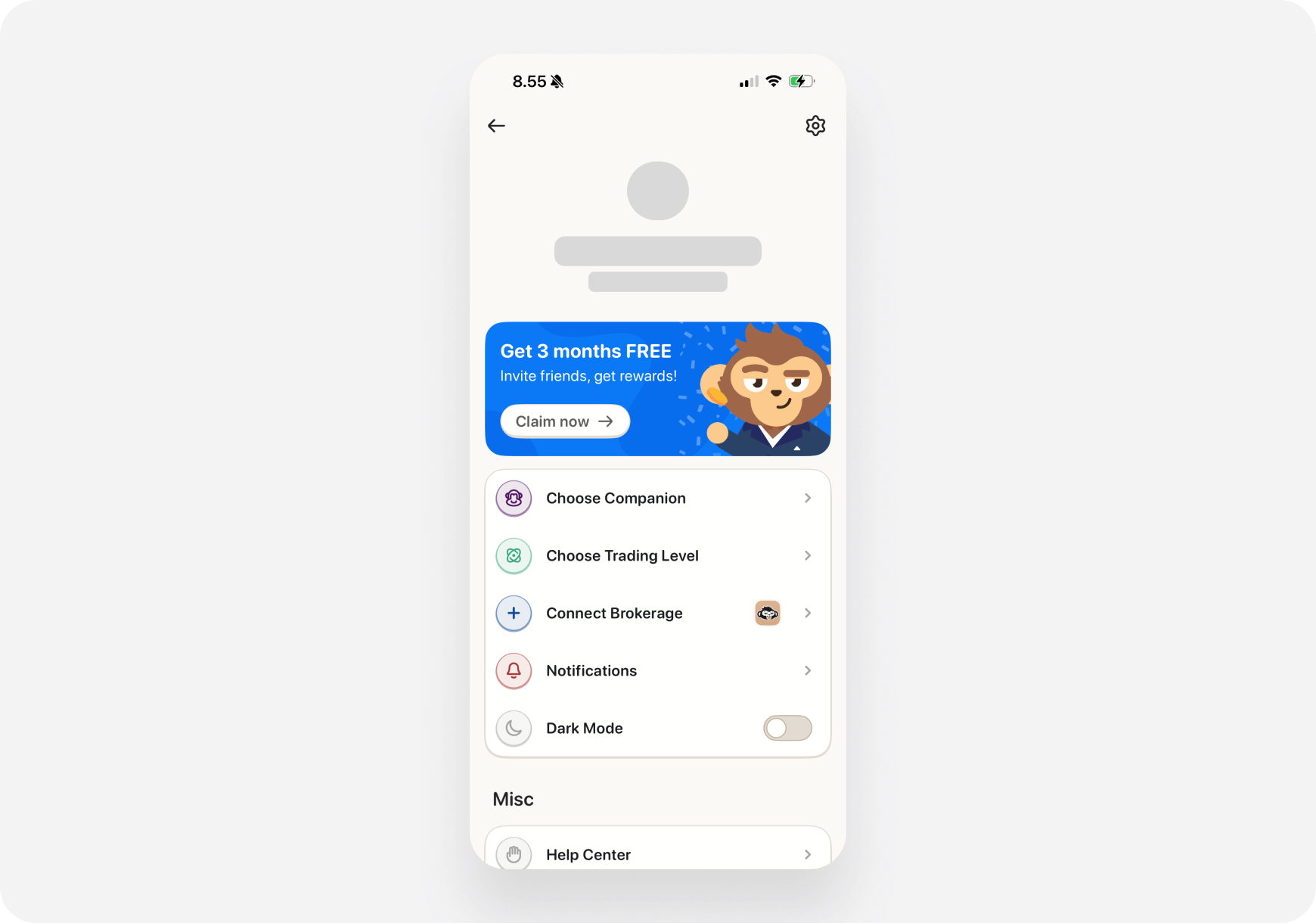
**Companion:**
* Choose Ape (Blitz, Maverick, Sage)
* Change anytime
**Preferences:**
* Theme (Light/Dark mode)
* Language (English only for now)
* Time zone
***
### Web
**Click Profile icon** (top right)
**Dropdown shows:**
* Account info
* Settings link
* Subscription
* Sign out
***
## ⚙️ Settings Sections
### Account Settings
**Personal Info:**
* Name
* Email address
* Password (change)
* Phone number (optional)
**Companion:**
* Choose Ape (Blitz, Maverick, Sage)
* Change anytime
**Preferences:**
* Theme (Light/Dark mode)
* Language (English only for now)
* Time zone
 ***
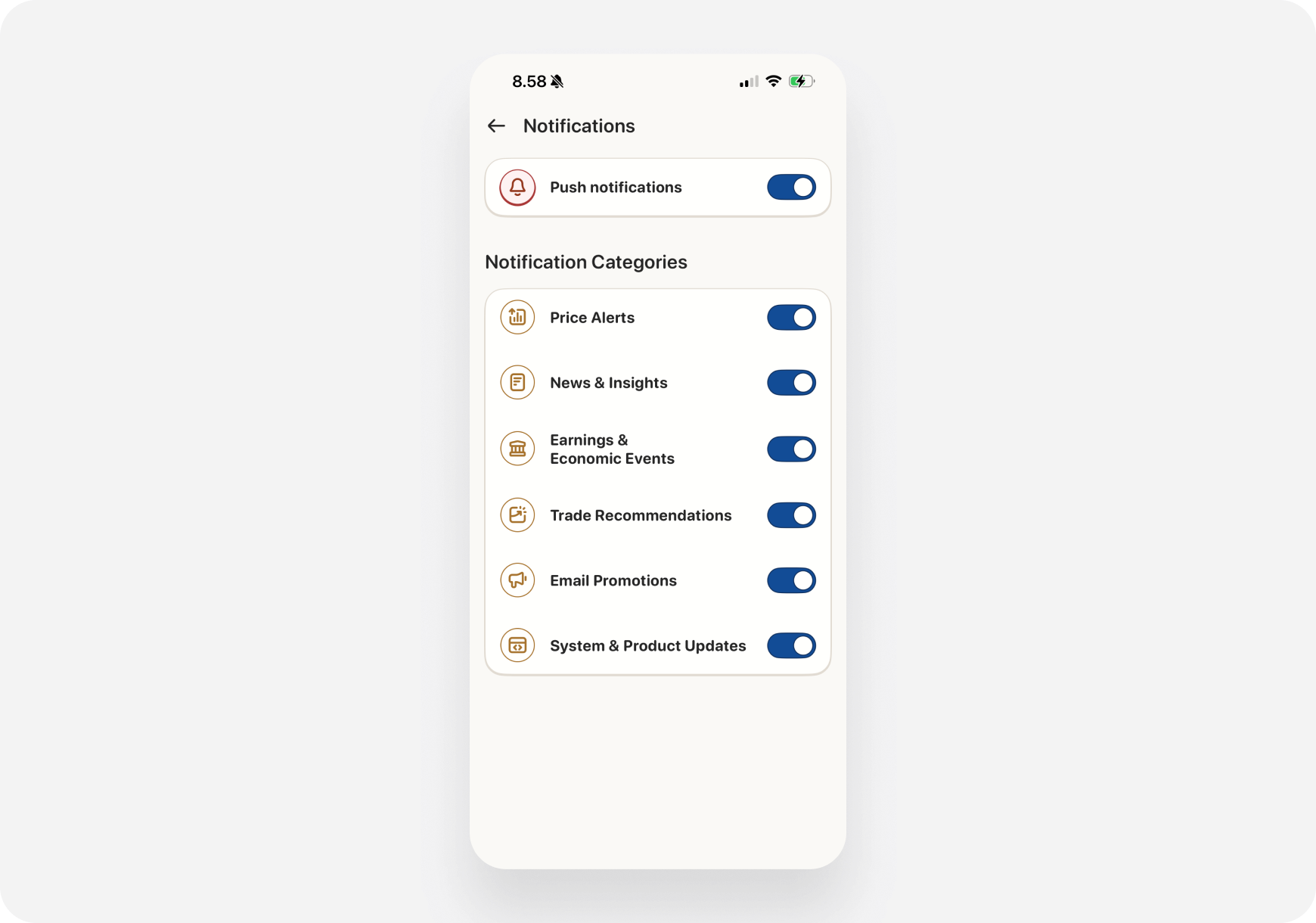
### Notification Settings
**What you can control:**
* **Portfolio Alerts** - Price movements, holdings
* **News Alerts** - Breaking news for your stocks
* **Daily Summary** - Morning/evening notifications
* **Trade Confirmations** - Order fills
* **Marketing** - Product updates (opt out anytime)
**Channels:**
* Push notifications (mobile)
* Email
***
### Notification Settings
**What you can control:**
* **Portfolio Alerts** - Price movements, holdings
* **News Alerts** - Breaking news for your stocks
* **Daily Summary** - Morning/evening notifications
* **Trade Confirmations** - Order fills
* **Marketing** - Product updates (opt out anytime)
**Channels:**
* Push notifications (mobile)
* Email
 ***
### Privacy Settings
**Control your data:**
* **Portfolio Privacy** - Hide \$ amounts (show % only)
* **Activity Privacy** - Share trades with community (opt-in)
* **Data Sharing** - Marketing preferences
**Delete Account:**
* Permanently delete (can't be undone)
***
### Connected Brokerages
**Manage connections:**
* View all connected accounts
* Reconnect if expired
* Enable/disable trading
* Disconnect brokerages
***
### Privacy Settings
**Control your data:**
* **Portfolio Privacy** - Hide \$ amounts (show % only)
* **Activity Privacy** - Share trades with community (opt-in)
* **Data Sharing** - Marketing preferences
**Delete Account:**
* Permanently delete (can't be undone)
***
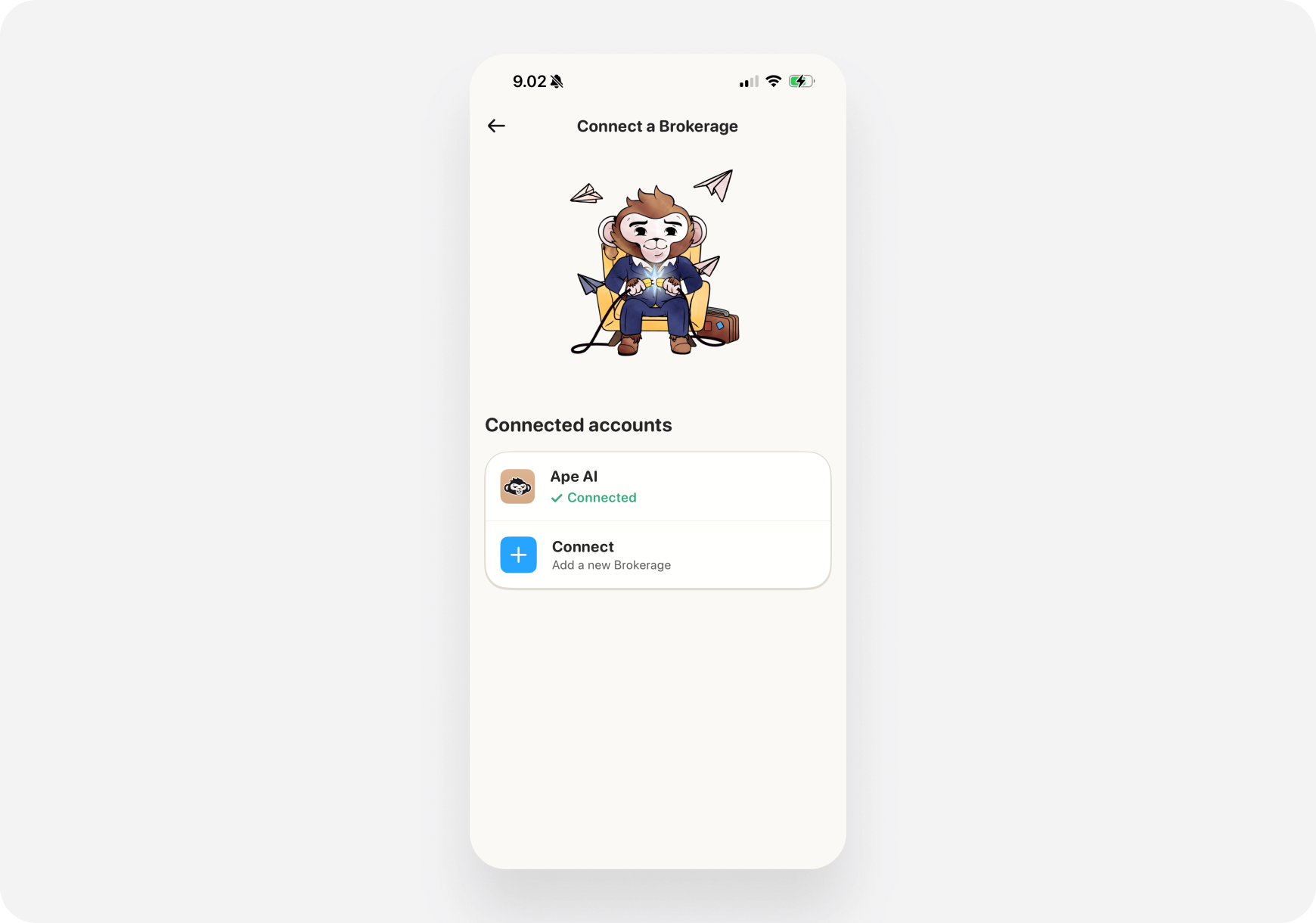
### Connected Brokerages
**Manage connections:**
* View all connected accounts
* Reconnect if expired
* Enable/disable trading
* Disconnect brokerages
 [Learn more →](../Brokerage/connecting)
***
### Subscription
**View/manage:**
* Current plan (Free, Pro, Super Ape)
* Billing info
* Payment method
* Upgrade/downgrade
* Cancel subscription
[Learn more →](/features/account/subscription)
***
## 💡 Pro Tips
**1. Enable Portfolio Alerts**
* Get notified of big moves
* Never miss important changes
**2. Customize Notification Timing**
* Morning brief: 8 AM
* Evening wrap: 5 PM
* Match your schedule
**3. Review Privacy Settings**
* Take screenshots? Enable privacy mode
* Hides dollar amounts
**4. Keep Email Updated**
* For security alerts
* Password resets
* Important notifications
***
## 🔒 Security
### Two-Factor Authentication (2FA)
* **Enable for security**
* Use authenticator app
* Protects your account
### Active Sessions
* See where you're logged in
* Log out remotely
* Security monitoring
### Password Tips
* Use strong, unique password
* Change regularly
* Don't share with anyone
***
## ❓ FAQ
**Q: Can I have multiple companions?** A: One at a time. Switch anytime in Settings → Choose Ape.
**Q: What happens if I change my email?** A: Verification required. Takes 1 minute.
**Q: Can I delete my account?** A: Yes. Settings → Privacy → Delete Account. Permanent!
**Q: How do I export my data?** A: Settings → Privacy → Export Data. Coming soon!
***
## What's Next?
* [Subscription Plans →](/features/account/subscription) - Upgrade options
* [Brokerages →](../../features/brokerage/) - Connect accounts
***
**Profile = Your Account Command Center! ⚙️👤**
[Learn more →](../Brokerage/connecting)
***
### Subscription
**View/manage:**
* Current plan (Free, Pro, Super Ape)
* Billing info
* Payment method
* Upgrade/downgrade
* Cancel subscription
[Learn more →](/features/account/subscription)
***
## 💡 Pro Tips
**1. Enable Portfolio Alerts**
* Get notified of big moves
* Never miss important changes
**2. Customize Notification Timing**
* Morning brief: 8 AM
* Evening wrap: 5 PM
* Match your schedule
**3. Review Privacy Settings**
* Take screenshots? Enable privacy mode
* Hides dollar amounts
**4. Keep Email Updated**
* For security alerts
* Password resets
* Important notifications
***
## 🔒 Security
### Two-Factor Authentication (2FA)
* **Enable for security**
* Use authenticator app
* Protects your account
### Active Sessions
* See where you're logged in
* Log out remotely
* Security monitoring
### Password Tips
* Use strong, unique password
* Change regularly
* Don't share with anyone
***
## ❓ FAQ
**Q: Can I have multiple companions?** A: One at a time. Switch anytime in Settings → Choose Ape.
**Q: What happens if I change my email?** A: Verification required. Takes 1 minute.
**Q: Can I delete my account?** A: Yes. Settings → Privacy → Delete Account. Permanent!
**Q: How do I export my data?** A: Settings → Privacy → Export Data. Coming soon!
***
## What's Next?
* [Subscription Plans →](/features/account/subscription) - Upgrade options
* [Brokerages →](../../features/brokerage/) - Connect accounts
***
**Profile = Your Account Command Center! ⚙️👤**